·
9 min
Cucumber Testing: How Gherkin Scenarios Become Executable

Roman Kirchmeier - Autemos

Cucumber Testing reads business scenarios from `.feature` files, connects each step to code, and reports the result. The scenarios usually use Gherkin syntax, which gives plain text a defined structure. Step Definitions then provide technical access to an application, API, or mobile app. Cucumber itself contains neither browser control nor an assertion library (Cucumber, 2026). In Behavior Driven Development, this execution follows examples discovered and written through joint work. A Cucumber suite created after implementation can provide useful regression checks, yet it does not prove that such BDD work occurred.
TL;DR: Cucumber processes Gherkin files, creates internal test cases, and assigns each step to a Step Definition. Drivers and test libraries handle browser, API, or app access plus assertions. The technical flow has 8 core stages. Joint Discovery, consistent domain language, and scenario-level state isolation control long-term usefulness.
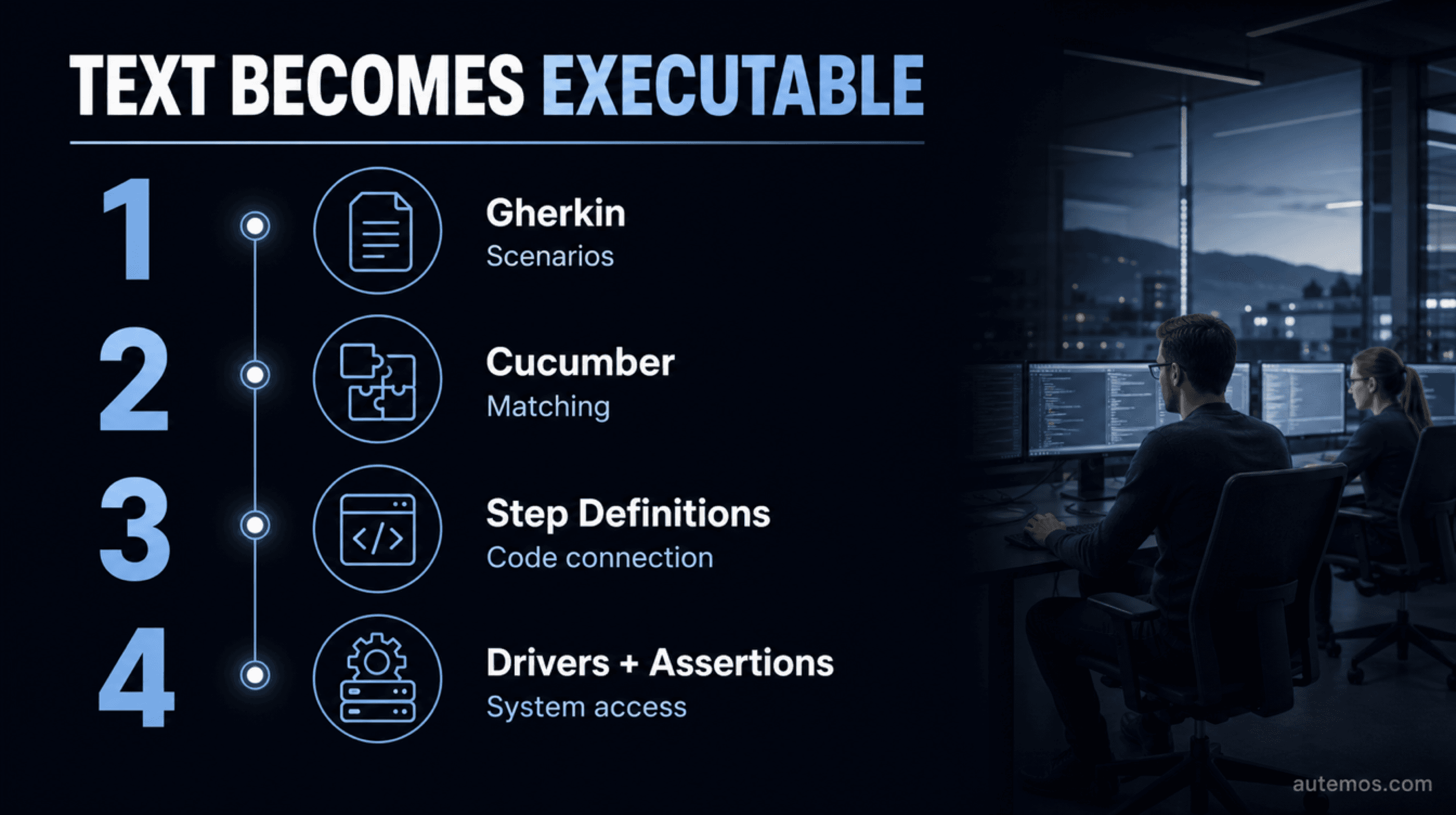
Figure 1: The four layers from Gherkin to system access.
What is Cucumber Testing?
Cucumber Testing is the execution of structured behavioral examples through Cucumber. The open-source tool reads executable plain-text specifications, finds matching automation code, and reports success or failure for each scenario (Cucumber, 2026). Its current installation overview separates implementations into 4 maintenance categories (Cucumber, 2026).
Gherkin structures the text. Cucumber processes that structure. Step Definitions connect business sentences to methods in Java, Kotlin, JavaScript, Ruby, or another supported environment. Those methods and their connected libraries contain the technical access to the system.
Cucumber separates tool usage from BDD Testing, which requires joint Discovery before automation. A Cucumber suite built after implementation is test automation, yet it does not establish a BDD process on its own (Cucumber, 2026).
The distinction affects day-to-day work. A team can write Gherkin after implementation and execute it with Cucumber. The result may be a readable regression suite. A BDD process begins when business, development, and testing participants clarify the examples together before production code.
How is a feature file executed?
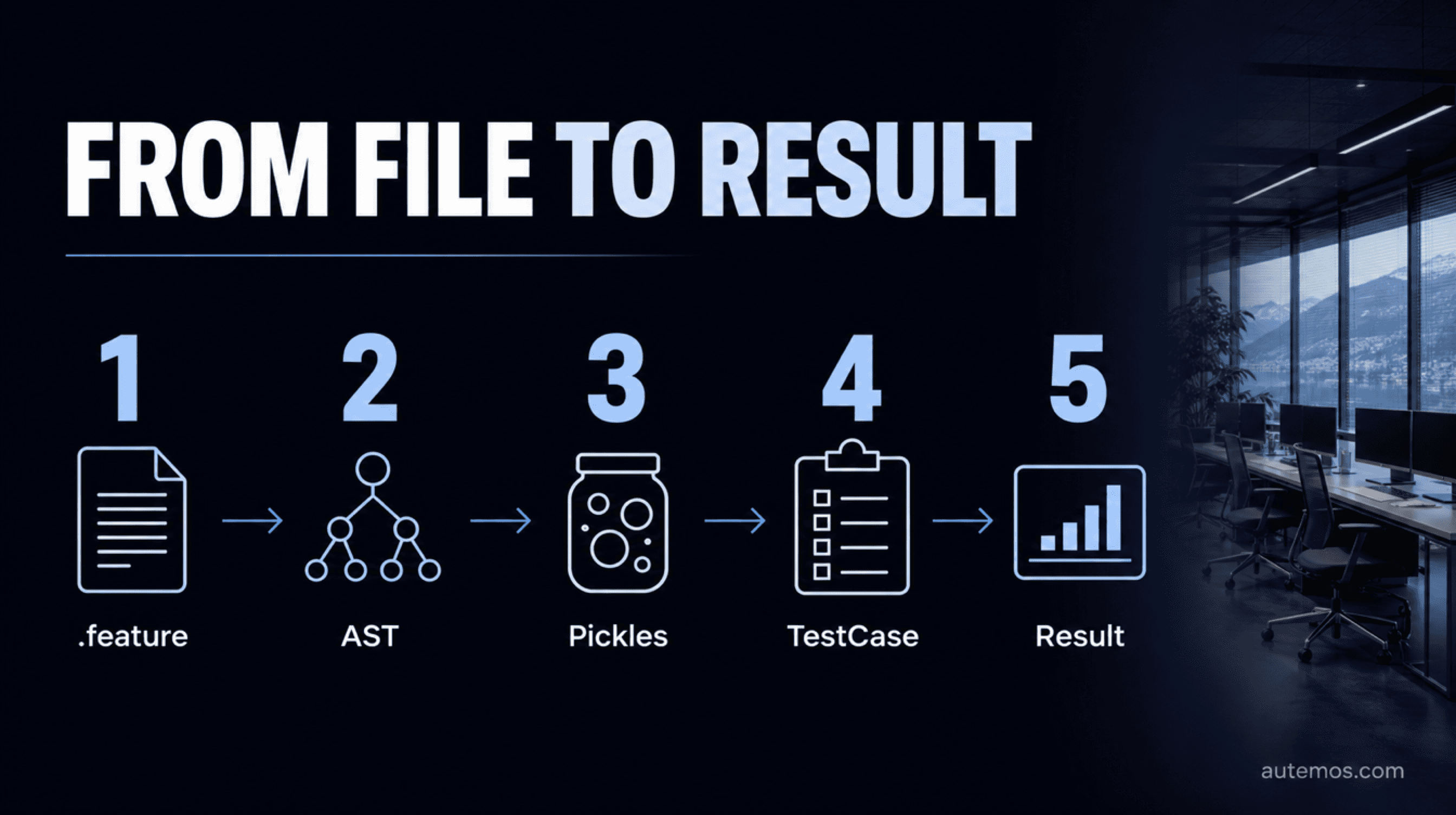
Figure 2: The five core stages of Cucumber execution.
A `.feature` file passes through 8 core stages from text to result. Gherkin 42.0.1 documents scanning, tokens, the syntax tree, and Pickles. The Cucumber API documents hooks, step matching, and statuses (Gherkin repository, 2026). Each Examples row creates a separate execution.
The scanner splits the `.feature` content into tokens.
The parser creates an Abstract Syntax Tree, or AST.
The compiler turns the AST into Pickles. A regular scenario creates one Pickle; each Examples row in a Scenario Outline creates another Pickle.
Cucumber turns Pickles into executable TestCases with references to hooks and steps.
Global hooks run before the scenario set, followed by scenario-level Before hooks.
A Background runs for each affected scenario after its Before hooks.
Cucumber finds one matching Step Definition for each step and runs them in written order.
Success, failure, or an undefined step produces a result, followed by cleanup through After hooks.
An undefined, pending, or failed step causes later steps in the scenario to be skipped (Cucumber API, 2026). This sequence belongs to Cucumber. A browser driver, API client, database connection, or mobile driver enters only through Step Definition code.
How do Step Definitions connect text and code?
A Step Definition is a method with an expression matching one or more Gherkin steps. Cucumber accepts 2 expression forms: Cucumber Expressions and regular expressions (Cucumber, 2026). Values in the text are captured, converted, and passed into the method as arguments.
A business example for a transfer limit has five lines:
Keyword | Business statement |
|---|---|
Feature | Transfer limit |
Scenario | Transfer within the daily limit |
Given | The remaining daily limit is CHF 1,000 |
When | The customer transfers CHF 250 |
Then | The remaining daily limit is CHF 750 |
The Step Definition for Then contains the expression `the remaining daily limit is CHF {int}`, reads the observed value through system access, and compares both values with an assertion. The expression captures 750 as an integer and passes it to the method. A plain `return false` does not fail the step; the method must raise an assertion or error (Cucumber, 2026).
Given, When, and Then do not affect Step Definition matching. Two steps with identical text and different keywords are duplicates from Cucumber's matching perspective (Gherkin reference, 2026). Consistent, unambiguous domain sentences reduce duplicate and ambiguous matches.
What does Cucumber handle, and what belongs elsewhere?
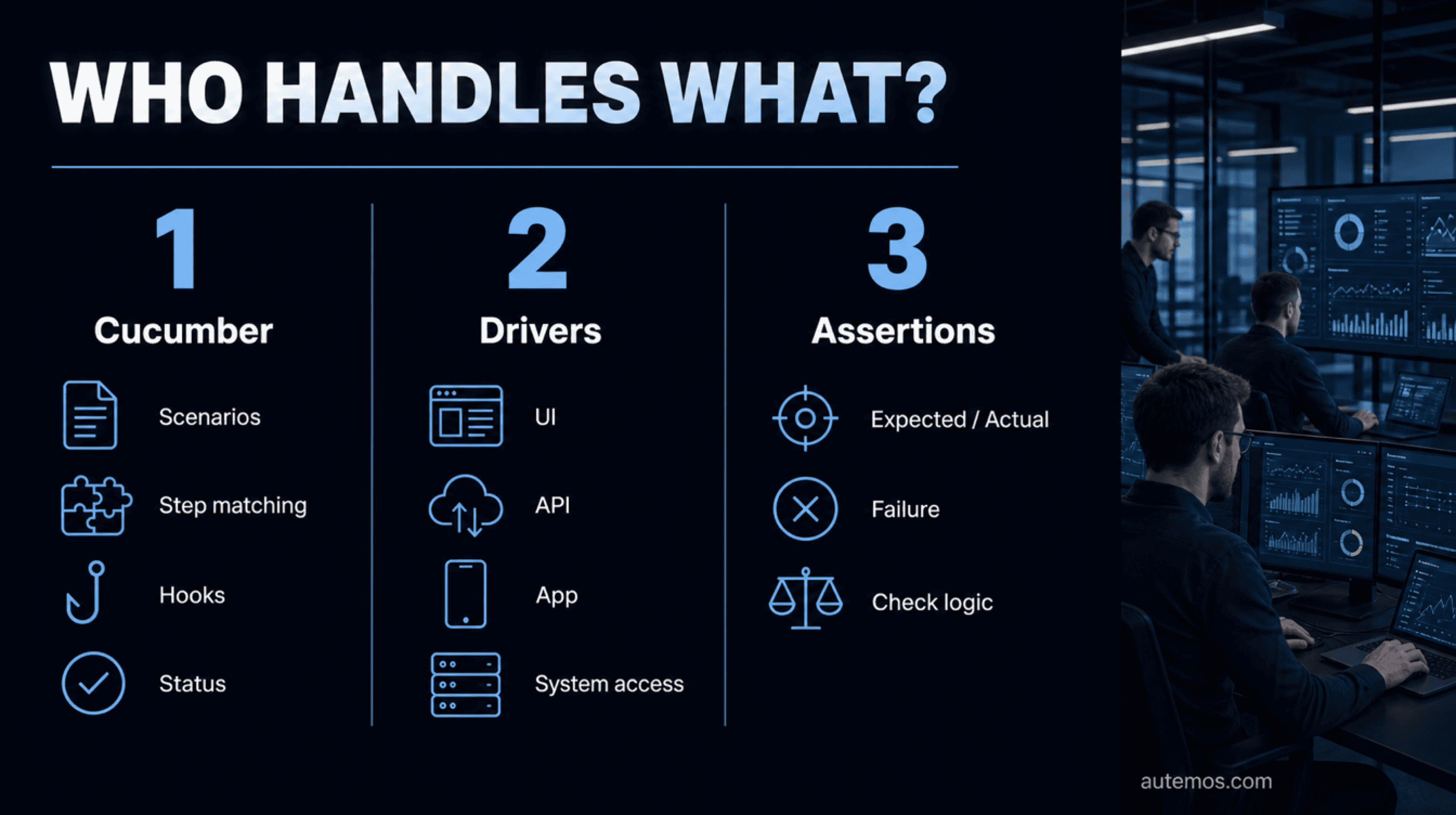
Figure 3: Cucumber coordinates, drivers access, and assertions check.
Cucumber coordinates scenarios, steps, hooks, and results. Connected tools perform system access and outcome checks. Two official guides separate these jobs. One states: “Cucumber is not a browser automation tool” (Cucumber, 2026). The other confirms that Cucumber has no built-in assertion library (Cucumber, 2026).
Part | Responsibility | Common examples | Outside its responsibility |
|---|---|---|---|
Cucumber | Read scenarios, bind steps, run hooks, report status | Cucumber-JVM, Cucumber-JS, Cucumber-Ruby | Direct browser or app control |
Gherkin | Structure plain text with Feature, Scenario, Given, When, Then | `.feature` file | Execute code or assertions |
Automation library | Access a UI, API, app, or other system boundary | Selenium, Playwright, Appium, HTTP client | Joint discovery of business examples |
Assertion library | Compare observed and expected values, raise a failure | JUnit, AssertJ, Node assert, RSpec | Process scenario structure |
Application code | Produce business behavior | Service, web application, mobile app | Create Cucumber reports |
This separation permits checks at several levels. A Step Definition may call a domain service directly, access an API, or operate a user interface. API test automation explains the interface route. The test pyramid supports decisions about count and distribution.
How are scenarios isolated from each other?
Cucumber creates exactly 1 new glue instance or a new World context for every scenario, depending on the implementation. Scenarios should not share state. Its documentation links shared state to tighter step coupling and weaker reuse in current maintained releases (Cucumber, 2026).
Shared context inside one scenario is valid. A Given step may create an account that later When and Then steps use. The state must be discarded or cleaned in a controlled manner after the scenario. Static variables, reused browser sessions, and long-lived test records create order dependencies.
An isolated suite meets four practical conditions:
Each scenario can run alone.
Scenario order does not change results.
Test data has a defined owner and lifetime.
Cleanup code runs after a failure.
Failures then become easier to assign. A scenario spends less time exposing side effects from earlier checks, and parallel execution becomes more predictable.
Which Cucumber mistakes increase maintenance?
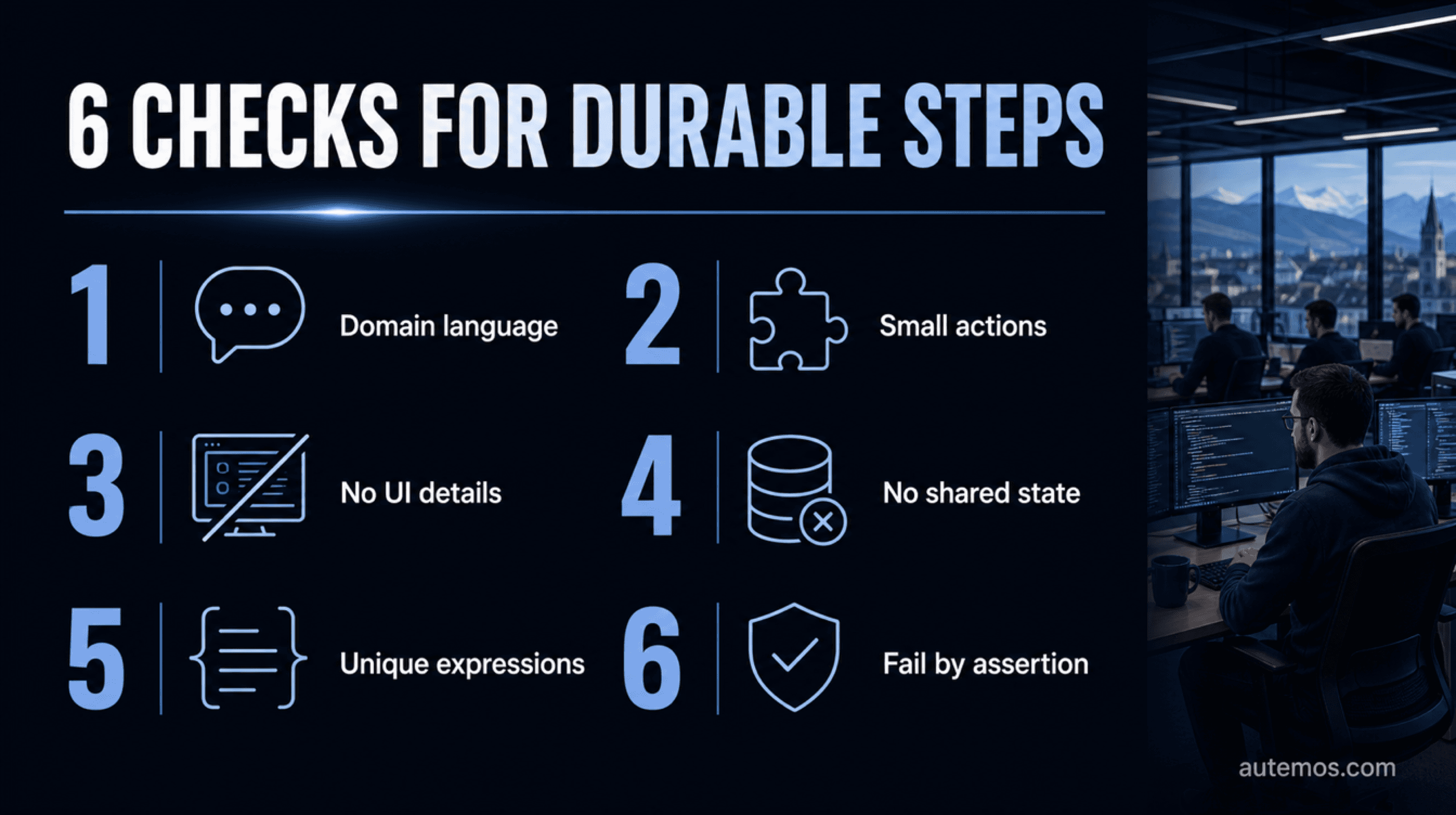
Figure 4: Six checks for maintainable Step Definitions.
Cucumber suites cost more to maintain when scenario text describes technical interaction or Step Definitions are grouped by files rather than business domain. The official guide gives 2 central remedies: domain-based Step Definitions and small business actions (Cucumber, 2026). Both reduce needless coupling.
Gherkin contains click paths, selectors, URLs, or waits.
One step combines separate business actions.
Every feature file gets duplicate Step Definitions.
The same meaning appears in many paraphrases.
Static state couples independent scenarios.
A step returns `false` without raising an assertion.
Cucumber is used as a substitute for unit or component tests.
Adoption begins without business participants and joint example work.
The language should name intended behavior. Cucumber says: “Your scenarios should describe the intended behaviour of the system, not the implementation” (Cucumber, 2026). “The customer signs in with valid credentials” survives a button redesign better than a sequence of click instructions.
Where does Autemos fit in a BDD process?
Autemos can turn agreed requirements or natural-language test descriptions into visual workflows and executable code. The AI Recorder lists 3 input types: requirements, recordings, and natural language. Code generation covers Playwright in 2 languages and Appium in Java (Autemos, 2026).
These functions belong in the Automation stage. The BDD team retains ownership of Discovery, business rules, and approval. The reviewed product pages contain no statement about `.feature` import, Gherkin synchronization, or Cucumber execution. Assess Autemos as a reviewable workflow and code option, without assuming a Cucumber runtime.
Four project questions support that assessment:
Which business examples have real readers and named owners?
Which existing Step Definitions or Playwright checks should remain?
Where would a visual workflow make review easier for business participants?
Which artifacts must remain traceable in repositories, CI/CD, and reports?
Frequently asked questions
The 5 common questions concern browser access, Gherkin, languages, drivers, and failure status. Cucumber lists implementations in 4 maintenance categories and accepts 2 matching forms, Cucumber Expressions and regular expressions (Cucumber, 2026). The answers separate specification, runner, and system access.
Is Cucumber a browser testing tool?
Cucumber is not a browser testing tool. It processes scenarios and calls Step Definitions. Browser access requires a driver or library such as Selenium or Playwright inside the automation code (Cucumber, 2026).
What is the difference between Cucumber and Gherkin?
Gherkin is the grammar for structured `.feature` files. Cucumber processes those files, assigns their steps to code, and reports results. The terms describe separate layers.
Which programming languages does Cucumber support?
The official overview lists maintained implementations for JavaScript, JVM languages, Ruby, Scala, Android/Java, and C++. Other projects are categorized as semi-official, unofficial, or unmaintained (Cucumber, 2026).
Does Cucumber require Selenium or Playwright?
Cucumber requires Selenium or Playwright only for browser flows implemented with those libraries. Step Definitions can access APIs, services, components, or other system boundaries. The choice follows the behavior and test strategy.
Why does `return false` fail to mark a step as failed?
Cucumber does not treat an arbitrary return value as a failed step. The Step Definition must raise an assertion or error. Without one, Cucumber treats the method as successfully completed.
Conclusion
Cucumber Testing is useful when business examples have real readers, clear owners, and executable meaning. The technical path has 8 core stages from `.feature` to a result; Gherkin 42.0.1 documents the AST and Pickles (Gherkin repository, 2026). Separate libraries provide browser access and assertions.
Keep scenarios business-focused, steps small, and state isolated per scenario. Decide early whether an example belongs at component, API, integration, or UI level. Autemos can create visual workflows and executable code from approved descriptions, without a documented native Cucumber connection. To place your current specifications, tests, and CI/CD routes into one workable plan with named owners, talk with the Autemos team.


