·
8 min
Playwright vs. Cypress: Which to Choose in 2026

Roman Kirchmeier - Autemos

Playwright is the broader choice for most new web test projects in 2026, while Cypress stays strong on interactive fault-finding. Both are open source and aim at the same job: reliable browser tests that pass in CI. The real difference sits deeper, in the architecture. Playwright drives browsers from the outside and covers Chromium, Firefox and WebKit with one API (Playwright release notes, 2026). Cypress runs inside the browser, in the same event loop as your application (Cypress docs, 2026). That single design choice explains nearly every practical difference you will feel in a project.
TL;DR: Playwright fits most new projects in 2026: native WebKit support, free parallel workers, multi-tab flows and four languages. Cypress stays strong on developer experience with time-travel debugging. In State of JS 2024, Playwright edged ahead 3,674 to 3,603 on „used at work" (State of JS 2024, 2024).
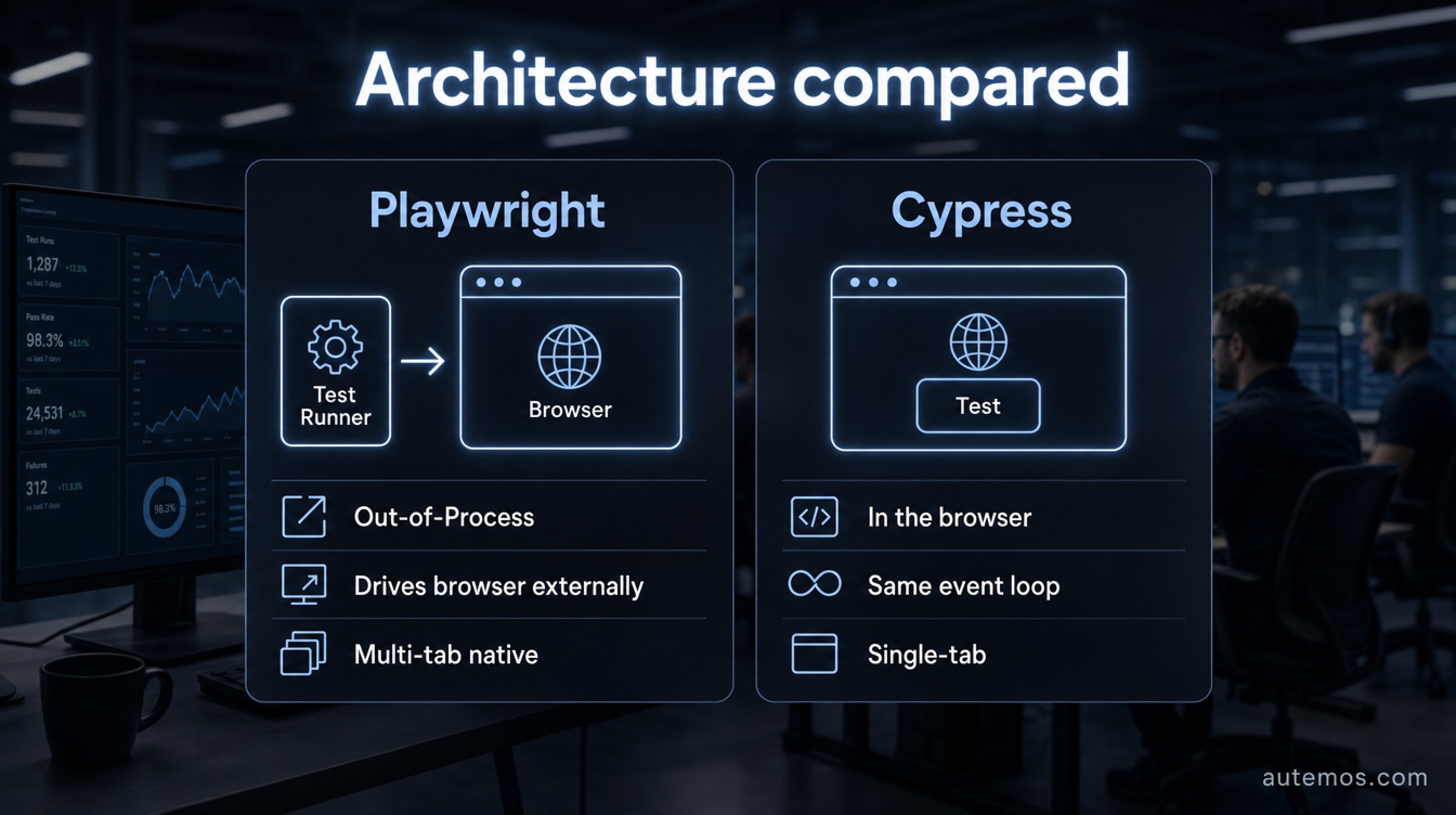
Figure 1: The architecture difference — Playwright out-of-process, Cypress in-browser.
Quick comparison: Playwright or Cypress?
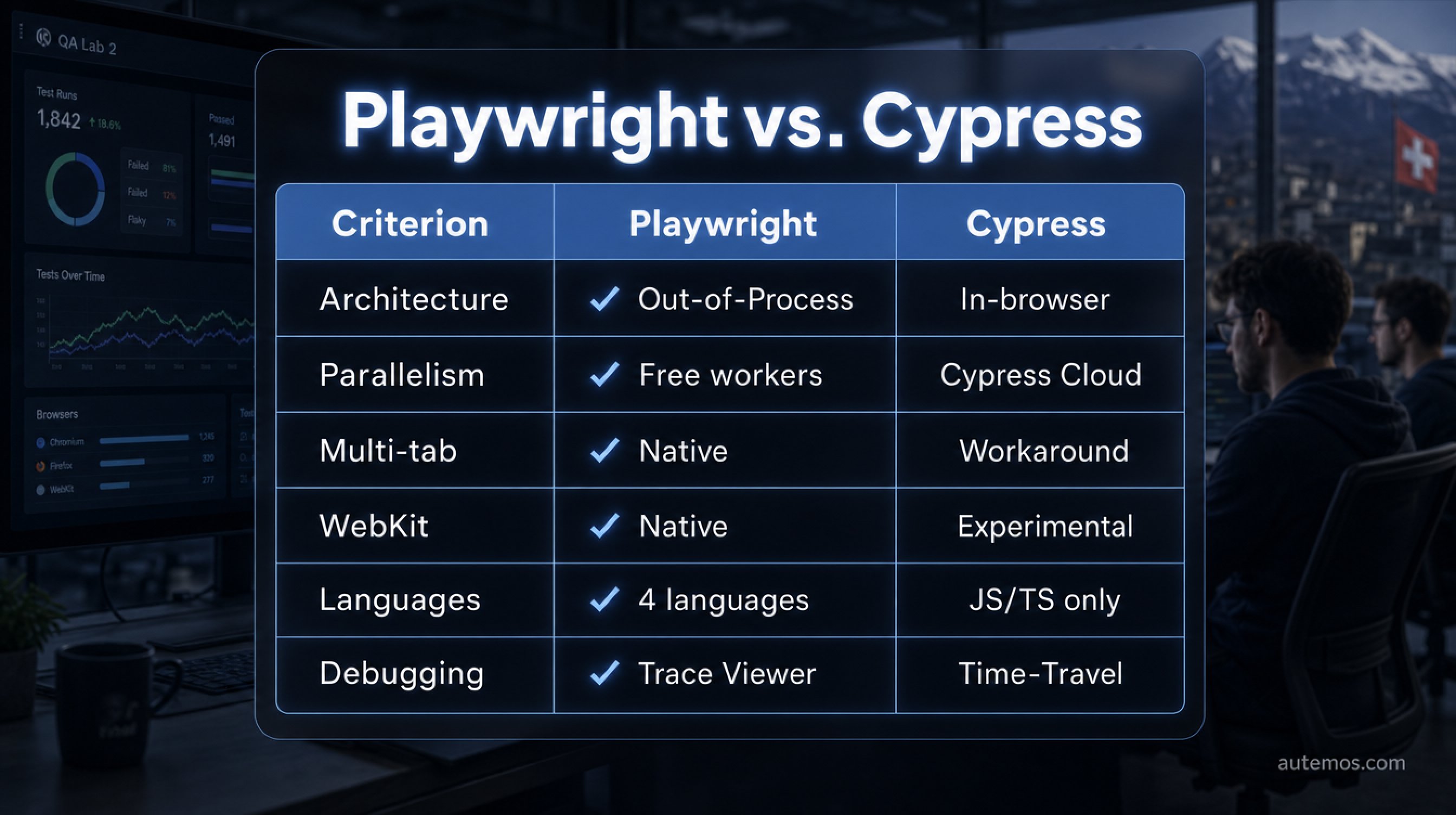
Figure 2: Quick comparison of the hard differences between Playwright and Cypress.
Playwright wins on architectural flexibility, parallelism and browser coverage; Cypress scores on visual debugging. In State of JS 2024, 3,674 respondents used Playwright at work versus 3,603 for Cypress (State of JS 2024, 2024). The table below sums up the hard differences.
Criterion | Playwright | Cypress |
|---|---|---|
Architecture | Out-of-process, drives browsers externally | In-browser, same event loop as the app |
Parallelism | Free parallel workers built in | CI orchestration via paid Cypress Cloud |
Multi-tab / multi-origin | Supported natively | Single-tab, workarounds needed |
Browser / WebKit | Native Chromium, Firefox, WebKit | Chrome family, Firefox; WebKit experimental |
Languages | JS/TS, Python, Java, .NET | JavaScript/TypeScript only |
Debugging / DX | Trace Viewer, Codegen | Time-travel debugging, GUI runner |
Momentum | Rising npm downloads, leads on retention | Flat usage, strong DX following |
Both tools are production-ready. The choice comes down to which of these rows weighs heaviest for your team. For a wider market view with Selenium, Katalon and commercial suites, see the 2026 test automation tools comparison.
How does the architecture differ?
Playwright runs as an external process and drives one or more browsers over a connection from the outside; Cypress runs inside the browser, in the same event loop as the application under test (Playwright release notes, 2026; Cypress docs, 2026). Nearly everything else follows from this one decision.
Cypress is an open-source test runner that executes inside the browser, giving tests direct access to the app internals: DOM, network, timers. That makes debugging pleasant. The cost is a tight scope: scenarios with multiple tabs or multiple origins fit this model poorly.
Playwright is an open-source framework for browser test automation whose out-of-process approach sits one level up. The test runner talks to the browser without being part of it. This lets Playwright coordinate several browser contexts, tabs and origins in a single test run. That separation is why true parallel workers and multi-origin flows work natively.
What about parallelism?
Playwright ships free parallel workers; Cypress orchestrates CI parallelism primarily through the paid Cypress Cloud (Playwright release notes, 2026; Cypress docs, 2026). For teams with large suites and tight CI windows, this difference is a direct cost and speed factor.
Playwright spreads tests across multiple worker processes by default, with no extra licence. You scale worker count via config and your CI machines. No external service needed.
Cypress can run tests in parallel too. Per the Cypress docs: „Execution of test files can be parallelized on a per group basis, where test files can be grouped by the browser under test." The smart distribution, load balancing and recording run through Cypress Cloud, the commercial layer on the open-source runner. Teams on the OSS version alone must build parallelism into the CI pipeline themselves. That works, though it costs setup and maintenance time.
Multi-tab and multi-origin: who wins?
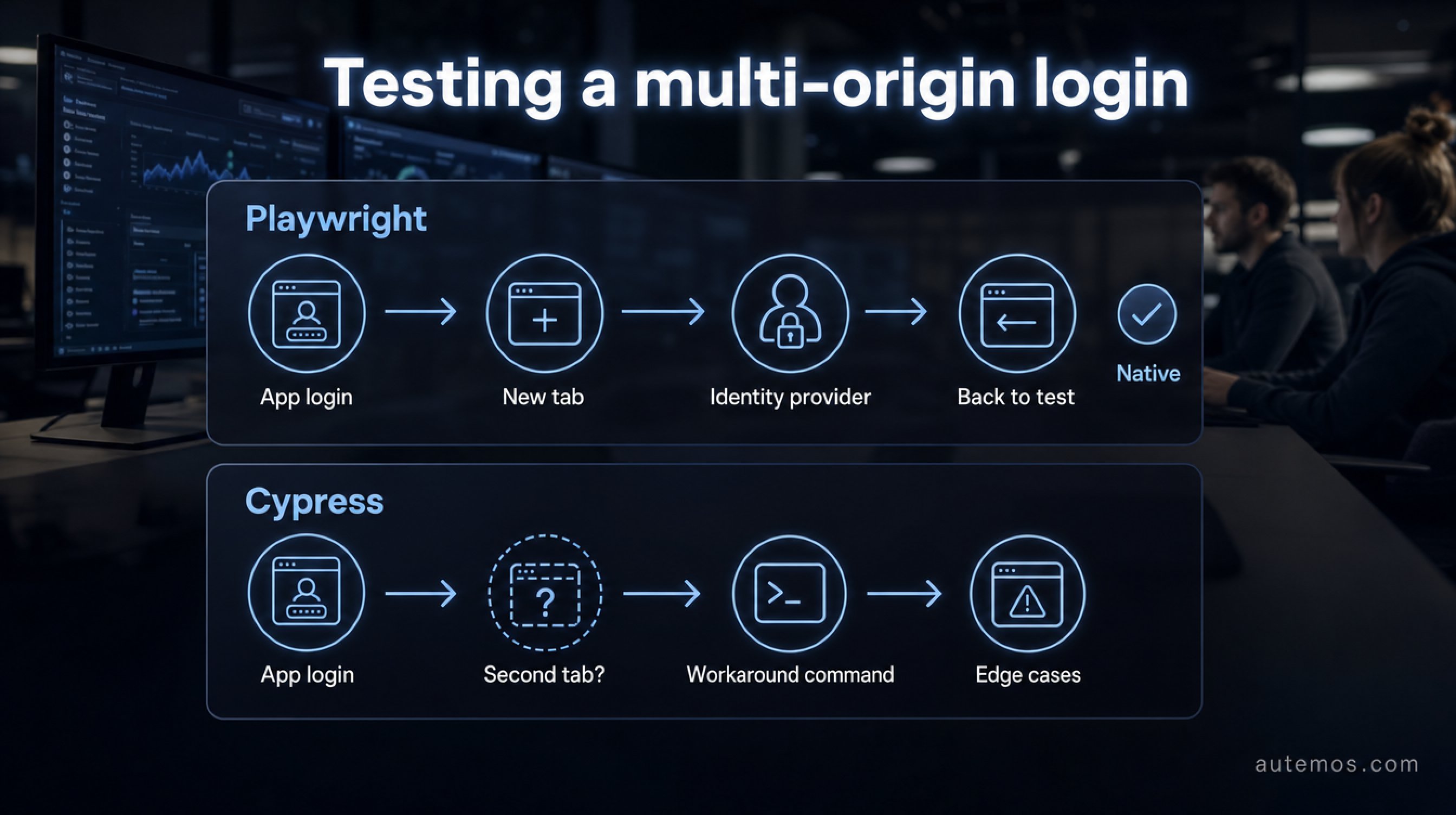
Figure 3: Multi-origin login — native flow in Playwright versus workarounds in Cypress.
Playwright supports multiple tabs and multiple origins natively; Cypress needs workarounds around its single-tab architecture (Cypress docs, 2026). For OAuth flows, payment services or pop-ups from third-party domains, this is often the deciding point.
A login through an external identity provider frequently opens a second window or briefly switches domains. In Playwright that flow runs in clear steps:
A new browser context for the second origin.
A new tab or window for the identity provider.
Back to the original context, and the test continues.
Cypress handles such cases via special commands and workarounds that hit their limits with every edge case.
In banking projects at selementrix, we run into exactly these flows constantly: smartcard logins, 3-D Secure windows, federated sign-ins. Where multiple origins are involved, Playwright's model saves real maintenance time. For how stable selectors add another layer of resilience to such flows, see the post on self-healing locators.
How do browser and language coverage compare?
Playwright tests Chromium, Firefox and WebKit natively through one API and binds JS/TS, Python, Java and .NET; Cypress covers the Chrome family and Firefox, supports JavaScript/TypeScript only, and treats WebKit as experimental (Playwright release notes, 2026; Cypress docs, 2026). For Safari parity and language range, Playwright offers more.
Playwright ships matched browser builds in version 1.61: Chromium, Firefox and WebKit in aligned versions (Playwright release notes, 2026). WebKit is the engine behind Safari, and coverage is fully integrated.
Cypress' WebKit support is a special case. It is enabled via `experimentalWebKitSupport: true` and first shipped in Cypress 10.8. Per the Cypress 10.8 release: „This experiment uses Playwright's build of WebKit to enable this feature". So Cypress' Safari tests run on the same WebKit binary Playwright provides, yet stay marked experimental; the `playwright-webkit` npm package must be installed.
On languages the gap is clear. Playwright offers official bindings for four languages; Cypress stays with JavaScript and TypeScript. For mixed teams with Java or .NET codebases, that is a selection criterion.
Debugging and developer experience: where is the edge?
Cypress is the reference for debugging comfort: time-travel through each step, a live GUI runner and automatic reloading; Playwright counters with Trace Viewer and Codegen (Cypress docs, 2026; Playwright release notes, 2026). Both paths lead to faster fault-finding, with different approaches.
Cypress' strength is the interactive experience. The GUI runner shows every command live, and time-travel lets you click back to any step and see the DOM state from that moment. For local development and quick reproduction, that is strong.
Playwright's Trace Viewer works after the run. It records each test with screenshots, DOM snapshots, network and WebSocket traffic, making CI failures reproducible after the fact (Playwright release notes, 2026). Codegen records clicks and turns them into runnable test code. This combination shines when debugging failed CI runs, where no live browser is open anymore.
Momentum and community: where is the trend heading?
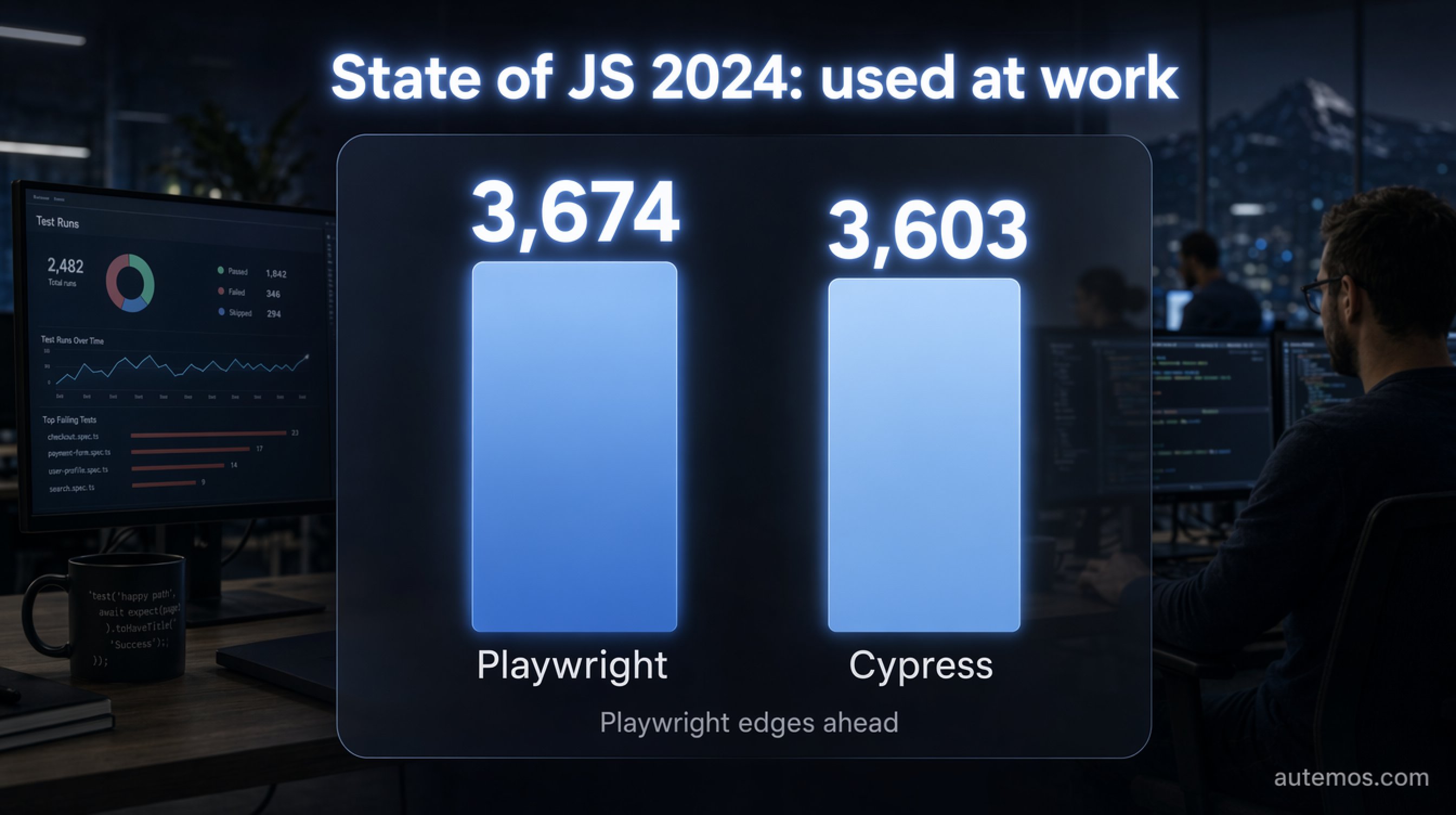
Figure 4: State of JS 2024 — Playwright edged ahead of Cypress 3,674 to 3,603.
Playwright passed Cypress in npm downloads in 2024, and the gap has since widened to roughly an order of magnitude; on „used at work" the two were nearly level in 2024, 3,674 to 3,603 (State of JS 2024, 2024; npm trends, 2026). The direction is clear, and absolute usage stays high for both.
In State of JS 2024, Playwright passed Cypress on work usage in that survey for the first time (State of JS 2024, 2024). The lead is narrow, though the trend on satisfaction and retention tilts more firmly toward Playwright.
On npm downloads the gap is larger. Playwright's weekly downloads lead by about an order of magnitude; exact daily counts swing by source, so a fixed number would mislead here (npm trends, 2026). Cypress' usage is fairly flat, with a steady following that values the DX above all.
When Playwright, when Cypress?
Playwright is the safer default for new projects in 2026; Cypress stays sensible where interactive debugging and a pure JS/TS environment come first. The Playwright vs Cypress decision maps to concrete cases. The list below sorts the most common situations.
You test Safari/WebKit seriously: Playwright, for native WebKit support rather than an experimental mode.
Your team uses Java, .NET or Python: Playwright, with official bindings for all four languages.
You have multi-tab or multi-origin flows (OAuth, payments, pop-ups): Playwright, since these scenarios run natively.
You need free parallelism without a cloud service: Playwright, with built-in workers.
Your focus is fast local debugging and live feedback: Cypress, for time-travel and the GUI runner.
Your stack is pure JS/TS and the team already knows Cypress: Cypress, if none of the limits above apply.
A third path is an AI-assisted platform built on Playwright. Autemos, for one, embeds real Playwright test code directly in its workflows and exports it back as Playwright code, so tests run outside the platform and no lock-in results. Its self-healing locators document every change in a reviewable way rather than hiding it in a black box (self-healing feature). For regulated teams, Playwright as a foundation is attractive partly for one reason: the generated code can be reviewed and versioned. For how these frameworks sit in the wider field, see the comparison of Selenium and Playwright.
Frequently asked questions
Playwright vs Cypress: which is better?
For most new projects in 2026, Playwright is the broader choice: native WebKit support, free parallel workers, multi-tab flows and four languages. Cypress stays strong on interactive debugging. In State of JS 2024, Playwright edged ahead 3,674 to 3,603 (State of JS 2024, 2024).
Does Cypress support Safari or WebKit?
Cypress supports WebKit only experimentally. The feature is enabled via `experimentalWebKitSupport: true`, shipped in Cypress 10.8, and internally reuses Playwright's WebKit build (Cypress: Launching Browsers, 2026). Native Safari automation is not part of Cypress.
Which languages do Playwright and Cypress support?
Playwright offers official bindings for JavaScript/TypeScript, Python, Java and .NET; Cypress supports JavaScript and TypeScript only (Playwright release notes, 2026). For Java- or .NET-heavy teams, that is a clear selection criterion.
Is Cypress' parallelism free?
Playwright ships free parallel workers; Cypress orchestrates CI parallelism primarily through the paid Cypress Cloud (Cypress docs, 2026). The pure OSS version of Cypress requires building parallelism into the pipeline yourself.
Can I combine Playwright and Cypress?
Yes, many teams use Cypress for component and local tests and Playwright for cross-browser E2E tests in CI. For what an E2E test actually covers, see the post on the E2E test.
Conclusion
Playwright is the safer default for new web test projects in 2026. Native WebKit support, free parallel workers, multi-tab flows and four language bindings cover more cases, and the momentum on npm and satisfaction points its way (State of JS 2024, 2024). Cypress stays a good choice for pure JS/TS teams that rely on interactive debugging and the GUI runner day to day. Both are production-ready; the decision hangs on your concrete flows, your stack and your CI cost. If you want Playwright as a foundation and want to speed up test creation and maintenance with AI, without lock-in, book a 30-minute Autemos demo.


