·
11 min
Accessibility testing: a practical guide to automated and manual checks

Roman Kirchmeier - Autemos

Accessibility testing checks whether people with disabilities can find, reach and operate an application. In practice it runs in three layers: automated checks in the pipeline, manual expert review, and testing with assistive technology. That split has a measurable reason. In an analysis by Deque Systems, the maker of the axe testing engine, 16 of 50 WCAG 2.1 success criteria at levels A and AA showed automatically detected issues, roughly 32% (Deque Systems, 2021). Tools handle the mechanical part fast and repeatably. Anything that turns on meaning, order and equivalence stays with a person. The two parts together produce evidence you can defend; one part alone does not.
TL;DR: Accessibility testing combines automated checks, manual expert review and testing with assistive technology. Automation covers roughly a third of WCAG success criteria (Deque Systems, maker of axe, 2021) and reliably catches contrast, missing alt text and unlabelled form fields. Conformance under the German BFSG or BITV 2.0 is confirmed by a person, never by a scan.

Figure 1: The three layers of accessibility testing
What is accessibility testing?
Accessibility testing is the set of procedures that establish whether people with disabilities can use a product or service without outside help. The reference is the W3C Web Content Accessibility Guidelines (WCAG), which have four principles and three conformance levels: A, AA and AAA (W3C WAI, 2024).
The W3C names the four principles as content that is "perceivable, operable, understandable, and robust". German law repeats them word for word. § 3 BITV 2.0 requires federal websites and applications to be „wahrnehmbar, bedienbar, verständlich und robust" (BITV 2.0, 2023).
The legal yardstick for products and services sits in § 3(1) of the German Barrierefreiheitsstärkungsgesetz (gesetze-im-internet.de, 2021):
„Produkte und Dienstleistungen sind barrierefrei, wenn sie für Menschen mit Behinderungen in der allgemein üblichen Weise, ohne besondere Erschwernis und grundsätzlich ohne fremde Hilfe auffindbar, zugänglich und nutzbar sind."
In plain English: products and services are accessible when people with disabilities can find, reach and use them in the customary way, without particular difficulty and in principle without assistance from another person.
That wording is more useful to a QA team than it first looks. It describes an outcome in use, and you cannot read it off the source code. A form can satisfy every technical criterion and still fail the moment its error message appears after submission and no screen reader ever announces it.
Why is accessibility testing on the QA agenda now?
The substantive obligations of the German Barrierefreiheitsstärkungsgesetz (BFSG) have applied since 28 June 2025, and § 37(2) provides for fines of up to one hundred thousand euros, or up to ten thousand euros in the remaining cases (gesetze-im-internet.de, 2021). The law transposes the European Accessibility Act, which covers consumer banking services, e-commerce, e-books, self-service terminals and several other categories.
One boundary matters for planning. The BFSG addresses offerings to consumers throughout. Purely internal B2B applications fall outside it. Which products and services the list names, and what evidence the law expects, is covered in the article on BFSG requirements.
Market surveillance is running. The MLBF, the joint market surveillance body of all 16 German federal states for the accessibility of products and services, is based in Magdeburg and started operating in September 2025 (MLBF, 2026). Its surveillance strategies were adopted on 29 January 2026.
On the first year, the responsible ministry in Saxony-Anhalt reports work on „fast 700 eingegangenen Meldungen", almost 700 incoming reports (Ministerium für Arbeit, Soziales, Gesundheit und Gleichstellung Sachsen-Anhalt, 2026). No individual fines under § 37 BFSG have been publicly documented so far. Anyone announcing a wave of penalties has no solid source for it.
The affected population is large, and the available figures count different things. In the EU, 23.9% of people aged 16 and over reported a long-standing activity limitation in 2024, 6.7% of them a severe one (Eurostat, 2025).
In Germany, 7.8 million people held an officially assessed severe disability at the end of 2025, a degree of disability of 50 or more, which is 9.4% of the population (Destatis, 2026). Those definitions differ and the numbers cannot be set against each other.
For banks and insurers the obligation lands on top of an already dense evidence regime. How accessibility evidence fits into existing release approvals is covered in the article on testing in regulated industries.
How much of accessibility can automated tools test?
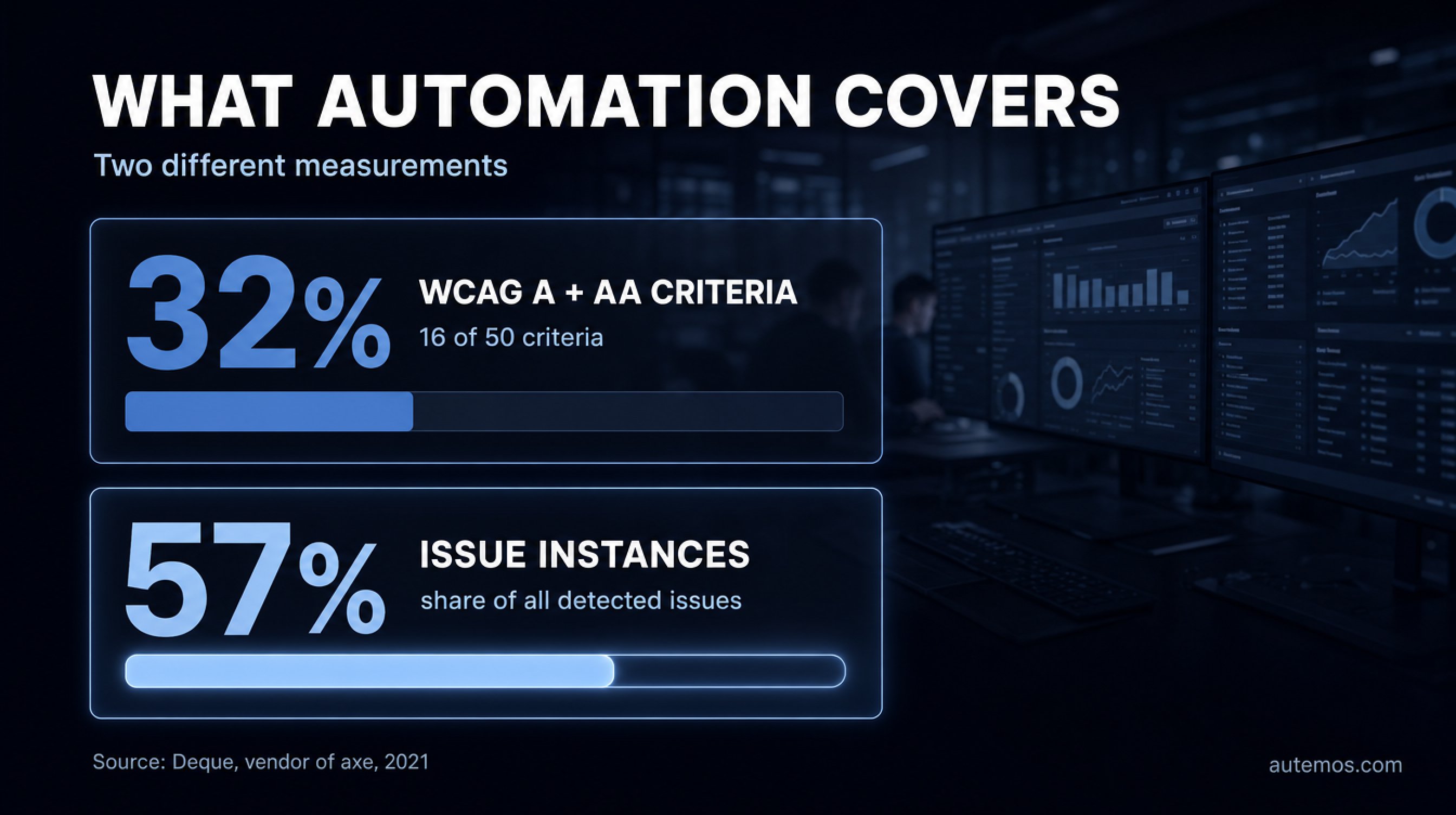
Figure 2: Criteria coverage and issue coverage measure different things
Automated tools cover roughly 32% of WCAG success criteria or roughly 57% of individual issue instances, depending on what you measure, and both figures come from Deque Systems, the maker of the axe testing engine (Deque Systems, 2021). The two numbers describe different quantities and get mixed up constantly.
Deque analysed more than 2,000 first-time audits covering over 13,000 pages and page states with around 300,000 detected issues, tested with its own axe suite. The result: automation found 57.38% of the issue instances, and 16 of 50 WCAG 2.1 success criteria at levels A and AA had automatically detected issues, which is 32% of the criteria.
Both statements hold at the same time. A handful of criteria produce the bulk of real-world defects, so issue coverage sits far above criteria coverage. For planning, that is the useful part: automation that clears contrast, alt text and labels takes a real load off a manual audit.
Both figures are vendor figures, from the vendor's own data, without independent replication. The peer-reviewed counterweight is older and more cautious. Vigo, Brown and Conway benchmarked six tools against WCAG 2.0 and concluded that "at most 50% of the success criteria are covered", with completeness between 14% and 38% and correctness between 66% and 71% (Vigo et al., W4A '13, 2013).
The 2013 tools are not today's tools. The order of magnitude for criteria coverage still matches Deque's own number.
The W3C states the limit without hedging (W3C WAI, 2024):
"Tools cannot check all accessibility aspects automatically. Human judgement is required."
The same page carries the sentence that settles any conformance argument: "Web accessibility evaluation tools can not determine accessibility, they can only assist in doing so." A green scan stays an intermediate result inside the review process.
What tools find and what people have to judge
Check (WCAG) | What a tool determines | What a person has to judge |
|---|---|---|
Contrast (1.4.3) | contrast ratios of text against its background | text in images, gradients and overlays |
Text alternatives (1.1.1) | whether an alt attribute exists | whether the text is an equivalent for the content |
Form labels (3.3.2) | whether a label is programmatically associated | whether the label is clear and unambiguous |
Page language (3.1.1) | whether lang is set and valid | language changes inside running text |
Keyboard operation (2.1.1) | hints at controls that cannot take focus | full operability, focus traps, shortcuts |
Focus order (2.4.3) | very little that holds up | whether the order follows the meaning of the page |
Reflow at 400% (1.4.10) | partial signals from viewport checks | loss of information and two-dimensional scrolling |
Captions (1.2.2) | whether a caption track exists | whether captions are accurate, complete and in sync |
The left column matches the error types WebAIM counts automatically in its Million study. The right column follows the W3C statement quoted above.
A second limit concerns tool choice itself: accessibility testing tools are not interchangeable with each other. In a study of nine automated tools across 121 pages, every tool found violations the others missed (Pool, W4A '23, 2023). If you are picking a stack, the tool comparison sits in the article on testing a website for accessibility.
How accessible are websites today?

Figure 3: Automatically detectable errors in the WebAIM Million 2026
95.9% of the top one million home pages had automatically detectable WCAG 2 failures in February 2026, with an average of 56.1 errors per page (WebAIM Million, 2026). The year before it was 94.8%.
Six error types account for 96% of all detected errors: low contrast text (on 83.9% of home pages), missing alternative text for images (53.1%), missing form input labels (51%), empty links (46.3%), empty buttons (30.6%) and missing document language (13.5%). WebAIM notes that this list has been unchanged for seven years.
The trend turned in 2026. The average error count rose from 51 to 56.1, up 10.1%, ending several years of improvement. Over the same period the average number of elements per home page grew to 1,437, an increase of 22.5% in a single year. Pages using ARIA carried more errors than pages without ARIA, 59.1 against 42 on average.
WebAIM puts the decisive caveat under its own study:
"Absence of detected errors does not indicate that a page is accessible or conformant."
Two things follow for accessibility testing in practice. The automatically testable part of the problem is the easy part, and it is nowhere near solved. A clean scan result marks the starting point of manual review.
Which standards and versions apply?
For testing in Europe, EN 301 549 V3.2.1 (2021-03) is the only harmonised version, and it builds on WCAG 2.1 Level AA (Commission Implementing Decision (EU) 2021/1339, 2021). V4.1.0 exists as a draft from November 2025 and sits in the formal vote of the European standards organisations until August 2026 (ETSI, 2026).
WCAG 2.2 was published as a W3C Recommendation on 5 October 2023, with an update on 12 December 2024. It adds nine success criteria and removes one. The W3C is explicit: "WCAG 2.0, WCAG 2.1, and WCAG 2.2 are all existing standards. WCAG 2.2 does not deprecate or supersede WCAG 2.1" (W3C WAI, 2024).
One small consequence has real test relevance. Criterion 4.1.1 Parsing was dropped in WCAG 2.2, and EN 301 549 V3.2.1 still points at WCAG 2.1. The W3C writes that authors required by policy to conform with WCAG 2.0 or 2.1 "may need to continue to test and report 4.1.1" (W3C, 2024). For BITV audits the test step stays on the list.
Under the BFSG the position is more open. § 3 of the BFSGV ordinance refers to the state of the art, names no specific standard and creates no presumption of conformity (gesetze-im-internet.de, 2022).
AccessibleEU writes about EN 301 549: "The standard is currently being updated to also support the European Directive 2019/882 on the accessibility requirements for products and services." (AccessibleEU, 2026). No version harmonised under the European Accessibility Act exists at this point.
Most DACH teams test against WCAG 2.1 AA as the binding part and add the new 2.2 criteria voluntarily. Which nine criteria those are, and which of them a tool can check, is set out in the article on WCAG 2.2.
How does an accessibility audit work?
A full audit follows a fixed sequence from scoping to the published report, and the automated steps come at the front of that sequence. The path below matches the structure of established audit procedures:
Define the scope: which applications, which version of the standard, which conformance level, which devices and which assistive technologies.
Select a representative sample of pages. The BIK BITV-Test sets the floor at three pages for simple, small and uniformly designed sites, and 5 to 10 or more pages for complex ones (BIK BITV-Test, 2026).
Run an automated scan first, to clear contrast, missing alt text, labels and structural errors before anyone spends expert time on them.
Run the keyboard pass: every function reachable without a mouse, focus visible, no focus traps.
Run the screen reader pass, using the screen reader and browser combination your users run.
Check magnification and reflow at 400% zoom on a 1280 by 1024 pixel viewport, since a width of 320 CSS pixels corresponds exactly to that case (W3C, 2026).
Rate every test step and write the report, including the accessibility statement required by § 14 BFSG for services.
Move the repeatable checks into release operations, so regressions surface between audits.
In the DACH region the BITV-Test is the established audit procedure. It is run by DIAS GmbH in Hamburg, covers 98 test steps across 88 requirements, and typically takes four to six weeks including quality assurance (BIK BITV-Test, 2026). Rating uses a five-level scale from „erfüllt" (met) to „nicht erfüllt" (not met); a page is conformant only when every test step is rated „erfüllt" or „eher erfüllt".
One detail persists stubbornly in tender documents: the old 100-point score with its 90-point threshold for „gut zugänglich" has not been in use since 2019. How the procedure rates results today, and who is allowed to run it, is covered in the article on the BITV-Test.
Who tests what?
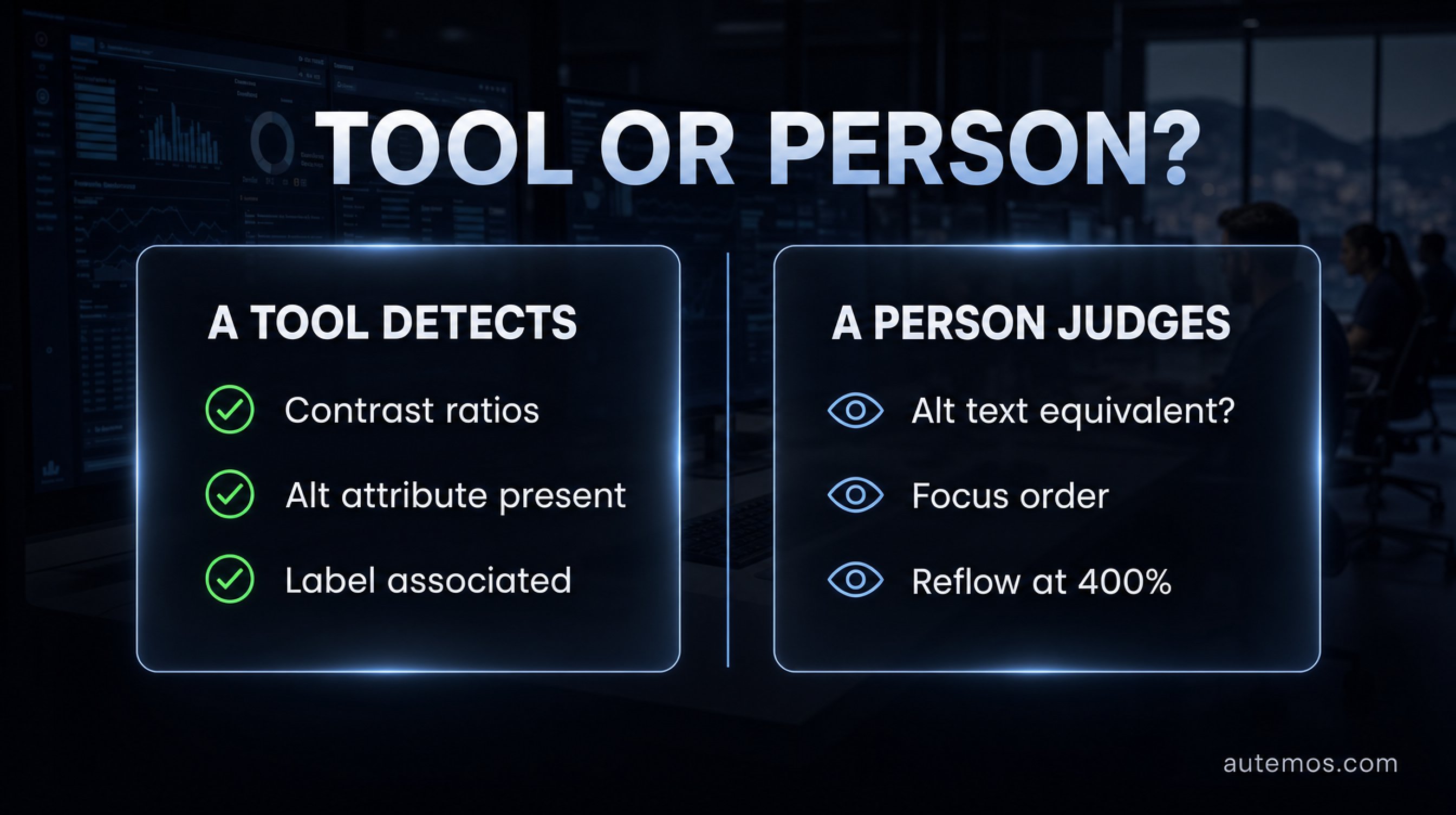
Figure 4: What a tool determines and what a person has to judge
Accessibility testing splits across four roles with clearly separated tasks, and none of them can stand in for the others. That split decides whether findings show up early or first appear in an audit.
Development: linting in the editor, component tests with axe assertions, semantic HTML, and ARIA only where native markup falls short.
QA and test automation: automated checks inside the existing test run, keyboard paths in the functional tests, regression coverage between audits.
Accredited test body: the formal audit. A BITV-Test „kann nur von BIK Prüfstellen durch qualifizierte BIK Prüfende durchgeführt werden", it can be carried out only by accredited BIK test centres and qualified BIK testers (BIK BITV-Test, 2026).
Users with disabilities: the reality check no checklist delivers.
On that last role the W3C is direct: "Evaluating with users with disabilities and with older users identifies usability issues that are not discovered by conformance evaluation alone." (W3C WAI, 2024). A page can meet every criterion and still carry an account opening flow that nobody using a screen reader finishes in reasonable time.
To place this next to the rest of your test portfolio, the overview of the different types of software testing helps. Accessibility testing belongs there as a non-functional check with its own evidence requirement.
How does accessibility get into test automation?
Accessibility testing belongs in the same pipeline as functional tests, with a defined failure condition. Section508.gov recommends exactly that: "Define the criteria for failing the CI/CD build when critical accessibility issues are detected" (Section508.gov, 2026). The same source warns about false results from misconfigured tools.
A layered arrangement works well in practice:
lint and static checks in the editor and before commit
axe assertions in component and unit tests
checks inside the existing E2E tests, for example through @axe-core/playwright, with no separate accessibility suite to maintain
a build gate with defined severity thresholds
scheduled full-site scans for trend tracking
the periodic manual audit, which the steps above cannot replace
This is where Autemos fits. Autemos is an AI-assisted test automation platform for Web, Mobile, API and Desktop. Its test workflows accept custom code blocks and existing Playwright tests, so an axe-core check runs inside the same automated workflow as the functional regression tests. Results go to Allure and Jira like any other test result. The test workflows page shows how that is wired up.
The limit is equally clear. Autemos does not sell an accessibility audit and does not certify conformance under the BFSG, BITV 2.0 or WCAG. Manual review and the assessment by an accredited test body remain human work. In client projects we mostly see one effect: once the automatable error classes ride along in the regression run, they stop creeping back in between two audits.
FAQ
Is an automated scan enough to prove accessibility?
No. A scan proves no conformance, under WCAG, the BFSG or BITV 2.0. The W3C states: "Tools cannot check all accessibility aspects automatically. Human judgement is required." (W3C WAI, 2024). Evidence comes from manual review, documented ratings and a report.
What percentage of WCAG criteria can be tested automatically?
About a third, measured at criteria level: 16 of 50 WCAG 2.1 success criteria at levels A and AA showed automatically detected issues in Deque's analysis (Deque Systems, 2021). Deque puts a second number next to it, 57.38% of individual issue instances, which measures issue volume, a different quantity.
Does the BFSG apply to internal business applications?
No. The BFSG addresses offerings to consumers throughout, such as consumer banking services, e-commerce and e-books (gesetze-im-internet.de, 2021). Purely internal B2B tools fall outside it. German federal public bodies are covered by BITV 2.0 instead.
Which WCAG version should we test against?
WCAG 2.1 Level AA as the binding part, since EN 301 549 V3.2.1, the only harmonised version, builds on it (Commission Implementing Decision (EU) 2021/1339, 2021). The nine extra criteria from WCAG 2.2 are worth adding voluntarily, since an updated version of the standard is expected.
Which screen reader should we test with in Europe?
In Europe NVDA leads with 37.2% ahead of JAWS with 29.7%, where globally JAWS leads with 40.5% ahead of NVDA with 37.7% (WebAIM Screen Reader User Survey #10, 2024). The survey is a self-selected online sample of 1,539 responses, not a probability sample.
Conclusion
Accessibility testing means separating two kinds of work cleanly and running both. Automation takes roughly a third of the WCAG success criteria and the bulk of the error volume, every day, without debate. Judging meaning, order, clarity and equivalence stays with people, and the conformance statement comes out of a documented audit procedure. With the BFSG in force since June 2025 and market surveillance active, that evidence has become part of release operations.
The pragmatic entry point: hang the automatable error classes onto your existing test run, define a build gate, then book a manual audit that no longer burns hours on contrast ratios. If you want to see how axe-core checks fit into your current test workflows, talk to us about your test scenario.