·
8 min
Web accessibility testing: how to test a site in three layers

Roman Kirchmeier - Autemos

Web accessibility testing takes three layers: automated checks in the pipeline, manual expert checks, and a pass with assistive technology. Tools cover only part of the WCAG criteria, so no scan replaces human judgement. The scale of the problem shows in the WebAIM Million 2026: 95.9% of the home pages surveyed had automatically detectable WCAG failures, at an average of 56.1 per page (WebAIM, 2026). This guide walks through the test process step by step, compares the common tools, and shows which part of the work belongs in a CI/CD pipeline.
TL;DR: Web accessibility testing combines automated scans, manual expert checks, and testing with assistive technology. Tools such as axe-core catch mostly contrast, alt text and label failures. Six error types account for 96% of all detected errors (WebAIM, 2026). Anything involving meaning, order and clarity stays manual.
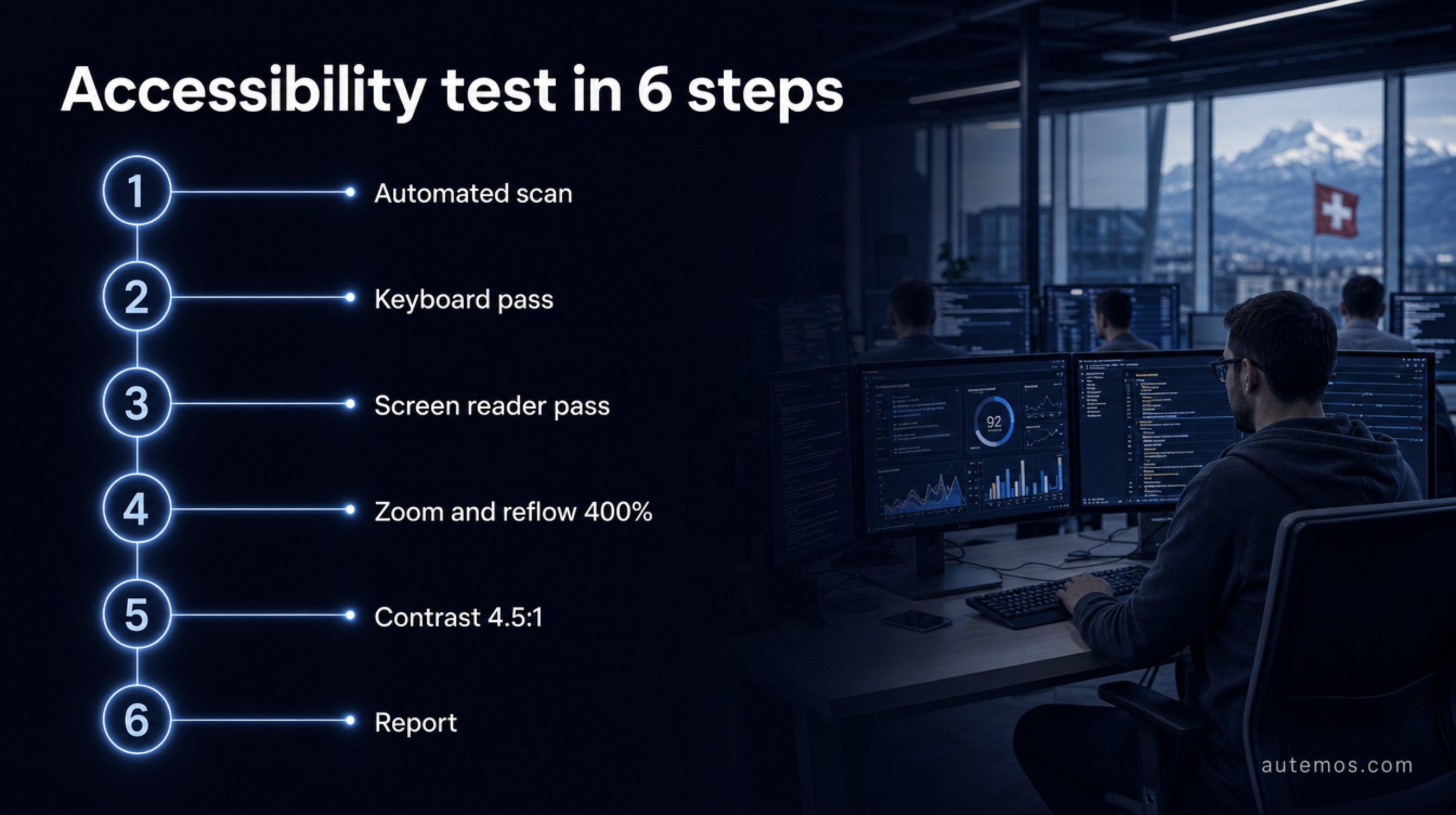
Figure 1: The test sequence in six steps.
How do you test a website for accessibility?
A website is tested for accessibility by combining three layers: automated rule checks in the build, manual test steps by trained testers, and a pass with assistive technology. Each layer finds failures the other two miss.
Automated: rule engines check the rendered DOM for machine-decidable failures, such as missing alternative text, unlabelled form fields or low contrast.
Manual: a trained tester judges focus order, whether alternative text carries the right meaning, heading logic, and the behaviour of complex widgets.
Assistive technology: keyboard-only operation, a screen reader pass, magnification and reflow.
The UK GOV.UK Service Manual puts the split in one sentence:
“It's important to do both types of testing - you'll miss some issues if you only do automated testing.” (GOV.UK Service Manual, 2026)
For the split between what tools can and cannot cover, see the overview of accessibility testing.
What does the test process look like step by step?
An accessibility test runs in eight steps, from page selection to a prioritised report. The automated scan goes first, so expensive manual test time is not spent on contrast ratios.
Define the scope. The German BIK test procedure gives a usable rule of thumb for page selection: at minimum three pages for simple, small and uniformly designed sites, and 5 to 10 or more for complex ones (BIK BITV-Test, 2026).
Run the automated scan. Across every selected page and every relevant page state, not just the initial state.
Triage the findings. Clear failures go to the backlog, uncertain results go to a human.
Keyboard pass. Operate all functionality without a mouse, focus visible at every stop, no focus traps.
Screen reader pass. Work through forms, error messages, dialogs and live regions.
Zoom and reflow. Window at 1280 x 1024, browser zoom at 400%, then check each page for losses.
Measure contrast. SC 1.4.3 requires a ratio of at least 4.5:1 for text, with exceptions for large text, incidental elements and logotypes (W3C Quick Reference, 2026).
Report and retest. Prioritise by severity, ship the fixes, then repeat the process for the affected pages.
Which web accessibility testing tools should you use?
Five tools cover most automated practice. They apply different rule sets, so they return different results for the same page.
Tool | Maker / licence | Good for | Limits |
|---|---|---|---|
axe-core | Deque Systems, MPL-2.0 | Rule engine for browser and CI, v4.12.1 released 10 June 2026, around 124 rules (GitHub, 2026) | Checks rendered content only; uncertain cases come back as incomplete for a human |
WAVE | WebAIM, Utah State University; extensions free, API paid | Findings shown visually in page context; the engine behind the WebAIM Million | Built to support human evaluation, gives no proof of conformance |
Lighthouse | Google, open source | Fast overview inside a Chrome audit (Chrome docs, 2026) | Every individual audit is strictly pass or fail, with no partial credit |
Pa11y | Open-source project, free | Pa11y CI for page lists, Pa11y Dashboard for trend graphs (pa11y.org, 2026) | The default engine is not documented on pa11y.org |
IBM Equal Access | IBM, Apache 2.0 | DevTools extensions plus the accessibility-checker npm package for Selenium, Puppeteer, Playwright (GitHub, 2026) | Separate rule engine that returns different findings from axe-core |
axe-core takes a strict line on false alarms. Its repository states: “It returns zero false positives (bugs notwithstanding).” The price is the incomplete result: where the engine cannot decide with certainty, it reports no failure and hands the case to a human reviewer (Deque, 2026).
Lighthouse names its own limit in its source code, and the same sentence appears in every report: “Automatic detection can only detect a subset of issues and does not guarantee the accessibility of your web app, so manual testing is also encouraged.” (Google Lighthouse, 2026)
What do automated tools miss?
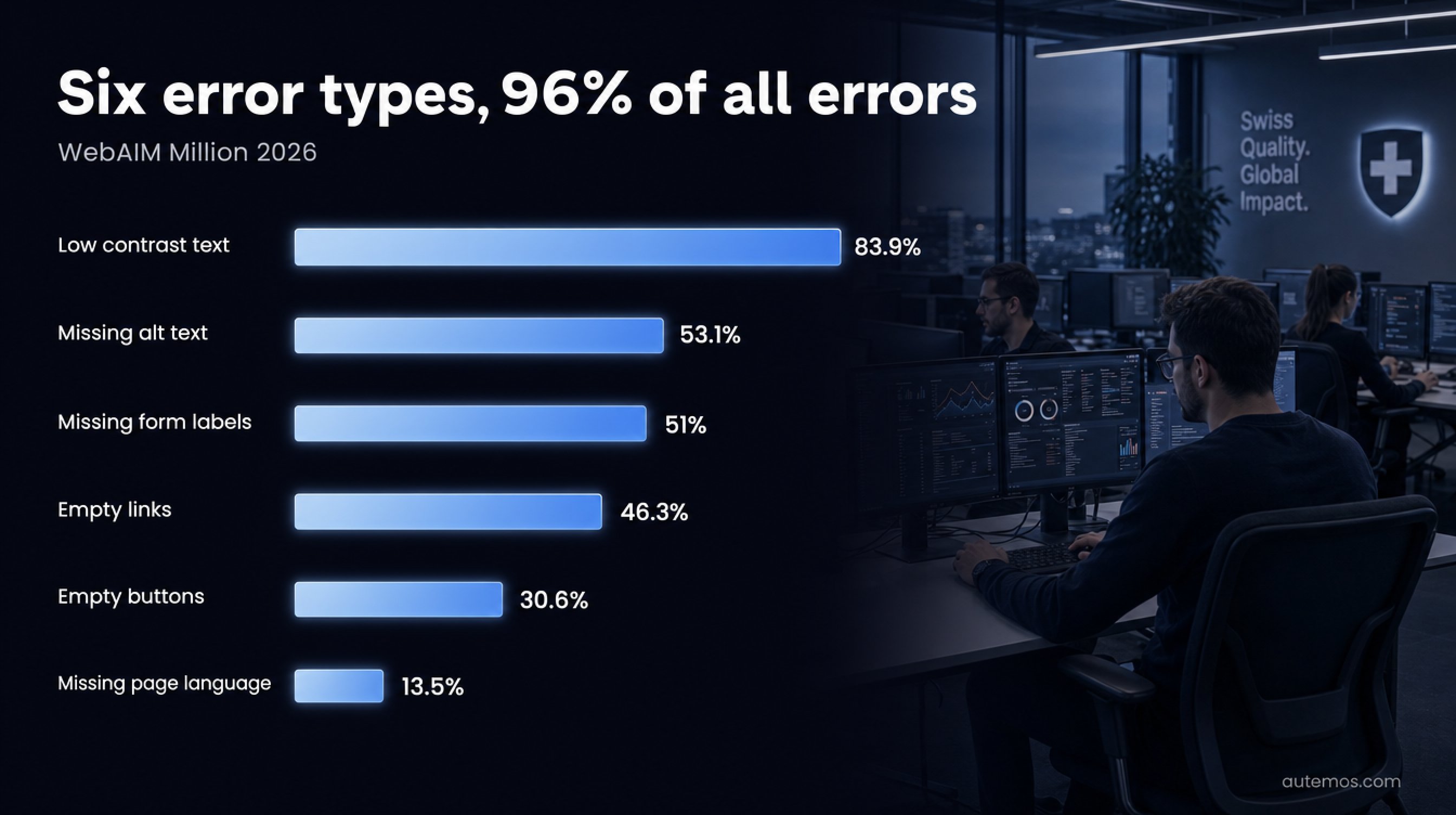
Figure 2: Six error types account for 96% of all detected errors.
Automated tools catch formal failures and miss everything that depends on meaning and context. The WebAIM Million 2026 shows how concentrated the detectable errors are: six error types account for 96% of all detected errors (WebAIM, 2026). Those six happen to be the machine-checkable ones.
Error type | Share of home pages |
|---|---|
Low contrast text | 83.9% |
Missing alternative text for images | 53.1% |
Missing form input labels | 51% |
Empty links | 46.3% |
Empty buttons | 30.6% |
Missing document language | 13.5% |
A scan sees that alternative text exists. Whether that text is a sensible replacement for the image is a human call. The same holds for focus order, clarity of error messages, and ARIA-heavy widgets such as comboboxes.
WebAIM draws the conclusion plainly: “Absence of detected errors does not indicate that a page is accessible or conformant.” A green scan is an interim state. For which criteria are machine-checkable at all, see the article on WCAG 2.2.
How do you run keyboard and screen reader tests?
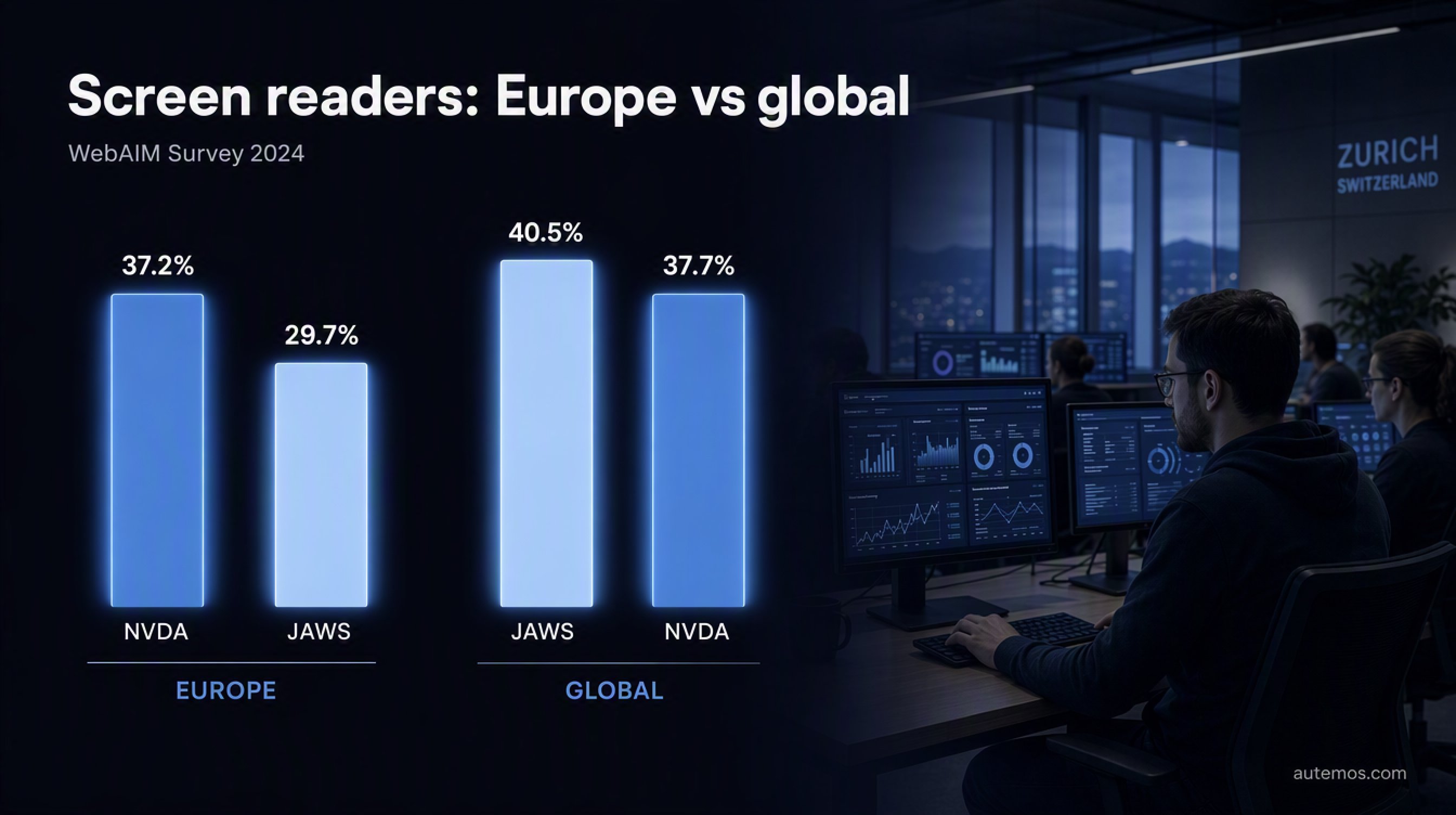
Figure 3: Screen reader usage, Europe against global.
The keyboard test comes before the screen reader pass, since it needs no specialist knowledge and exposes most operation problems immediately. Put the mouse away and drive every function with Tab, Shift+Tab, Enter, Space and the arrow keys. Visible focus at every stop, logical order, no focus trap.
For the screen reader pass, the question is which program goes first. Worldwide, JAWS leads with 40.5% against NVDA at 37.7%. In Europe the ranking flips: NVDA 37.2%, JAWS 29.7% (WebAIM Screen Reader User Survey #10, 2024). The regional split decides the order in a test plan.
For a DACH team that means NVDA on Windows goes first and JAWS second. The two handle ARIA differently, so an NVDA-only pass is too narrow.
Two caveats belong with that number: the survey is self-selected, and the data comes from December 2023 to January 2024 with 1,539 respondents.
Why is reflow tested at 1280 x 1024 with 400% zoom?
The reflow test runs at a 1280 x 1024 pixel window with 400% browser zoom, since that combination reproduces the condition in SC 1.4.10. The criterion requires content to be presented without loss of information and without scrolling in two dimensions, at a width of 320 CSS pixels and a height of 256 CSS pixels.
The arithmetic behind it: 1280 CSS pixels of starting width divided by 400% zoom gives 320, and 1024 divided by 400% gives 256. W3C spells this out in its explanatory document for the criterion, naming “a starting viewport width of 1280 CSS pixels wide at 400% zoom” (W3C on SC 1.4.10, 2026).
What you check: does content disappear, does horizontal scrolling appear, do elements overlap, do controls become unreachable? Sticky headers, data tables and modals fail here most often.
How do you put accessibility tests into a CI/CD pipeline?

Figure 4: Shift-left in six layers, with the manual audit on top.
Accessibility tests belong in the pipeline as soon as they can be automated, so checks run on every code change. Section508.gov, run by the US General Services Administration, states the gate rule verbatim: “Define the criteria for failing the CI/CD build when critical accessibility issues are detected” (Section508.gov, 2026).
The shift-left layering, from the developer's keyboard to the audit:
Lint in the editor and pre-commit. axe-linter and eslint-plugin-jsx-a11y catch markup failures before they reach the repository.
Component tests with axe assertions. jest-axe and @axe-core/react check components in isolation. jest-axe is a community package, not a Deque one.
Assertions inside existing E2E suites. @axe-core/playwright and @axe-core/webdriverjs attach the check to test cases that run anyway. No second suite to maintain.
A build-failing CI gate. pa11y-ci, axe-core/cli or the IBM accessibility-checker with defined severity thresholds.
Scheduled full-site scans. Pa11y Dashboard or a cron job across the whole site, for trends rather than individual findings.
A periodic manual audit. A BITV-Test or WCAG test plus testing with users with disabilities. Steps 1 to 5 do not substitute for this layer.
Section508.gov warns in the same guidance about “possible false results, particularly if tools are configured incorrectly”. Thresholds are covered in the article on quality gates, and the pipeline mechanics in the piece on test automation in CI/CD.
Inside Autemos test workflows, the check hangs off the automation a team already has: the workflows accept custom code blocks and existing Playwright tests, so an axe-core check via @axe-core/playwright runs in the same run as the functional regression tests. Results go to Allure and Jira like any other result, and accessibility regressions show up in the same report. Autemos does not assess conformance and does not replace the manual audit layer.
Which mistakes do teams make most often?
Three mistakes turn up in almost every project: treating a green scan as proof of conformance, testing only the home page, and skipping ARIA-heavy components.
The green scan. A run with no findings means the machine-checkable rules pass. For BFSG purposes a scan log is one piece of the technical documentation rather than evidence of conformance; the required records are listed in the overview of BFSG requirements.
Home page only. Login, checkout, form flows, error states and PDF downloads are where users get stuck. None of them appear in a home page scan.
ARIA-heavy components. Home pages with ARIA present averaged 59.1 errors in the WebAIM Million 2026, against 42 on pages without ARIA (WebAIM, 2026). Misapplied ARIA attributes make results worse, and those components need the screen reader pass most.
FAQ
Is an automated scan enough to prove accessibility?
No. An automated scan checks machine-decidable rules only and proves no WCAG conformance. W3C states it directly: “Tools cannot check all accessibility aspects automatically. Human judgement is required.” (W3C WAI, 2024).
Which tool should you start with?
axe-core, since its browser extension, CLI and library share one rule set and move into the pipeline later without a rewrite. Version 4.12.1, released 10 June 2026, ships around 124 rules (GitHub, 2026).
Which screen reader should a European team test first?
NVDA. In Europe NVDA leads with 37.2% against JAWS at 29.7%, and globally JAWS leads with 40.5% (WebAIM Survey #10, 2024). JAWS belongs in the plan as the second pass.
How many pages do you need to test?
For simple, uniformly designed sites the BIK test procedure names three pages as the minimum, and 5 to 10 or more for complex sites (BIK BITV-Test, 2026). Selection follows representativeness.
Can accessibility checks run inside existing E2E tests?
Yes. Packages such as @axe-core/playwright attach an axe-core check to existing test cases, so no second suite appears. Section508.gov recommends exactly this embedding, with checks on each code commit (Section508.gov, 2026).
Conclusion
Web accessibility testing means running three layers and overrating none of them. The automated scan clears the frequent, formal failures, and by volume those are the majority: six error types stand for 96% of all detected errors (WebAIM, 2026). Focus order, the meaning of alternative text, and complex widgets stay manual work.
A workable starting point for a team that already runs test automation: attach axe-core to the existing E2E tests, set a gate with defined severity thresholds, make the keyboard and NVDA passes fixed test steps, and plan a manual audit. The wider context is in the overview of accessibility testing.
If you want accessibility checks built into an existing test automation setup, talk to us.