·
8 min
Real Devices vs. Emulators: What Actually Matters in Mobile Testing

Roman Kirchmeier - Autemos

Emulators and real devices are not an either-or choice: emulators speed up early functional and UI tests; real devices are mandatory for performance, battery, sensors, biometrics and sign-off. Emulators and simulators cannot reliably measure CPU, battery drain or memory, according to BrowserStack (2025).
Few questions in mobile testing spark such stubborn debate, and few are so riddled with half-truths. One camp swears by emulators as a cheap do-everything tool. The other treats any test on a virtual device as worthless. Both are wrong. This article dismantles four common myths and offers a decision framework that actually holds up in regulated DACH environments.
TL;DR: Emulators and real devices are not an either-or choice. Emulators win at fast functional and UI iteration plus broad config sweeps. Real devices are mandatory for performance, battery, sensors, biometrics, network and pre-release sign-off. Per BrowserStack (2025), emulators cannot reliably measure CPU, battery or memory.
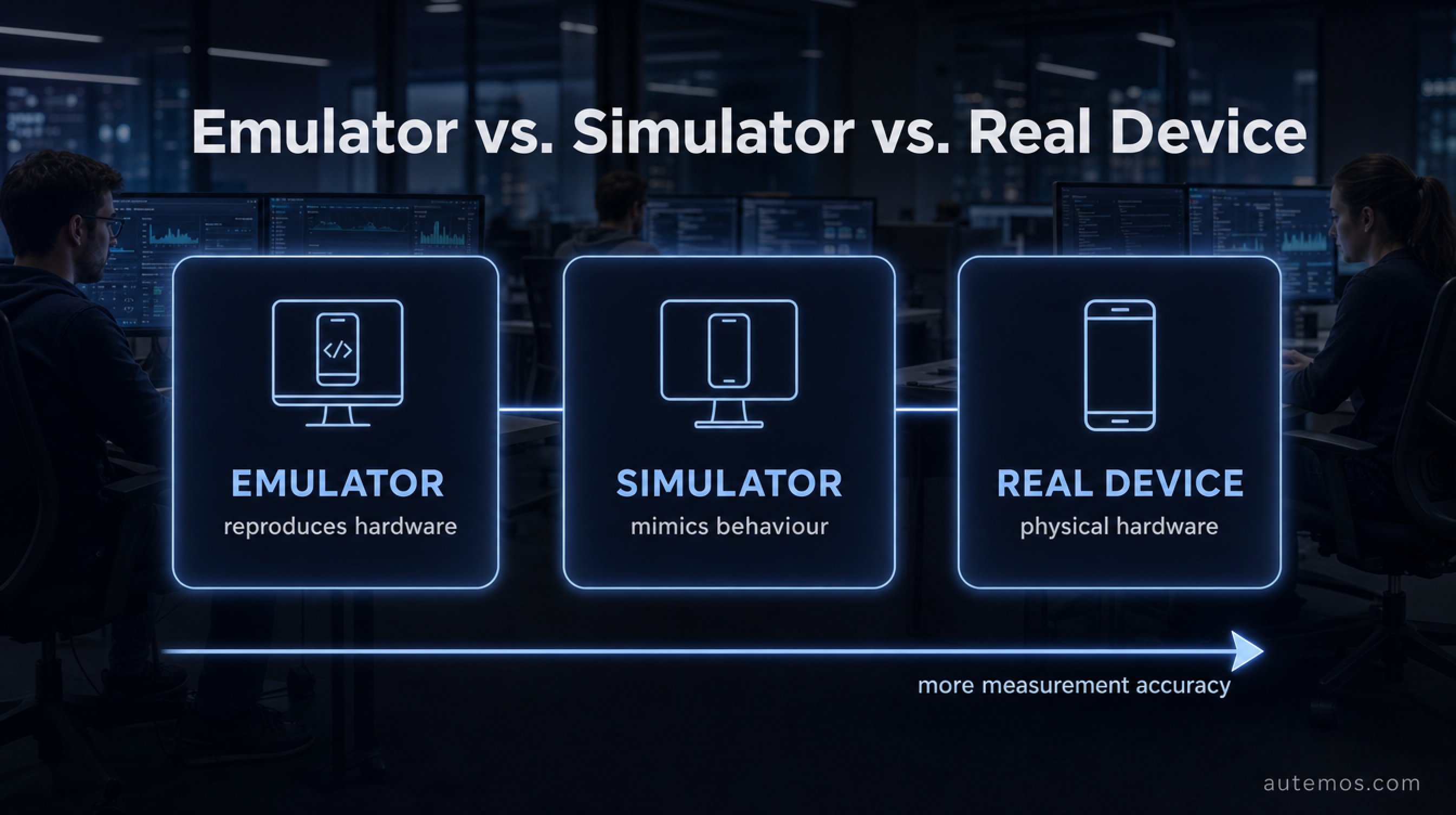
Figure 1: Emulator, simulator and real device compared by measurement accuracy.
What's the actual difference between an emulator, simulator and real device?
An emulator is software that reproduces an Android device's full hardware; a simulator (iOS) only mimics behaviour, and a real device is the physical hardware itself. This gradation decides what you can measure. According to BrowserStack (2025), no virtual environment matches the accuracy of real sensors, radios and batteries.
The technical core lies in architecture. Android emulators usually run on the x86 processor of your development machine, while end-user devices use ARM chips. This mismatch produces the notorious "passes on emulator, fails on device" pattern (BrowserStack, 2025). Native code compiled for x86 sometimes simply behaves differently on ARM.
Simulators move one step further from reality. According to BrowserStack (2025): "Simulators, unlike emulators, do not mimic hardware. Thus one cannot investigate certain functionalities like battery usage, cellular interrupts, etc." For layout checks that's enough. For anything touching hardware, it isn't.
Citable: Android emulators typically run on x86, real devices on ARM. This architectural gap drives the "passes on emulator, fails on device" pattern, because native code compiles and executes differently across platforms (BrowserStack, 2025).
Myth 1: "Emulators are good enough these days"
Wrong – for entire test categories, emulators are fundamentally unsuitable, not just imprecise. Per BrowserStack (2025), emulators and simulators cannot reliably measure CPU load, battery drain or memory use, nor reliably test camera, push, real network fluctuation, sensors, biometrics or natural touch gestures.
This isn't about tool maturity – it's physics. An emulator has no real battery, so it cannot show real battery drain. It has no fingerprint sensor, no real camera, no LTE modem. What it doesn't possess, it cannot test.
In customer projects we see the same effect again and again: an app passes every emulator suite green, then fails on the first real device at a biometric login or a network handover inside a tunnel. The emulator never experienced that condition.
"Emulators are a tool for early development, not a substitute for sign-off. Measuring performance on a virtual device measures your development machine's performance – not the customer's device."
Myth 2: "Real devices are always better"
Not true either – for fast functional iteration and broad config sweeps, real devices are often the slower and more expensive choice. Emulators boot in seconds, can be scripted, parallelised and set to any screen size or API version. For the first 80 percent of UI and logic tests, that's ideal. Per BrowserStack (2025), virtual devices are "best suited to use during the initial stages of code development" thanks to better debugging.
Real devices carry downsides that rarely get discussed. They overheat under sustained load, their batteries age, they need physical maintenance and storage. A device lab with dozens of models is a logistics project, not a mouse click.
The pragmatic point: deploy the scarce, expensive device where it makes a measurable difference. Early functional tests belong on the emulator. That saves device time for the tests that only make sense on real hardware. Forcing everything onto real devices burns budget with no return.
Myth 3: "Device clouds are cheap"
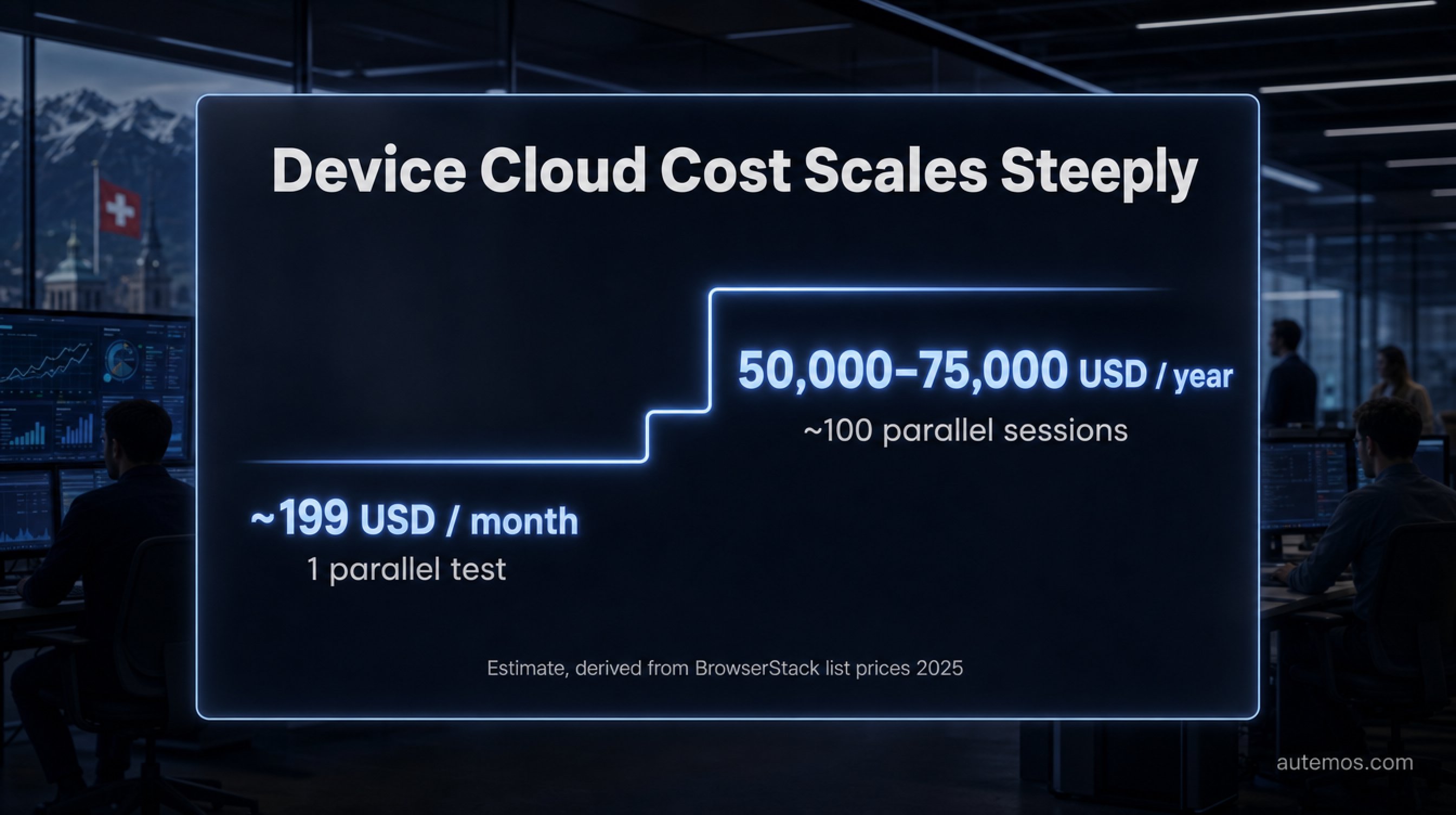
Figure 3: Device cloud cost scales steeply with parallelism (estimate).
Careful – device clouds are cheap to enter but their cost scales steeply with parallelism. The entry tier at BrowserStack (2025) is around 199 USD per month for exactly one parallel test. That sounds harmless. But anyone parallelising seriously in CI/CD leaves that comfort zone fast.
The maths flips at scale. A rough estimate for roughly 100 parallel sessions lands at about 50,000 to 75,000 USD per year (scale estimate, T3, derived from BrowserStack list prices, 2025). That's not an official figure but an extrapolation – yet it shows the order of magnitude.
Factor | Device cloud | On-prem device lab |
|---|---|---|
Entry cost | low (~199 USD/month) | high (hardware + setup) |
Parallelism scaling | expensive, rises linearly | fixed cost, then cheap per test |
Data residency | external, often outside DACH | full control |
Maintenance | with the provider | in-house |
Audit traceability | limited | fully documentable |
The hidden factor is total cost of ownership. Licence, parallelism, data egress and compliance effort all add up. An honest cost calculation weighs all four – not just the monthly price on the landing page.
When should you use emulators and when real devices?
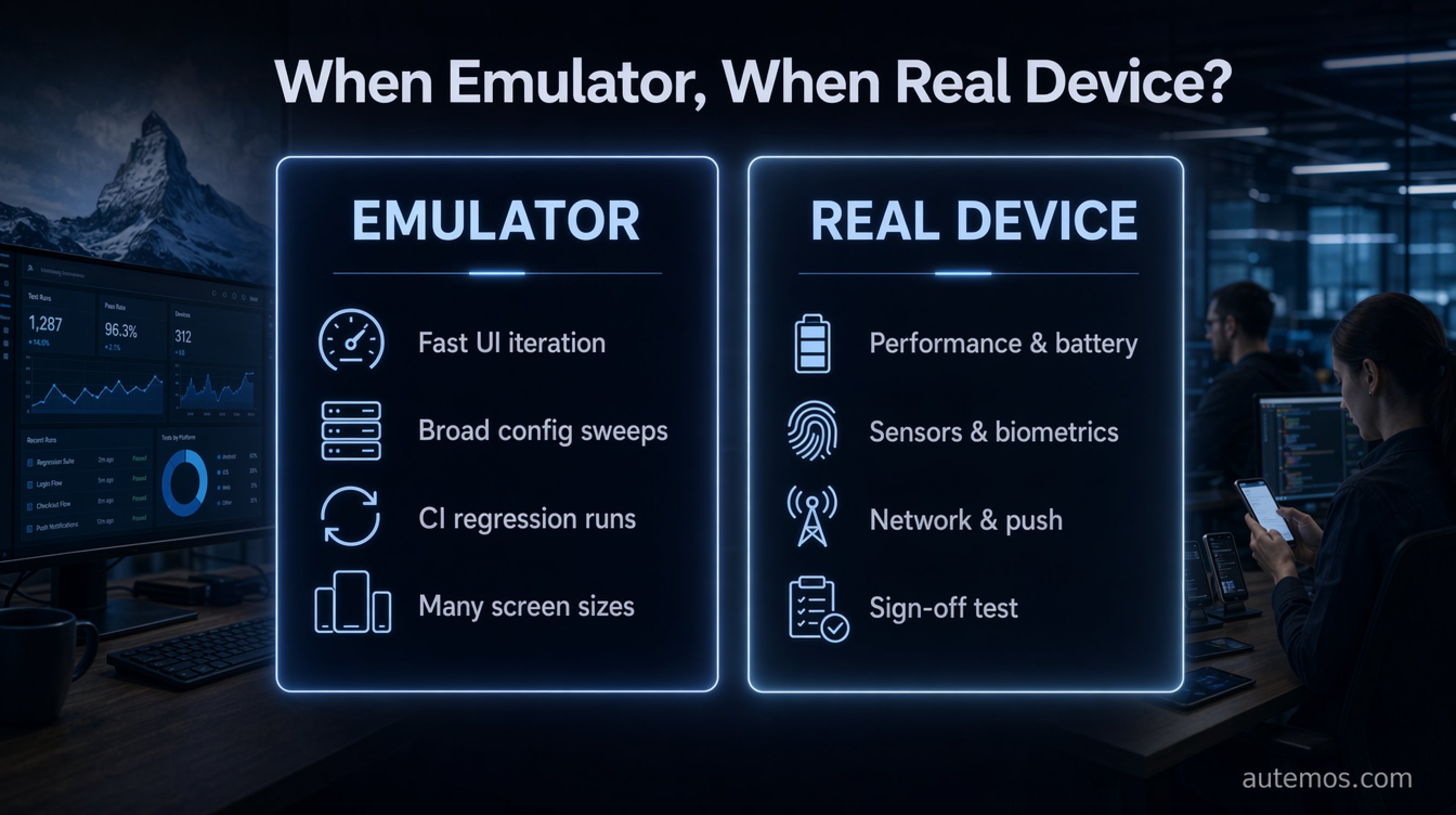
Figure 2: When to use emulator and when real device – the tasks at a glance.
Use emulators for fast functional and UI iteration plus broad config sweeps, and real devices for performance, battery, sensors, biometrics, network and pre-release sign-off (BrowserStack, 2025). This framework dissolves the debate: it's not about the better technology, but the right phase.
Here's how the split operationalises cleanly:
Emulator/simulator: early development, unit and UI smoke tests, fast regression runs in CI, covering many screen sizes and API levels in seconds.
Real device: performance and battery profiling, camera, push notifications, real network fluctuation, GPS and other sensors, biometric login, touch gestures under real load.
Mandatory on real hardware: the final sign-off test before every release, ideally on your audience's most-used real models.
A tiered model works best in practice. Stagger the pipeline like this:
Early pipeline: broad emulator runs for unit, UI and smoke tests across many configurations.
Middle stage: targeted runs on real devices for performance, sensors and biometrics.
Sign-off stage: a curated set of the most-used real models before every release.
Per BrowserStack (2025): "Due to the accuracy factor, Sanity Testing and User Acceptance Testing can be better done with real devices." For more on pipeline structure, see our guide to mobile test automation, and we cover platform-specific quirks in the post on testing across iOS and Android.
Why is the device question different in regulated DACH industries?
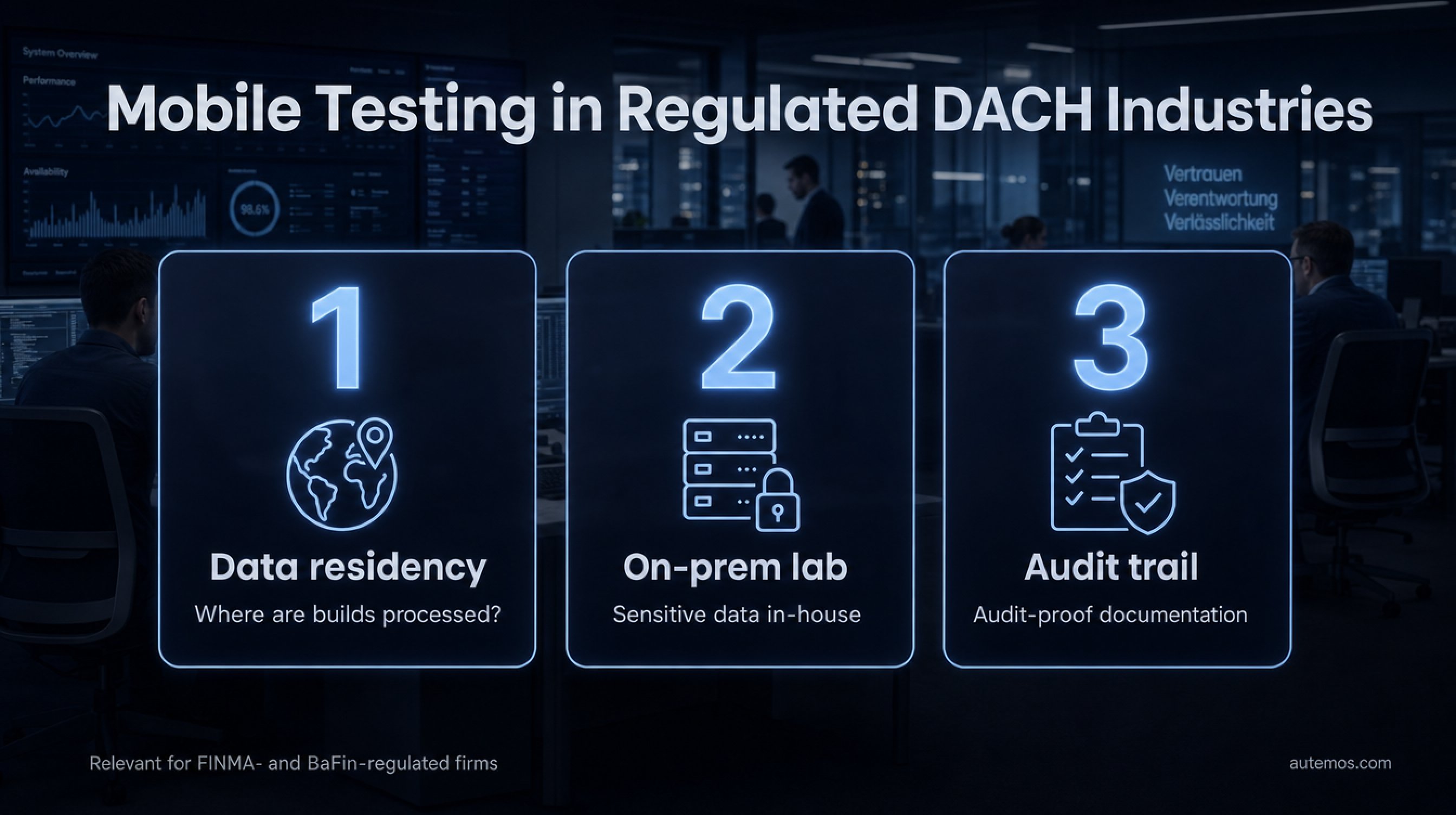
Figure 4: Three compliance requirements for mobile testing in regulated DACH industries.
At banks and regulated firms, three factors decide mobile testing beyond test quality: data residency, on-prem labs and traceability – an aspect many vendors ignore. When test data or app builds pass through an external device cloud, they potentially leave the controlled space. For FINMA- or BaFin-regulated firms, that's a risk in its own right.
Three requirements come to the fore here:
Data residency: where physically are builds and test data processed?
On-prem device labs: an internal lab keeps sensitive data in-house.
Audit traceability: every test run must be documented in an audit-proof way – which device, which build, which result.
In customer projects with banks we find these points often matter more than an emulator's few-seconds advantage. A cheap cloud helps little if it can't satisfy the compliance auditors. How to set up test automation in this environment is something we explore in the post on test automation in regulated banks.
Citable: For FINMA- or BaFin-regulated firms, mobile testing is decided not only by real-device accuracy but also by data residency, on-prem device labs and audit-proof traceability – a bundle of requirements external device clouds frequently fail to cover.
FAQ
Can I skip real devices entirely and use only emulators?
No. Emulators cannot reliably measure CPU, battery or memory, and cannot test camera, biometrics, push or real network fluctuation, per BrowserStack (2025). At minimum, the final sign-off test must run on real hardware.
Why does a test pass on the emulator but fail on the device?
Usually it's architecture. Android emulators often run on x86, real devices on ARM, and native code behaves differently per platform (BrowserStack, 2025). On top of that, the emulator lacks real sensors, network and battery.
How much does a device cloud really cost?
Entry is around 199 USD per month for one parallel test (BrowserStack, 2025). At high parallelism the cost scales steeply – a rough estimate reaches 50,000 to 75,000 USD a year at roughly 100 parallel sessions (scale estimate).
Is an own on-prem device lab worth it?
For regulated DACH firms, often yes. An internal lab keeps data in-house, enables data residency and complete audit traceability. The high fixed costs amortise under sustained high parallelism and strict compliance requirements.
Which devices belong in a sign-off set?
Your audience's most-used real models. Since iOS versions are concentrated while Android is heavily fragmented, you need more models on the Android side to cover the relevant user base (Android Developers, 2026).
Conclusion
The question "real device testing or emulator" has no blanket answer – and that's precisely the answer. Emulators are the right tool for fast, broad iteration in early development. Real devices are indispensable for everything touching hardware, performance and sensors, and for every pre-release sign-off. Combining both worlds in tiers tests faster and more realistically at the same time. In regulated DACH industries a third dimension joins in: data residency, on-prem labs and audit traceability, which external clouds rarely cover cleanly. Looking only at the monthly price misses the real cost. To see what a robust, compliance-ready setup for your mobile testing looks like, explore our mobile testing solution – and in a direct conversation we'll map it to your context.
</content>


