·
8 min
Testing iOS and Android: A Cross-Platform Strategy

Roman Kirchmeier - Autemos

iOS testing and Android testing share the same goals but play by very different rules. The sharpest contrast is OS distribution: iOS 26 already runs on roughly 79% of all iPhones (Apple via MacRumors, 2026), while Android's most-used version reaches only about 19% of devices (Android Developers, 2026). Covering both platforms means planning for that asymmetry. This guide shows how iOS and Android testing differ technically, when native frameworks win, and when a shared layer makes sense. For the basics, start with our overview of mobile app testing.
TL;DR: iOS is concentrated (iOS 26 on ~79% of iPhones); Android is fragmented (top version ~19%). Native frameworks — XCUITest for iOS, Espresso for Android — are fast and stable but platform-locked. A workable strategy shares test logic, uses Appium for a single API, and applies AI to cut maintenance on both sides.
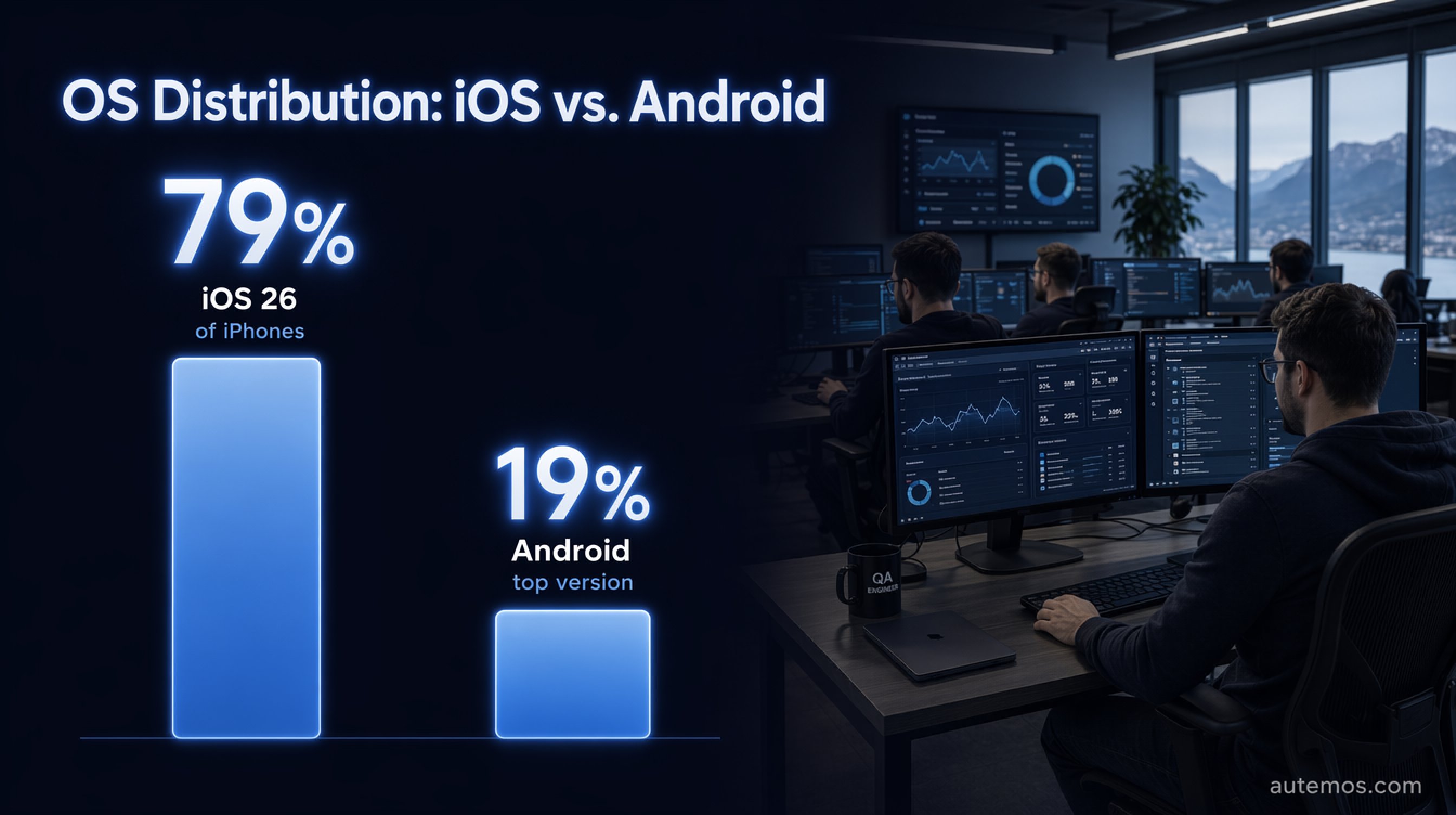
Figure 1: OS distribution compared – iOS is concentrated, Android fragmented.
How do iOS testing and Android testing differ?
iOS testing and Android testing differ mainly in device diversity and OS pace, barely in functionality. iOS lives in a closed ecosystem with few device types and fast update adoption — iOS 26 reaches ~79% of iPhones per Apple (Apple via MacRumors, 2026). Android spreads across thousands of models and many active OS versions.
That asymmetry shapes every decision. On iOS you test few combinations deeply; on Android you cover a broad matrix. The most-used Android version sits at just ~19% (Android Developers, 2026) — no single device represents the majority of your users.
Add manufacturer skins (Samsung One UI, Xiaomi MIUI) that make the same Android behave differently. A layout that renders cleanly on a Pixel can break on a Samsung. In customer projects we see most "only-on-device-X" bugs originate exactly here.
What do the native frameworks XCUITest and Espresso offer?
XCUITest (iOS) and Espresso (Android) are the first-party frameworks, considered faster and more stable than cross-platform tools — but each covers only one platform (BrowserStack, 2026). They run in the same process as the app and know its internal state.
Espresso syncs automatically with the app's main thread via `IdlingResource` and waits until the UI is idle. That slashes flakiness. One vendor benchmark measured Espresso at just 2% flaky tests on the first run versus 22% for Appium (Autonoma, 2026) — a single vendor's test, so read it with care.
The price of that stability is platform lock-in. XCUITest tests don't run on Android, and Espresso tests don't run on iOS. Covering both platforms natively means maintaining two separate test codebases in two languages (Swift/Objective-C and Kotlin/Java).
When are native frameworks worth it?
Native frameworks pay off when speed and stability in the CI pipeline are critical. For platform-specific features — Apple Pay, biometric logins, Android intents — there's no way around testing close to the platform anyway.
What host and signing hurdles does iOS testing have?
iOS testing ties you to Apple hardware and a signing process Android doesn't impose in the same way. XCUITest runs need a macOS host with Xcode, and the WebDriverAgent (WDA) must be rebuilt and resigned per device (BrowserStack, 2026).
Every iOS build needs a valid signing and provisioning profile. That complicates CI/CD setups because certificates expire, bind to device UDIDs, and must be managed securely. For regulated environments across the DACH region, key management and auditability add another layer.
In practice, an iOS test lab needs Mac Mini fleets or a macOS-capable device-cloud provider. A pure Linux CI won't cover iOS — a structural overhead versus Android that you should plan into your tooling choice early.
Why does Android testing sometimes fail on emulators?

Figure 4: Two-tier device strategy – emulators early, real devices for the hard test.
Android emulators usually run on x86 architecture while real devices run on ARM — and that gap produces "passes on emulator, fails on device" bugs. BrowserStack documents compile and behavior differences between x86 emulators and ARM devices (BrowserStack, 2026).
Emulators are ideal for fast early iteration: functional checks, layout tests, broad configuration sweeps. But they can't reliably measure CPU, battery, and memory behavior, and they can't realistically test camera, push, sensors, or biometrics (BrowserStack, 2026). Network conditions stay imprecise too: per BrowserStack, "Emulators do not always mimic real mobile network conditions like latency, bandwidth restrictions, etc."
The practical consequence is a two-tier strategy:
Emulators/simulators first: for early development, functional and UI tests, and broad version matrices.
Real devices for the hard test: performance, battery, sensors, biometrics, network fluctuation, and final release sign-off.
Where exactly that line falls is detailed in our comparison of real devices versus emulators.
How do you build ONE cross-platform strategy?
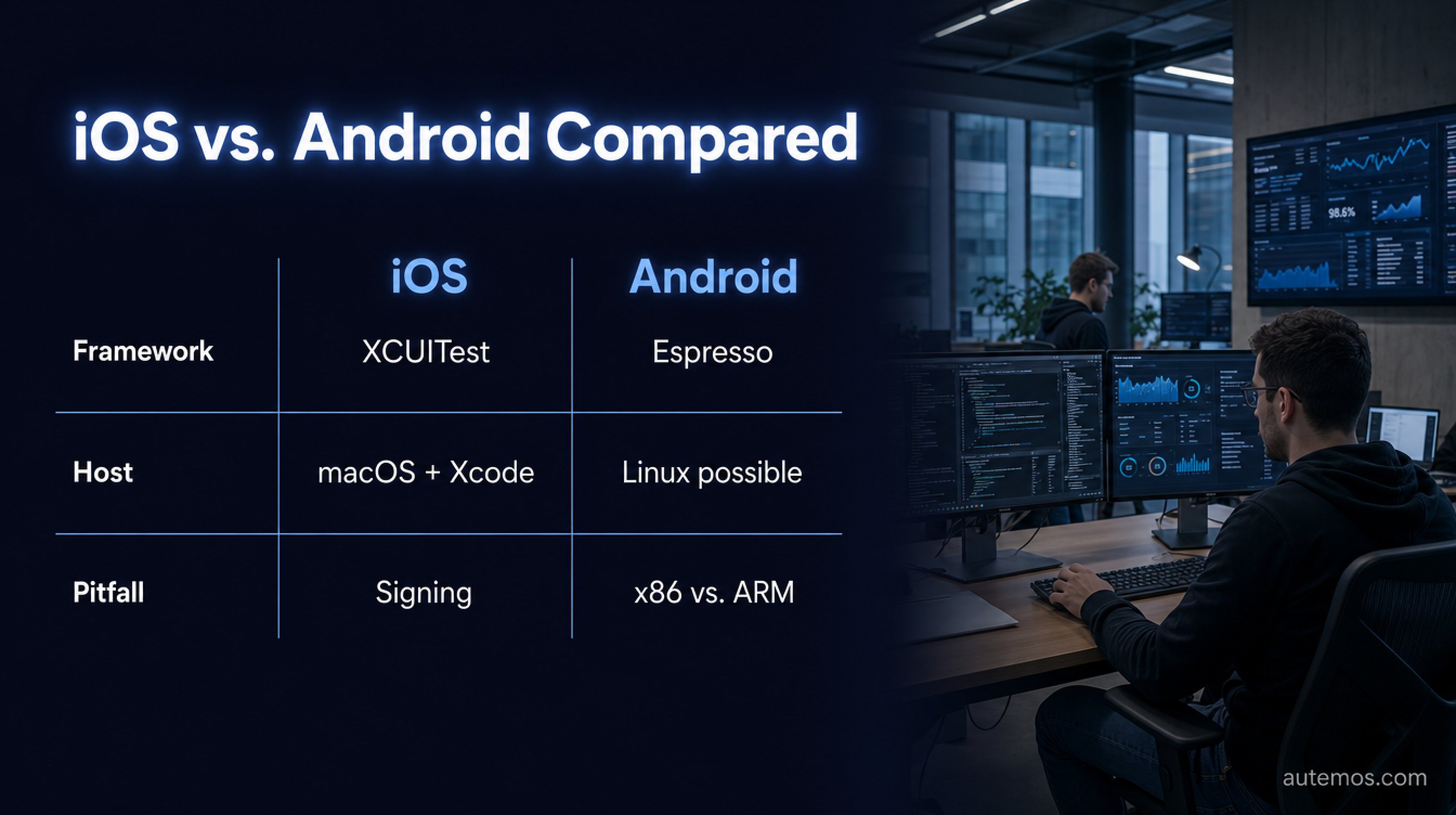
Figure 2: iOS and Android side by side – framework, host, and typical pitfall.
A workable strategy separates shared test logic from platform-specific execution. A test's business logic — "log in, search for an item, add to cart" — is identical on iOS and Android. Only the element locators and a few gestures differ.
Appium is an open-source framework on the W3C WebDriver protocol that offers a single API for iOS, Android, and web (Appium docs, 2026). Per the Appium documentation, drivers are "Appium's answer to the question, 'how do we support automation of multiple, unrelated platforms?'". Under the hood Appium uses UiAutomator2 for Android and XCUITest via WDA for iOS — you write once, it translates per platform. Our guide to Appium for mobile testing shows what the setup looks like in practice.
The trade-off is speed. As an external black-box client, Appium doesn't know the app's main thread and ran ~4–4.5x slower than Espresso in one benchmark (Autonoma, 2026) — a single vendor test. The table below sums up the differences:
Criterion | iOS | Android |
|---|---|---|
Native framework | XCUITest | Espresso |
Cross-platform option | Appium (XCUITest driver via WDA) | Appium (UiAutomator2 driver) |
OS adoption, top version | iOS 26 ~79% | Top version ~19% |
Host requirement | macOS + Xcode, sign WDA per device | Linux/Windows/macOS possible |
Typical pitfall | Signing/provisioning | x86 emulator vs. ARM device |
Most teams frame the question backwards. They ask "Appium or native?" as if it were either-or. Layering works better: shared smoke and regression suites via Appium, platform-specific deep tests (Apple Pay, Android intents) native. That cuts maintenance without giving up critical paths. The same logic applies to end-to-end tests spanning multiple platforms.
How does AI help cover both platforms with less maintenance?
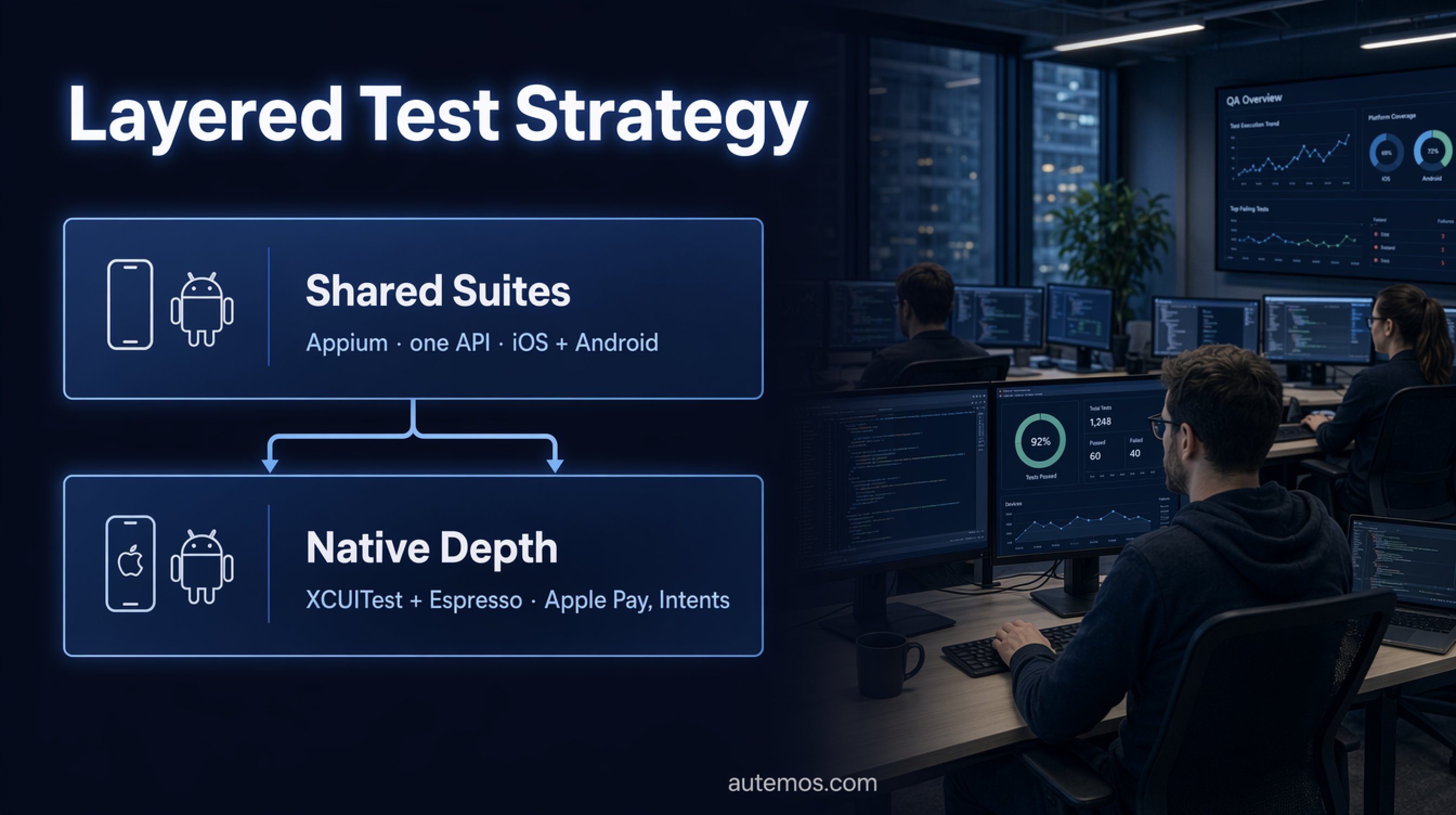
Figure 3: Layered strategy – shared Appium suites plus native deep tests.
AI mainly cuts the maintenance load that doubles when you have two platforms. The honest anchor isn't a marketing promise but a defensible number: QA engineers spend roughly 7.8% of their time on flaky tests (LambdaTest via Katalon, 2024). That's exactly where AI earns its keep.
Vision-AI identifies UI elements visually — like a human — instead of relying on brittle locators. That makes tests more resilient to code and layout changes and works across platforms, because a button looks similar on iOS and Android even when its DOM name differs (Drizz, 2026). We cover this further in our piece on visual testing with Vision-AI.
Self-healing tools claim 50–80%, sometimes 95%, less maintenance (Drizz, 2026) — vendor figures, not proof. In customer projects we see more realistic effects: fewer broken locators after UI refactors and noticeably less duplicate upkeep, because one visual description carries both platforms. AI doesn't replace the hard test — performance, battery, biometrics.
FAQ
What's the biggest difference between iOS and Android testing?
Device and OS fragmentation. iOS 26 runs on ~79% of iPhones (Apple via MacRumors, 2026), while Android's top version reaches only ~19% (Android Developers, 2026). iOS testing is concentrated and deep; Android testing is broad and matrix-heavy.
Do I really need a Mac for iOS testing?
Yes. XCUITest requires a macOS host with Xcode, and the WebDriverAgent must be signed per device (BrowserStack, 2026). A pure Linux CI won't cover iOS — you need Mac hardware or a macOS-capable device-cloud provider.
Should I use Appium or native frameworks?
Both, depending on the test. Appium offers one API for both platforms but ran ~4–4.5x slower than Espresso in a benchmark (Autonoma, 2026). Use Appium for shared suites and native frameworks for platform-specific deep tests.
Why does a test pass on the emulator but fail on the device?
Usually because of the architecture gap: emulators run on x86, real devices on ARM (BrowserStack, 2026). Performance, battery, sensors, and biometrics can't be measured reliably on an emulator — for those you need real devices.
How does AI reduce testing effort across two platforms?
By cutting duplicate upkeep. QA teams lose ~7.8% of their time to flaky tests (LambdaTest via Katalon, 2024). Vision-AI identifies elements visually rather than through brittle locators, so one description carries across iOS and Android.
Conclusion
iOS testing and Android testing demand the same respect but different tactics. iOS is concentrated and quickly updated (~79% on iOS 26); Android is broad and fragmented (top version ~19%). Native frameworks — XCUITest and Espresso — deliver speed and stability but lock you to one platform each. A smart strategy layers it: shared logic through a single API like Appium, platform-specific depth native, plus real devices for performance and sensors. AI and Vision-AI cut duplicate maintenance but don't replace a hard test on a real device. Plan this into tooling and CI early and you avoid expensive detours later. See how Autemos handles mobile testing across iOS and Android, or talk to our team about your test strategy.


