·
9 min
Integrating Test Automation into CI/CD: A Practical Guide

Roman Kirchmeier - Autemos

Integrating test automation into CI/CD means automated tests run on every code change inside the build and release pipeline, instead of manually before a release. Development teams get direct feedback, short lead times and a low error rate in production (DORA, 2024). This guide shows, step by step, how to wire tests into GitHub Actions, GitLab CI and Jenkins: where to place tests, which triggers make sense, how a staged pipeline looks and how to keep the suite fast and stable.
In short: Test automation in CI/CD wires tests into the pipeline through triggers such as push, pull request and schedule. Unit tests run on every push, slower E2E tests on merge or overnight. Reports as JUnit XML or Allure and a quality gate decide between release and block.
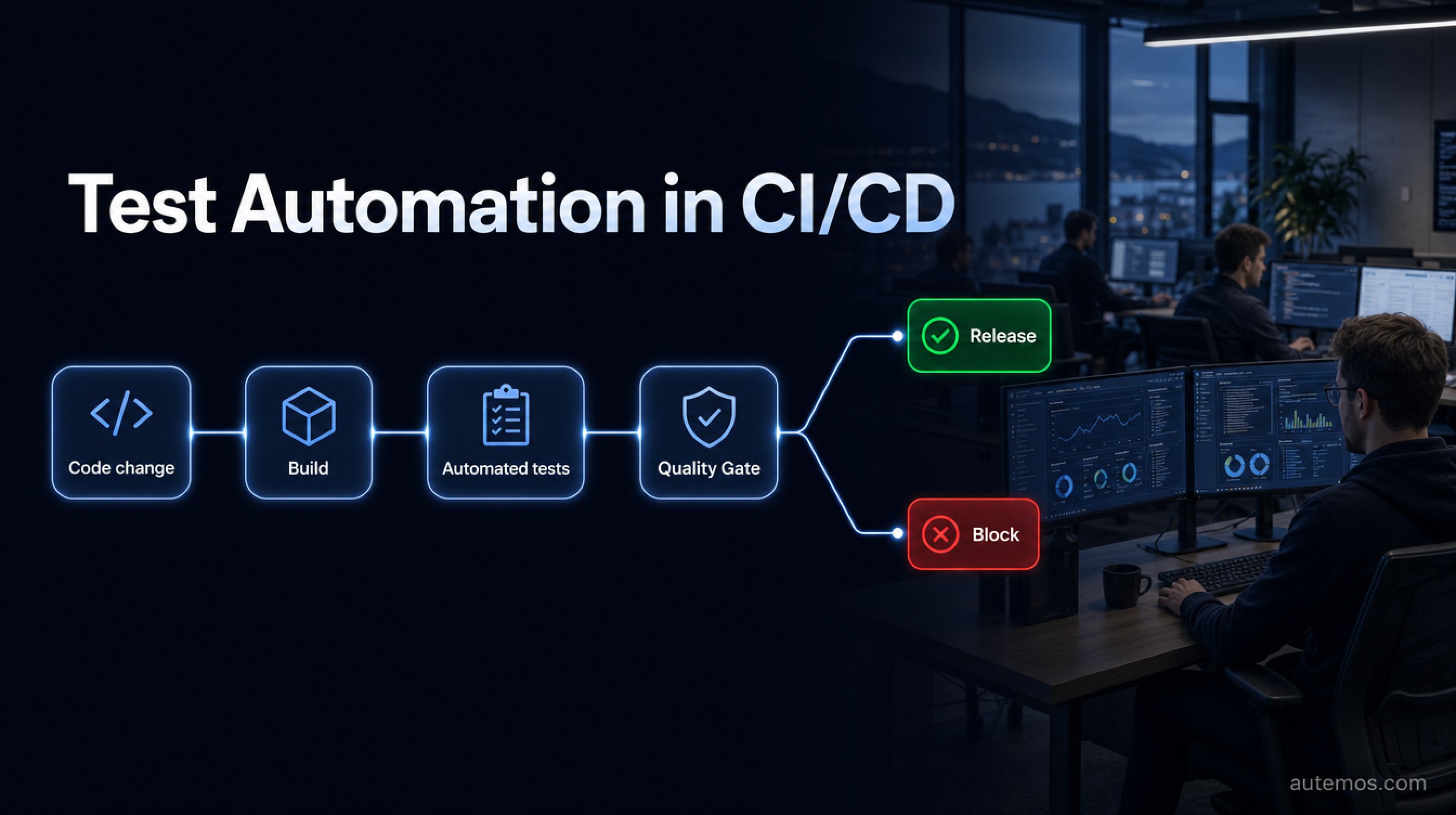
Figure 1: CI/CD test pipeline from code change through the quality gate to release or block.
What does test automation in CI/CD mean?
Test automation in CI/CD is the fixed integration of automated tests into the continuous integration and continuous delivery pipeline, so every code change triggers a build and its tests. The goal: catch defects early, before code is merged or shipped.
DORA reports that automated testing in the pipeline contributes to "quick feedback for developers, a short lead time from check-in to release, and a low error rate in production" (DORA, 2024). How this fits together across the whole pipeline is covered in our guide to continuous testing.
DORA 2024 shows why the fundamentals have to come first: for every 25% rise in AI adoption, throughput dropped an estimated 1.5% and stability 7.2%, since the expected gains fail to show up without solid testing and small change sets (DORA 2024).
Test automation and CI/CD are two separate building blocks. Test automation writes checks as code. CI/CD runs that code automatically on every change. Together they form a pipeline that checks every commit and reports back.
How do teams integrate tests into the pipeline?
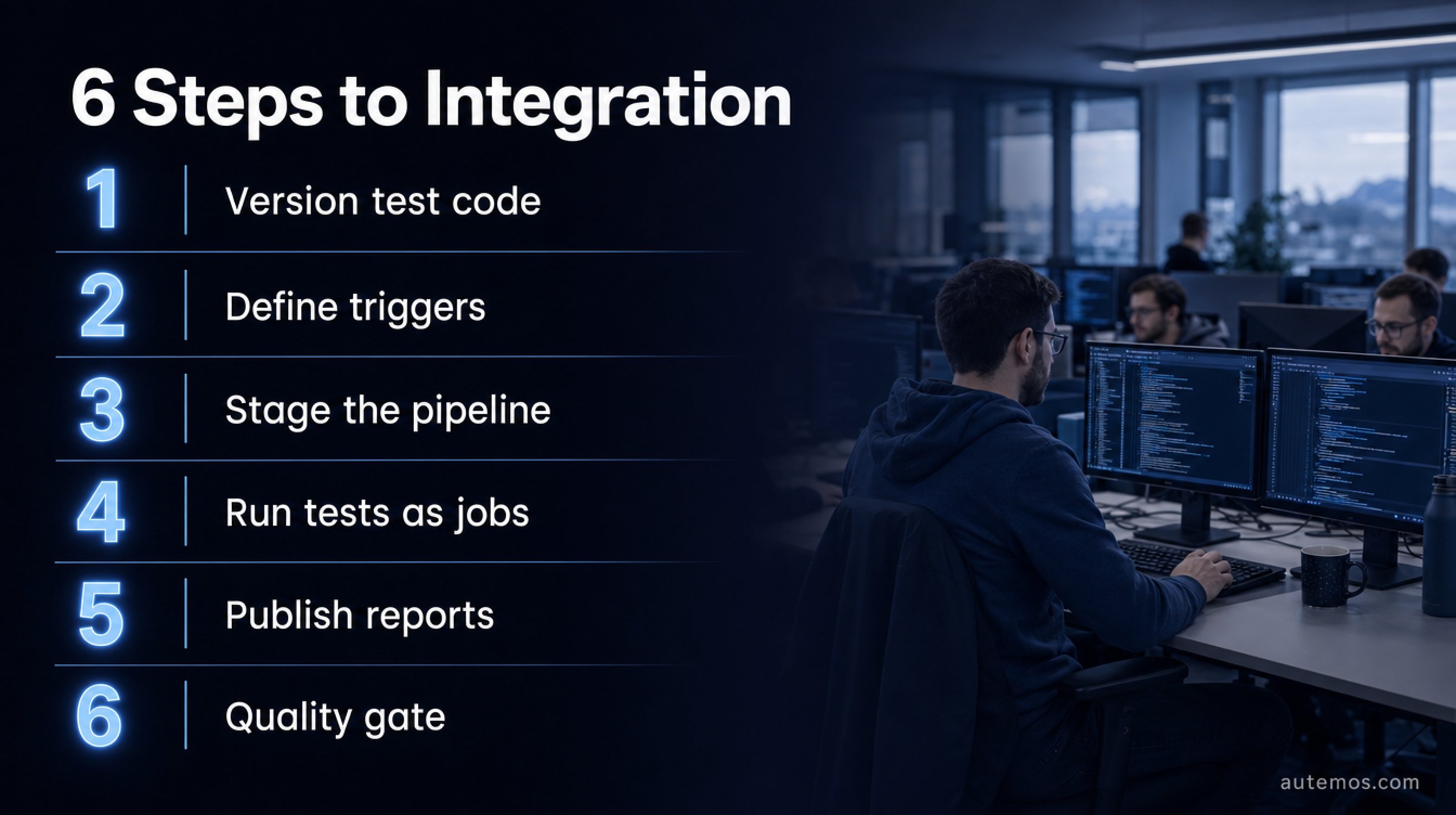
Figure 2: Six steps to integrate automated tests into the CI/CD pipeline.
Teams integrate tests in six steps: version the test code, define triggers, split the pipeline into stages, run tests as jobs, publish results as reports and let a quality gate decide on release.
Put test code in the repository. Tests sit versioned next to the application code, so every change stays traceable.
Define triggers. GitHub Actions starts workflows on events such as push, pull request, schedule and manual dispatch (GitHub Docs, 2024).
Split the pipeline into stages. Build first, then fast unit tests, then integration and E2E.
Run tests as jobs. Jobs run on isolated runners, concurrently by default, ordered by dependencies.
Publish results. Reports as JUnit XML or Allure make failures and trends visible.
Set a quality gate. A failure blocks the merge or deploy automatically.
Artifacts such as logs, screenshots and report files stay available after each run and help investigate a failure without a rerun. In regulated environments this traceable history counts as release evidence.
In client projects we see integration often break on hand-built glue code. Autemos syncs test cases and executions bidirectionally with GitLab, GitHub Actions and Jenkins, and starts runs on a schedule or via event triggers mid-pipeline. Results are available as an Autemos or Allure report.
GitHub Actions, GitLab CI and Jenkins compared

Figure 3: GitHub Actions, GitLab CI and Jenkins compared side by side.
GitHub Actions, GitLab CI and Jenkins solve the same task differently: all three run tests on every change, and they differ in configuration, trigger model and reporting.
For GitLab CI the docs state: "Stages run in sequence, while the jobs in a stage run in parallel" (GitLab Docs, 2024). The parallel keyword starts several instances of a job, each getting its index and the total node count to select its share of tests.
Aspect | GitHub Actions | GitLab CI | Jenkins |
|---|---|---|---|
Configuration | YAML under .github/workflows | .gitlab-ci.yml in repo | Jenkinsfile (declarative) |
Triggers | Push, pull request, schedule, manual | Push, merge request, schedule, API | SCM polling, webhook, cron |
Ordering | Jobs parallel, ordered by needs graph | Stages sequential, jobs parallel | Stages sequential, parallel block |
Reporting | Artifacts, test summaries | JUnit report artifacts | junit step, trend graphs |
Failure behaviour | Job fails, blocks | Pipeline blocks | Build marked UNSTABLE |
GitHub Actions and GitLab CI provide hosted runners, and Jenkins usually runs on your own infrastructure with agents. For regulated environments it matters that test runs happen on controlled, logged runners.
For many DACH teams the existing platform decides: teams that already keep code in GitLab stay on GitLab CI, and GitHub users reach for GitHub Actions. Jenkins stays a sound choice when you need self-hosted runners, fine-grained permissions and older build chains.
Jenkins records results through a post block with the junit step, so trends survive even on failure. Failing tests mark the build as UNSTABLE (Jenkins Docs, 2024). Which framework fits underneath is compared in our overview of test automation tools.
Which tests run when?
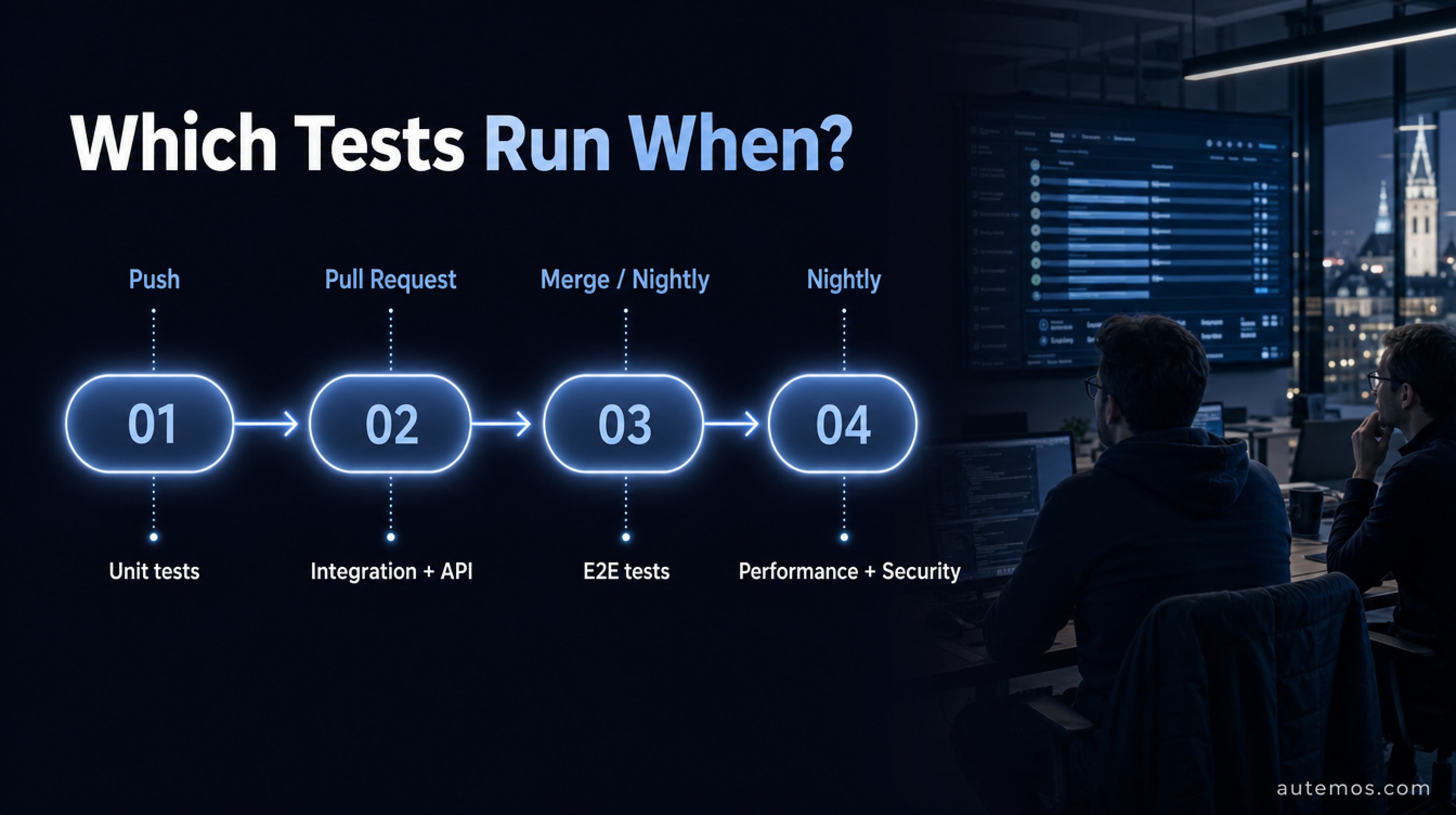
Figure 4: Which test types run at which trigger in the pipeline.
Fast tests run early and often, slow ones rarely: unit tests on every push, integration tests on every pull request, E2E tests on merge or as a nightly run. Feedback stays fast without every commit waiting for the full suite.
Unit tests: on every push, runtime in seconds, block early.
Integration tests: on every pull request, check how components work together.
API tests: on every pull request, faster than the UI and more stable.
E2E tests: on merge into the main branch or overnight, cover critical user paths.
Non-functional tests: performance and security scans overnight or before larger releases, since they take longer to run.
This staging follows the test pyramid: many fast tests at the bottom, few slow ones at the top. Long E2E suites can be shortened further through parallel test execution, by splitting them across several runners. Which tests run when belongs in the pipeline code, so new team members grasp the staging right away.
How do CI pipelines stay fast and stable?
CI pipelines stay fast through test selection and stable by isolating unreliable tests. Test selection runs only the tests affected by a change. Unreliable tests move into quarantine instead of blocking merges.
Predictive test selection maps code changes to affected tests and runs only those. Facebook describes the approach for very large codebases (Machalica et al., ICSE-SEIP, 2019). The risk sits in a wrongly skipped test set that was actually affected.
Flaky tests pass sometimes and fail sometimes without any code change. The first large empirical study names async waits, concurrency and test-order dependencies as the main root causes (Luo et al., FSE, 2014). Such tests belong in quarantine, so they do not slow the team down.
Order matters too: running fast, often-failing tests first reports errors earlier and saves runner time. Caching dependencies and test data shortens every run further, without changing what the tests prove. A limited retry, say a single re-run, absorbs genuine flakiness, and it should stay monitored so it does not hide systematic failures.
Another drag comes from tests that break after every UI change. Autemos self-healing locators stabilise them automatically and cut false failures. Which thresholds should block a build is defined by quality gates. For stable checks below the UI, API test automation fits well, and teams can record tests and run them straight in CI/CD with the AI Recorder.
Frequently asked questions
Which triggers should start tests in CI/CD?
The four common triggers are push, pull request, schedule and manual start. Unit tests run on push, larger suites on pull request or merge, long runs on a nightly schedule, and manual triggers serve ad-hoc runs (GitHub Docs, 2024).
What if tests make the pipeline too slow?
Stage and select tests. Fast unit tests run on every push, slow E2E tests less often. Test selection runs only affected tests, and parallel execution splits the suite across several runners (Machalica et al., 2019).
Should failing tests stop the build?
Yes, on real failures. A quality gate blocks the merge or deploy as soon as tests fail. Unreliable tests belong in quarantine first, so random failures do not block the whole team.
Is CI/CD test automation worth it in regulated industries?
Yes. Automated tests in the pipeline produce traceable release evidence for audits. Poor software quality cost the U.S. economy an estimated 2.41 trillion USD in 2022 (CISQ, 2022), which justifies the effort of early checks.
What sets GitHub Actions apart from Jenkins?
GitHub Actions uses YAML workflows in the repository and hosted runners. Jenkins is a self-run server with a Jenkinsfile and plugins. GitHub Actions orders jobs by a needs graph, and Jenkins records results through the junit step (Jenkins Docs, 2024).
Conclusion
Test automation in CI/CD rests on three decisions: the right triggers, a staged pipeline and a quality gate that blocks real failures. Unit tests on every push, integration and API tests on every pull request, E2E tests on merge or overnight keep feedback fast and releases safe. GitHub Actions, GitLab CI and Jenkins reach this through different configuration and triggers, and the principle stays the same. Test selection, parallel execution and quarantining unreliable tests keep the pipeline fast even as the suite grows. Autemos wires tests in through bidirectional sync with GitLab, GitHub Actions and Jenkins, starts them on a schedule or by event and delivers reports in Autemos or Allure format. Want to set up your pipeline together? Talk to our team.


