·
8 min
Which tests should you automate? Criteria, checklist and what stays manual

Roman Kirchmeier - Autemos

Automate the checks that repeat often, run stably and protect heavily used business workflows, starting with regression tests. Exploratory tests, subjective look-and-feel, one-off checks and anything that needs human judgement stay manual. The ISTQB Test Automation Strategy syllabus (CT-TAS v1.0), released in May 2024, draws this line with concrete selection criteria (ISTQB CT-TAS, 2024). Its textbook example of a test that's hard to automate comes from finance: a loan application checked by a human agent. For how this choice fits the wider rollout, see the guide to introducing test automation.
TL;DR: Automate stable regression tests first, the ones that run often and cover heavily used workflows. The ISTQB CT-TAS syllabus (2024) gives you the questions to ask, from technical feasibility to ROI. Exploratory tests, look-and-feel, accessibility and workflows with manual decisions, such as a loan application reviewed by an agent, still need people.
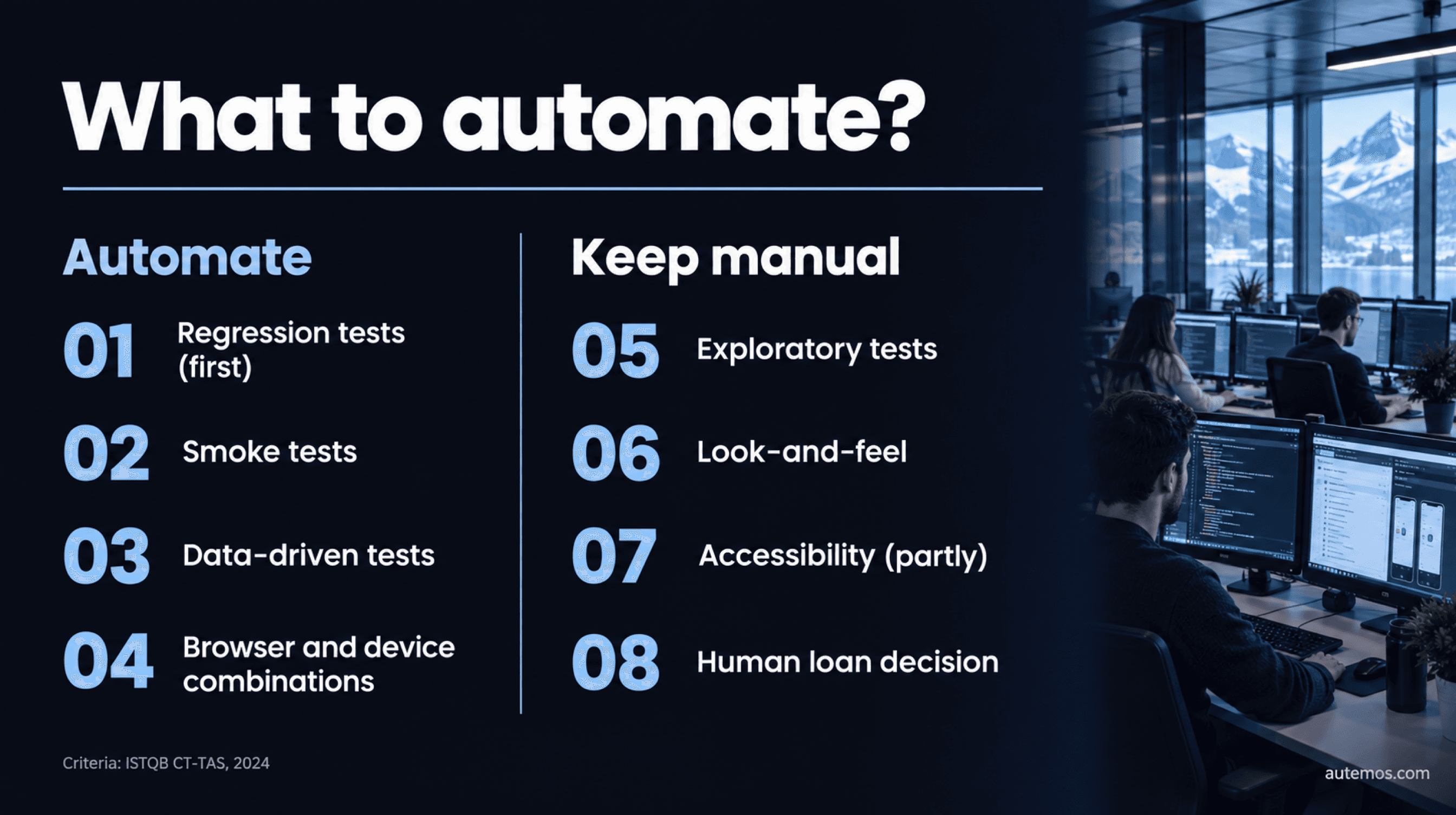
Figure 1: What to automate and what stays manual, based on ISTQB CT-TAS (2024)
What to automate in testing, and what to leave manual?
Automate tests that run often and the same way every time, whose result a tool can judge without ambiguity, and that cover stable, heavily used features. The ISTQB names the starting point plainly: “The easiest opportunity for transitioning from manual testing to test automation is to target regression testing” (ISTQB CT-TAS, 2024). Your first candidate is the regression test.
The table below sorts common test types. It's a rule of thumb, and it doesn't replace a look at each individual test case.
Test type | Automate? | Why |
|---|---|---|
Regression tests of stable core workflows | Yes, first | Runs after every change, same steps, clear expected result |
Smoke test | Yes | Short, runs on every build, fast feedback |
Confirmation test after a fix | Yes, if it moves into the regression suite | Run once, the effort rarely pays back |
Data-driven tests, browser and device combinations | Yes | Many permutations, barely doable by hand |
Load and stress tests | Yes, with a specialized tool | Need load generation and monitoring |
Exploratory tests | No | Learning and asking questions is human work |
Look-and-feel, UI consistency | No | Subjective judgement; CT-TAS says it needs human review |
Accessibility | Partly | Tools find some barriers, people check the rest |
One-off tests, short-lived features | Mostly no | Build and maintenance cost won't pay back |
Workflows with manual approval (e.g. a loan decision) | Partly | Automate the system steps, the decision stays human |
Tests with long waits (e.g. session timeout) | Only with mocks | Time must be controllable via mocks or server responses |
What's the difference between testing and checking?
Testing is a learning process that tools can only support; checking is the mechanistic comparison of defined statements about a product, which a tool can take over. The distinction comes from James Bach and Michael Bolton. Their simplified 2024 wording reads: “Checking is the mechanistic process of verifying propositions about the product” (Bach & Bolton, 2024).
For selection, that means: automate the checks whose expected result you can state exactly in advance. Martin Fowler treats a lack of exploration as a warning sign: “I would consider it a red flag if a team isn't doing exploratory testing at all” (Fowler, 2019).
Checklist: what criteria decide which tests to automate?
The ISTQB CT-TAS (§3.3.1) assesses each candidate with questions on feasibility, skills, economics, frequency, repeatability, maintainability and reuse (ISTQB CT-TAS, 2024). Go through the questions for each test case and note yes or no:

Figure 2: Ten questions per test case based on ISTQB CT-TAS §3.3.1
Technically possible? The tool has to drive the system's UI, interface or platform.
Is the team trained? Without skills in the tool and framework, you get scripts nobody maintains.
Is the ROI adequate? Building and maintaining the test must pay off over the planned runs.
Does running it often add value? A test that runs every night pays off faster than one that runs each quarter.
Functional or non-functional? The type determines the tool and the test level.
Is it part of the smoke, regression or confirmation suite? These suites run again and again.
Is it repeatable? The same inputs must lead to the same expected result.
Is it easy to maintain when the system changes? Tests on unstable screens cost time with every release.
Does it cover frequently used business workflows? Defects there hit many users.
Is there functional overlap? Shared steps such as a login, and shared test data, can be reused.
A simple working rule, not an ISTQB requirement: a test with almost all yes answers goes to the top of the list. If feasibility or repeatability gets a no, fix the cause first. The article on the smoke test shows why a short build check passes nearly every question.
Which tests can only automation handle?
The CT-TAS (§3.3.2) lists eight situations where manual testing is practically ruled out, from runs that take too long to stress tests with heavy user load (ISTQB CT-TAS, 2024). If one of these applies, plan for automation from day one:
Manual execution takes too long.
Executions must be synchronized.
Results are needed directly in the CI/CD pipeline.
Large log files have to be parsed.
Precise timing is required.
There are many permutations of operating systems, browsers, devices and configurations.
A large volume of executions or data input is needed.
Non-functional tests need automated monitoring or huge user input, such as stress and reliability tests.
An example from banking: the same online banking flow in several browsers, on iOS and Android, with different account types. Each extra account type multiplies the number of runs, and CT-TAS names a large volume of executions or data input as a case for automation (ISTQB CT-TAS, 2024). Load and stress tests need specialized tools; functional UI tools don't cover them.
Manual vs automated testing: which tests should stay manual?
Tests that need human judgement stay manual: subjective look-and-feel, workflows with a lot of human interaction, features with operating-system restrictions such as native SMS, and long time dependencies you can't shorten with mocks (ISTQB CT-TAS, 2024).
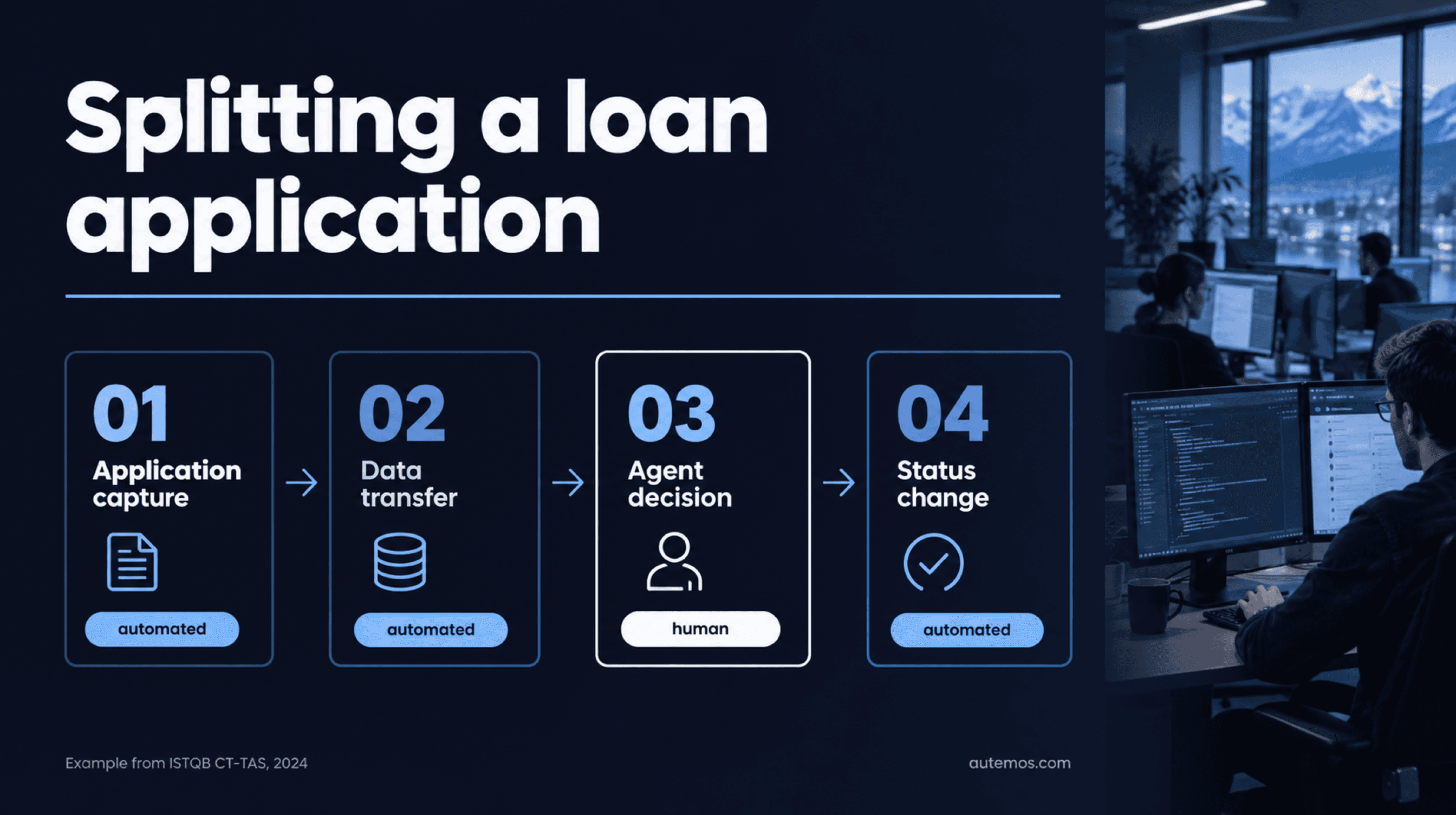
Figure 3: Splitting a loan application, automate the system steps, the decision stays human
The Foundation syllabus lists the opposite as a risk: “Using a test tool when manual testing is more appropriate” (ISTQB CTFL 4.0.1, 2024). A 2012 survey of 115 practitioners points the same way: 80% disagreed with the idea that automated testing would fully replace manual testing (Rafi et al., 2012 survey).
Why is a loan application the textbook example?
The CT-TAS illustrates too much human interaction with an example from finance: a loan application where agents check the details and decide manually (ISTQB CT-TAS, 2024). At banks and insurers, approvals, four-eyes checks and manual decisions sit inside many core processes.
You can usually split such a workflow. Automated tests can cover application capture, data transfer and the status change after the decision, through the API and the UI. The decision itself stays a human judgement; in the test, you set it with prepared test data or a stand-in approval in the test system.
What about accessibility?
Accessibility can only partly be checked automatically. The W3C puts it this way: “Tools cannot check all accessibility aspects automatically. Human judgement is required.” (W3C WAI, accessed 2026). A test by the UK Government Digital Service on a deliberately broken page shows the scale: all tools combined found 71% of the barriers, the best single tool 37% (GOV.UK, 2017). Treat these numbers as illustrative, not current.
How does the test pyramid help you choose?
The test pyramid tells you at which level to automate a test: many fast tests at unit and API level, few slow tests through the UI. ISTQB defines it as “a model showing that different tests may have different granularity” (ISTQB CTFL 4.0.1, 2024). In 2015, Google proposed a split of 70% unit, 20% integration and 10% E2E tests, explicitly “as a good first guess” (Google Testing Blog, 2015). It's a heuristic, not a standard; the mix differs from team to team.
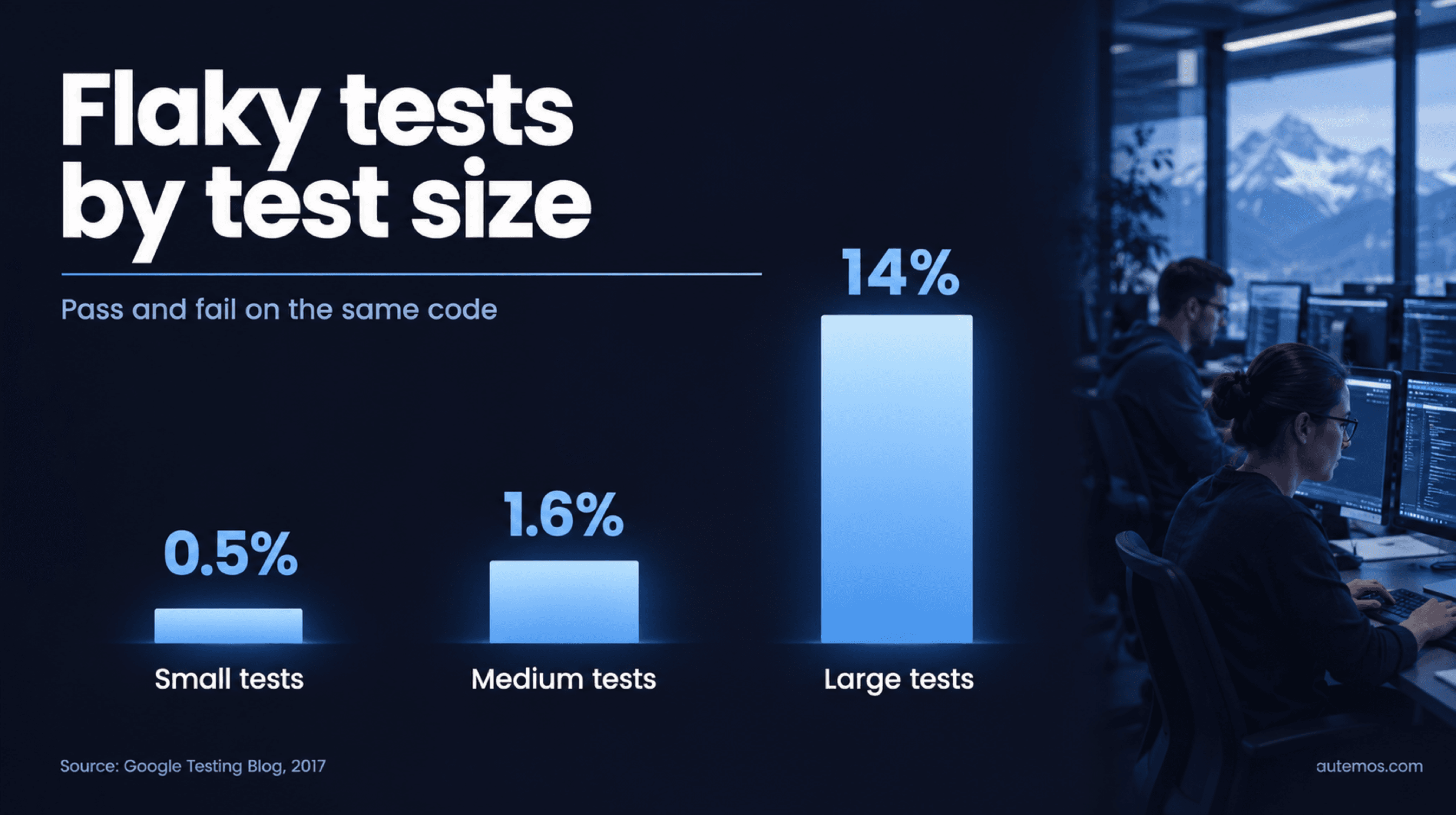
Figure 4: Flaky tests by test size (source: Google Testing Blog, 2017)
Martin Fowler says the same without numbers: “you should have many more low-level UnitTests than high level BroadStackTests running through a GUI” (Fowler, 2012). The reason is stability. In 2017, Google analyzed its tests by size: 0.5% of small, 1.6% of medium and 14% of large tests were flaky, passing and failing on the same code (Google Testing Blog, 2017).
Before each planned UI test, ask whether the same business rule can be tested lower down, through the API for example. Keep the UI for a small number of full workflows. The article on the test pyramid and its levels explains how the levels fit together.
How do you prioritize which tests to automate first?
Start with your existing manual regression suite, check every candidate against the checklist and automate the tests with the best value for the effort first. The sequence below is based on CT-TAS §1.1.2, §3.3.1, §5.1.1 and §6.1.1 (ISTQB CT-TAS, 2024):
Collect candidates. List the manual regression tests that run with every release.
Check the manual test. Does it run cleanly and reproducibly? According to CT-TAS, automating a broken manual test only gives you a non-functioning automated test. Fix the root cause first.
Apply the checklist. Score each candidate with the ten questions above.
Pick the level. Test each rule as low in the pyramid as you can.
Estimate value and effort. CT-TAS defines ROI as a ratio: savings divided by investment. The full calculation is in the article on test automation ROI.
Build reusable parts first. A shared login component and a single data source save time on every later test.
Start small. CT-TAS recommends a pilot project to check tools and feasibility (“The use of a pilot project helps determine the tools and viability of selected technologies”). Automate a manageable set first.
Retire tests regularly. Remove tests that no longer add value; CT-TAS counts this among the success factors.
Budget for the transition. CT-TAS warns: “the project should expect increased costs as both manual testing and automated testing take place simultaneously” (ISTQB CT-TAS, 2024). Where this selection belongs in your wider planning is covered in the article on test strategy.
Where does the Autemos AI Recorder help?
The Autemos AI Recorder is a recording feature that drafts an executable test workflow from a Jira ticket, a user story or a plain-text test case. Your team reviews and approves every AI-generated step before it runs. The recorder builds the tests you've selected; your team still decides which tests get automated. Autemos covers functional tests for web, mobile, API and desktop; load, performance and security testing are out of scope. Details are on the AI Recorder page.
Frequently asked questions
Can you automate all tests?
No, tests that need human judgement, such as exploratory tests, look-and-feel or manual decisions, can't be fully automated. The ISTQB CT-TAS gives the example of a loan application where agents decide manually (ISTQB CT-TAS, 2024).
Which tests should you automate first?
Automate stable regression tests first, the ones that run often and cover heavily used workflows; the ISTQB CT-TAS (2024) calls them the easiest starting point. Check beforehand that the manual test works reliably.
What share of tests should be automated?
There's no proven ideal share: the ISTQB Foundation syllabus treats the degree of test automation as something the context determines (ISTQB CTFL 4.0.1, 2024). A vendor survey by Applitools of almost 1,000 companies found that most had automated less than half of their testing (SD Times, 2022). Google's 70/20/10 refers to test levels, not to manual vs automated.
Is test automation worth it for short projects?
Often not: CT-TAS states that automation isn't worth introducing if the planned project duration is shorter than the ROI turning point (ISTQB CT-TAS, 2024). Work out savings and investment before you start.
Can AI decide which tests to automate?
No, AI can draft tests, but the selection stays your team's decision. The ISTQB Foundation syllabus lists relying on a tool too much, “ignoring the need of human critical thinking”, as a risk (ISTQB CTFL 4.0.1, 2024). AI drafts need human approval.
Conclusion
What to automate in testing is decided test case by test case: does it run often, is it repeatable and maintainable, does it cover a heavily used workflow, and does the effort pay back? Then it goes on the list, starting with the regression suite.
Exploratory tests, look-and-feel, accessibility and workflows with manual decisions, such as the loan application, stay with people. The test pyramid tells you at which level to build a test, and Google's 2017 numbers show that large tests are the flakiest. If you'd like to go through your regression suite with us and draft the first candidates in the AI Recorder, book a conversation with our team.


