·
11 min
Test automation: definition, benefits, limits and rollout in regulated companies

Roman Kirchmeier - Autemos

Test automation means that tools run test cases, compare actual and expected results and log deviations that people would otherwise check by hand. It saves time on checks that repeat often, regression tests above all. Before that, it costs money for tools, scripts and maintenance. The ISTQB Foundation Level syllabus puts it plainly: “Simply acquiring a tool does not guarantee success.” (ISTQB CTFL v4.0.1, 2024)
Financial firms carry extra duties from supervisory law. In the EU, the DORA regulation has applied since 17 January 2025; in Switzerland, FINMA Circular 2023/1 sets the rules for banks and securities firms. Both require controlled testing of ICT changes and separate test and production environments (under DORA via Delegated Regulation 2024/1774).
TL;DR: Test automation pays off where the same checks run often and reliably, starting with regression tests. The ISTQB CT-TAS syllabus (2024) calculates ROI as savings divided by investment and warns that short projects may never reach break-even. Banks add supervisory duties: tested changes and separate environments (EU: DORA, Switzerland: FINMA Circular 2023/1), plus anonymized test data under DORA.
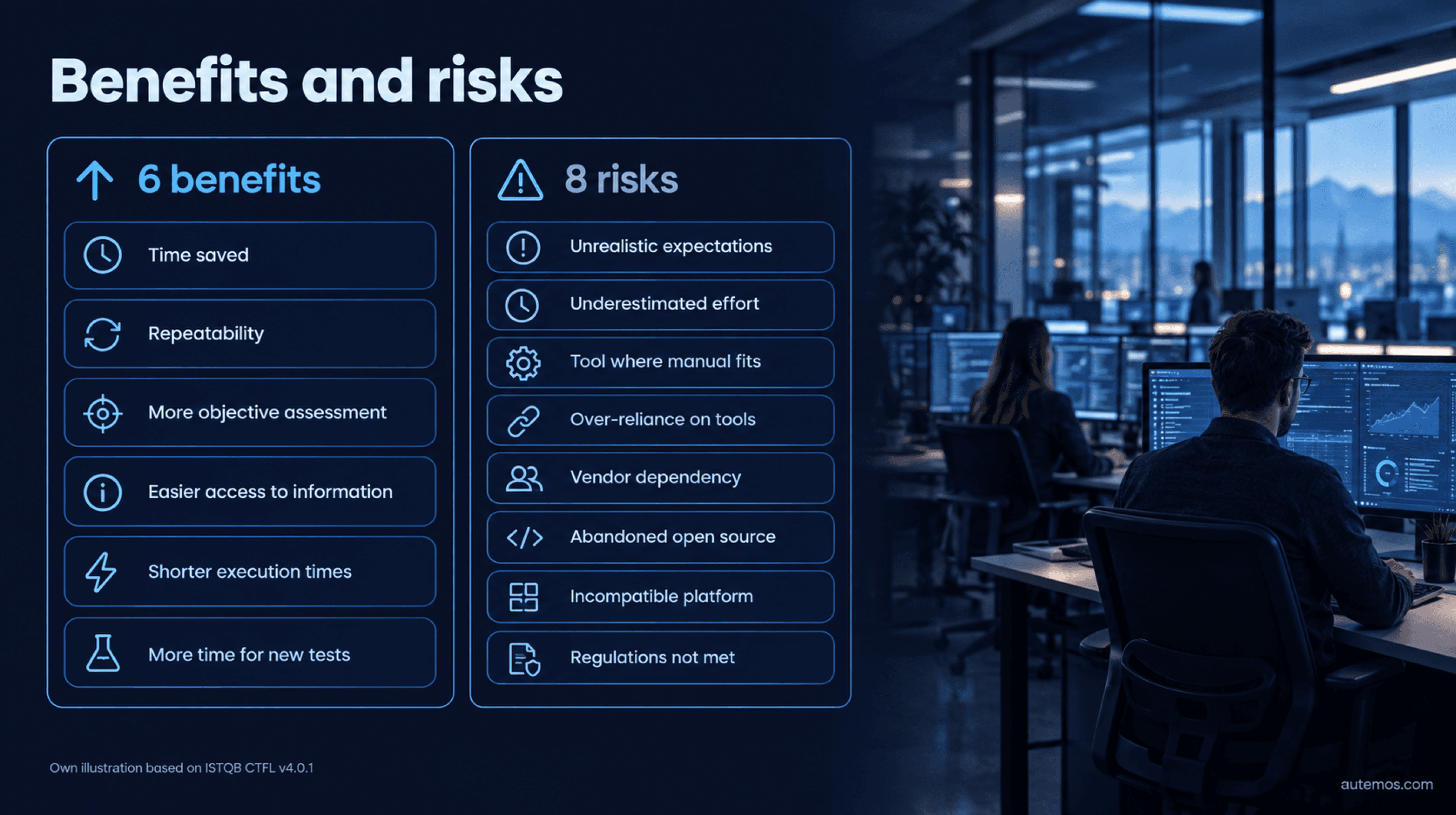
Figure 1: Six benefits and eight risks of test automation (own illustration based on ISTQB CTFL)
What is test automation?
Test automation is a software quality assurance method in which tools take over test activities: preparing test data, running tests, comparing results and reporting. The ISTQB glossary defines it as “The conversion of test activities to automated operation” (ISTQB Glossary, 2026).
It spans every test level, from unit tests to acceptance tests via the UI or API. The tool concept is broad: the CTFL syllabus states that “a spreadsheet is a test tool in the context of testing” (ISTQB CTFL v4.0.1, 2024).
An automated test checks only what someone defined in advance: per the CTAL-TAE v2.0 syllabus, automated tests verify only what they are programmed to do and only check machine-readable results (ISTQB CTAL-TAE v2.0, 2024). People still find unexpected failure patterns, in exploratory testing for example.
What are the benefits of test automation?
The ISTQB Foundation Level syllabus lists six benefits, starting with “Time saved by reducing repetitive manual work” (ISTQB CTFL v4.0.1, 2024). The other five:
Repeatability: fewer simple human errors.
More objective assessment: measures such as coverage.
Easier access to information: results flow into test management and reports.
Shorter execution times: earlier defect detection, faster feedback, faster releases.
More time for new tests: testers design new, deeper tests.
Google's DORA research program (dora.dev), unrelated to the EU regulation, writes: “Manual regression testing is time-consuming to execute and expensive to perform, which makes it a bottleneck in the process.” (dora.dev, 2026) The program links fast, reliable automated test suites with more stable software and less burnout.
“Software Engineering at Google” reports that more than 80% of production pushes for the Google Web Server once contained user-affecting bugs that had to be rolled back; after a testing policy came in, emergency pushes dropped by half within a year (Software Engineering at Google, ch. 11, 2020). It remains a single-company example.
What are the risks and limits of test automation?
The first risk of automating tests is wrong expectations: the CTFL syllabus puts “Unrealistic expectations about the benefits of a tool” at the top of its risk list (ISTQB CTFL v4.0.1, 2024). Seven more risks follow:

Figure 2: Flaky tests at Google (Google Testing Blog, 2016)
Underestimating the time, cost and effort for introduction, script maintenance and process change
“Using a test tool when manual testing is more appropriate”
“Relying on a tool too much, e.g., ignoring the need of human critical thinking”
Dependency on a vendor that may go out of business, retire or sell the tool, or give poor support
Abandoned open-source projects that receive no updates
Tools that are not compatible with the development platform
Tools that do not comply with regulatory requirements or safety standards
Studies back several of these risks. Wiklund et al. count maintenance costs among the most frequently reported impediments and describe how unrealistic hopes for quick ROI lead teams to abandon automation (Wiklund et al., STVR, 2017). In a survey of 115 practitioners by Rafi et al., 45% said available tools fit their needs poorly (Rafi et al., AST, 2012).
Which criteria matter when choosing a tool?
A test tool must fit your platform, let you take your tests with you if the vendor disappears, meet your rules on hosting, access rights and traceability, and be usable by your team. Our comparison of test automation tools puts common options side by side.
Why do flaky tests undermine automation?
Flaky tests are tests that pass and fail on unchanged code, and they make test results hard to trust. Google reported in 2016 that about 1.5% of all test runs returned a “flaky” result, almost 16% of tests showed some flakiness and about 84% of pass-to-fail transitions involved a flaky test (Google Testing Blog, 2016).
Teams then learn to ignore red results. “Software Engineering at Google” says tests begin to lose value as flakiness approaches 1% (Software Engineering at Google, 2020). Luo et al. classified 161 fix commits and found asynchronous waiting to be the top cause, at 45% (Luo et al., FSE, 2014).
Which tests should you automate, and which not?
Automate tests first that run often, are repeatable and check stable, frequently used business workflows. The ISTQB CT-TAS v1.0 syllabus lists criteria such as technical feasibility, adequate ROI, value in running frequently and easy maintenance when the system under test changes (ISTQB CT-TAS v1.0, 2024).
Good candidates (per CT-TAS) | Hard to automate or manual (per CT-TAS) |
|---|---|
Tests in smoke, regression and confirmation suites | Look and feel and visual consistency that need a human's review |
Permutations of operating systems, browsers, devices and configurations | Workflows with heavy human judgment, such as a loan application that agents check |
Large volumes of executions or input data | Operating system restrictions, such as native SMS functions |
Results that a CI/CD pipeline needs | Long waits such as a two-hour session timeout, if time can't be controlled through mocks |
Precise timing, synchronized runs, large log files | Exploratory testing and end-user feedback |
CT-TAS uses that loan application as its textbook example of a test that is hard to automate, and it suggests that manual testing efforts “focus on exploratory testing and end-user feedback”. Our checklist of which tests to automate lists all criteria.
What role does the test pyramid play?
The test pyramid helps decide at which level to automate a test. “The test pyramid is a model showing that different tests may have different granularity,” says the CTFL syllabus (ISTQB CTFL v4.0.1, 2024). Martin Fowler recommends many more unit tests than slow tests through the UI (Fowler, TestPyramid, 2012).
In 2015 Google suggested a 70/20/10 split across unit, integration and E2E tests, explicitly “as a good first guess” (Google Testing Blog, 2015). It is a rule of thumb, not a standard. CT-TAS names the pyramid as a way to cut execution time and improve ROI. Our guide to the test pyramid explains the layers.
How do you introduce test automation step by step?
You introduce test automation in stages: define the strategy, check the investment, start a pilot, automate regression tests first and budget for higher costs during parallel manual and automated testing. The steps draw on the ISTQB CT-TAS v1.0 syllabus from 2024 (ISTQB, 2024).
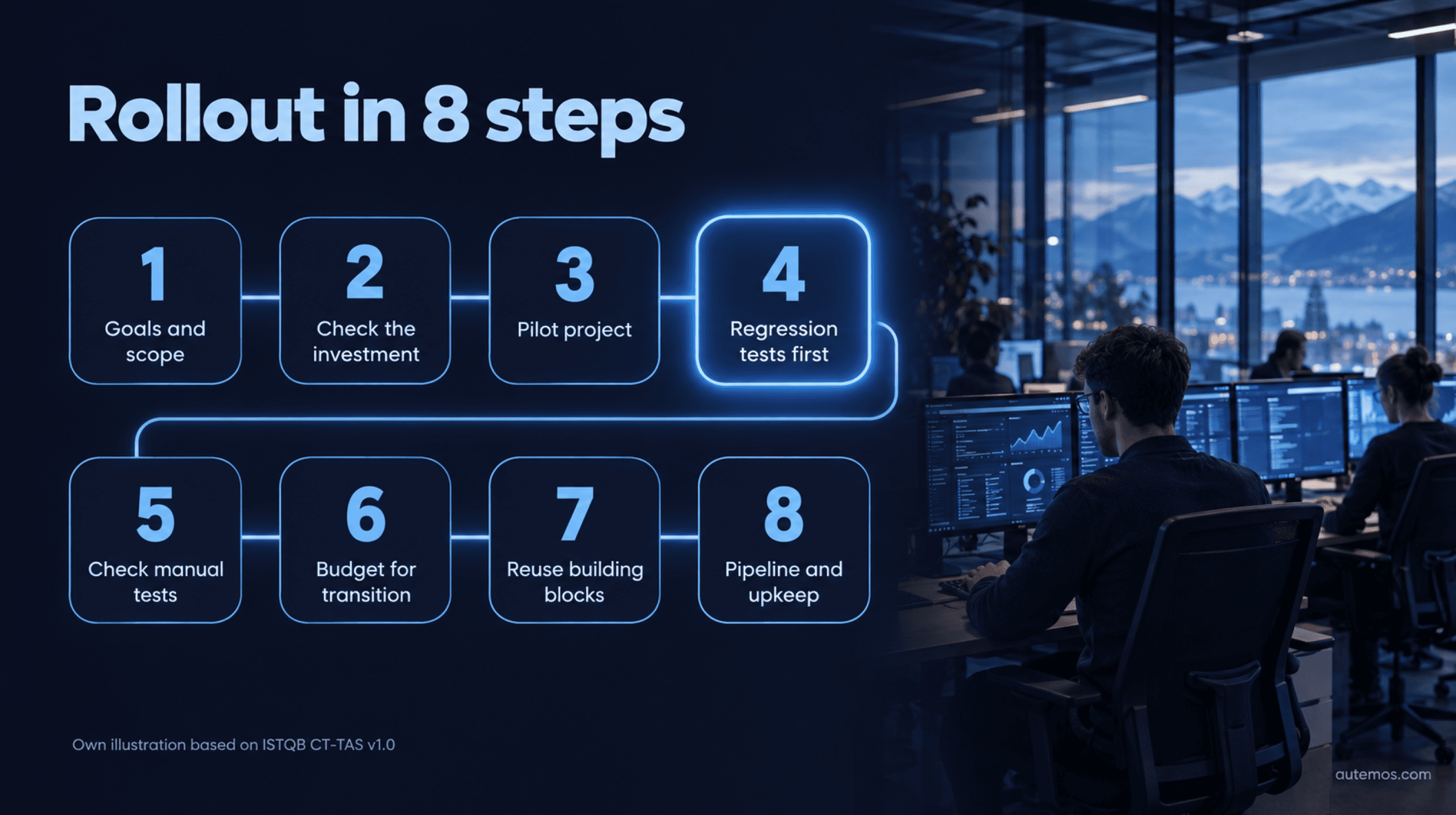
Figure 3: Rollout in 8 steps (own illustration based on ISTQB CT-TAS v1.0)
Set goals and scope. CT-TAS lists seven points an automation strategy must cover (table below). Our article on test strategy per ISTQB shows how to build the document.
Check the investment. CT-TAS names four criteria: introduction cost (hiring, hardware, training), lifecycle phase, expected project duration and maintenance cost. The earlier you start, the better.
Start with a pilot. “The use of a pilot project helps determine the tools and viability of selected technologies,” the syllabus says (ISTQB CT-TAS v1.0, 2024).
Regression tests first. “The easiest opportunity for transitioning from manual testing to test automation is to target regression testing.”
Check manual tests first. Don't automate a regression test that already fails manually. CT-TAS calls the result wasteful and unproductive.
Budget for transition costs. The syllabus warns that “the project should expect increased costs as both manual testing and automated testing take place simultaneously.”
Reuse building blocks and data. Shared steps such as login belong in reusable components, test data in a single source. Avoid dependencies between tests.
Put tests in the pipeline and curate them. Automated tests should run on every build (see test automation in CI/CD pipelines). CT-TAS recommends retiring tests that no longer add value.
The seven strategy elements from CT-TAS §1.1.1 work as a checklist, here with examples from a bank:
Element (CT-TAS §1.1.1) | Key question | Example in banking |
|---|---|---|
Purpose | What should automation achieve? | Shorten the regression cycle before quarterly releases |
Risks | What can go wrong? | Flaky tests block releases |
Scope | Which systems, test levels and test types? | E-banking front end and payments API, no load tests |
Stakeholders | Who decides, who maintains? | Business, QA, development, IT risk management |
Tool selection | Which criteria? | On-premises hosting, audit trail, open export formats |
Test automation architecture (TAA) | How are tests, libraries and adapters structured? | One login component for all test cases |
Environments | Where do tests run? | Separate test environment with anonymized data |
What does a test environment need for automated tests?
Automated tests need a stable test environment separated from production, plus test data in a known state for every run. The CTFL syllabus lists typical items: “stubs, drivers, simulators, and service virtualizations” (ISTQB CTFL v4.0.1, 2024).
Complexity has a price. CT-TAS warns that “overcomplicating the test environment may result in hours of unwanted time fixing defects in the TAF instead of benefiting from the solution.” The Twelve-Factor App advises: “Keep development, staging, and production as similar as possible” (The Twelve-Factor App, 2026).
DORA sets a hard limit on test data: test environments may hold only anonymized, pseudonymized or randomized production data, with exceptions only time-limited and approved (Delegated Regulation (EU) 2024/1774, Art. 16(5) and (6), 2024). Our guide to the test environment for automated tests shows how to stage environments and keep them stable.
When does test automation pay off?
Test automation pays off once the time saved exceeds the time invested. The ISTQB CT-TAS v1.0 syllabus gives the formula “ROI = Savings / Investment”, a ratio measured in time units (ISTQB CT-TAS v1.0, 2024). Above 1.0, you have passed break-even. A project rate converts hours to money.
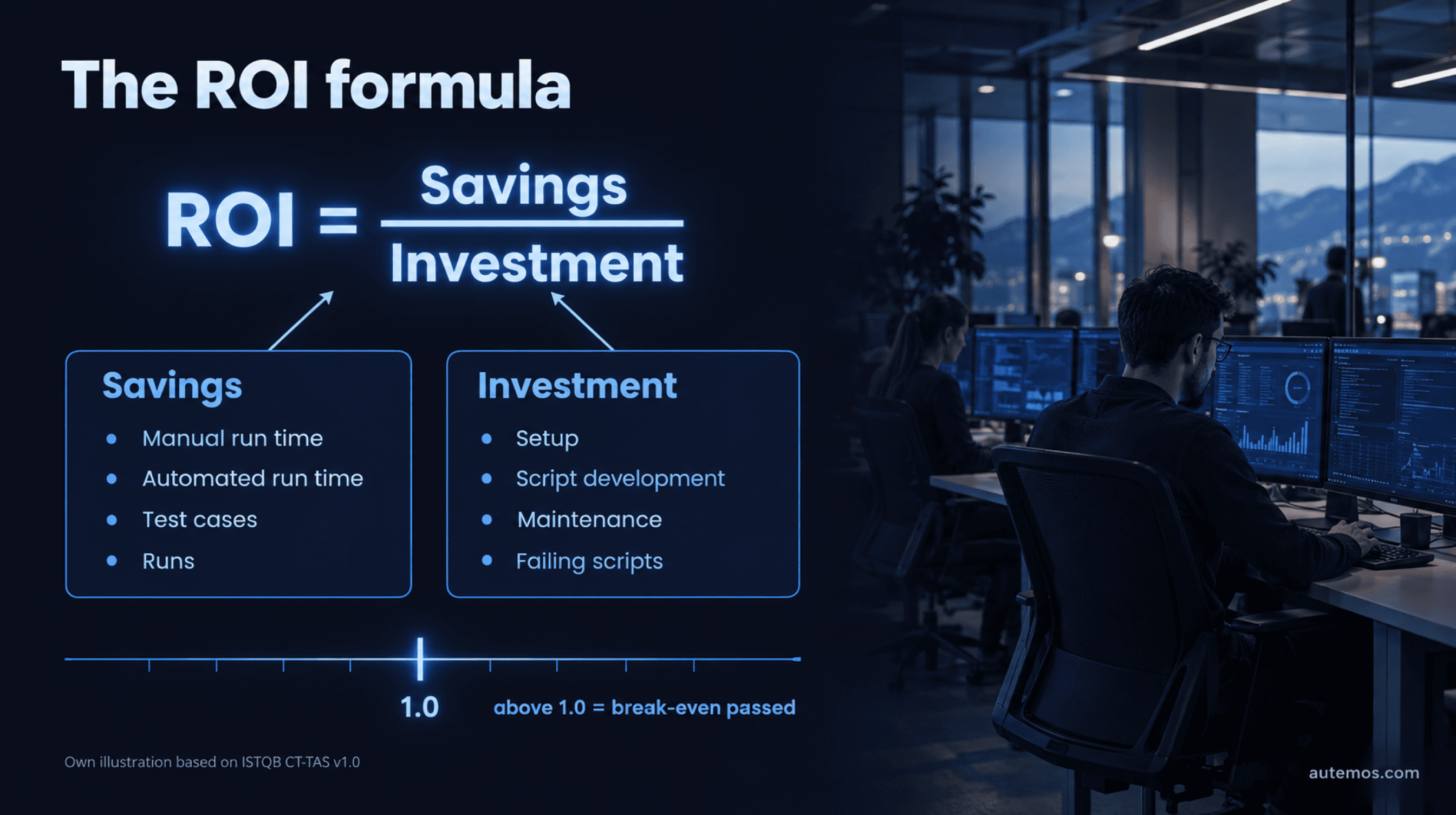
Figure 4: The ROI formula (own illustration based on ISTQB CT-TAS v1.0)
The model counts manual and automated run times, test cases and runs as savings. It counts setup, script development, maintenance and the share of failing scripts as investment, so every flaky test lowers the ROI.
Many guides use (benefits − costs) / costs; ISTQB uses the simple ratio. For short projects, the syllabus draws a clear line: “If the planned project duration is less than the turning point of the ROI, it is not worth introducing test automation.” Our article on test automation ROI has a worked example.
Do “80% savings” and the 1:10:100 rule hold up?
We found no primary study behind the often-quoted 80% savings figure. The CT-TAS syllabus states that “100% test automation coverage is not achievable” (ISTQB CT-TAS v1.0, 2024).
The 1:10:100 rule, which says a defect costs ten times more in each later phase, goes back to an “IBM Systems Sciences Institute”. Laurent Bossavit traced it to internal training material with data probably from before 1981 (The Register, 2021). Menzies et al. found no reliable effect of this kind across 171 projects (Menzies et al., 2016). Google still calls late bugs more expensive; the cost curve depends on the project.
What do DORA and FINMA require from testing at banks?
DORA and FINMA Circular 2023/1 require banks to test ICT changes in a controlled way and to separate test from production environments; DORA adds yearly tests of critical systems and allows only anonymized, pseudonymized or randomized production data in test environments. DORA (Regulation (EU) 2022/2554) has applied to EU financial entities since 17 January 2025. Article 9(4)(e) requires ICT changes to be “tested, assessed, approved, implemented and verified in a controlled manner” (Regulation (EU) 2022/2554, 2022).
Five provisions from DORA and Delegated Regulation (EU) 2024/1774 matter for day-to-day testing:
DORA Art. 24(6): at least yearly, appropriate tests on all ICT systems and applications that support critical or important functions.
DORA Art. 25(1): possible tests range from source code reviews and scenario-based or compatibility tests to performance and penetration tests.
RTS 2024/1774 Art. 16(2): a procedure “for the testing and approval of all ICT systems prior to their use and after maintenance”.
RTS Art. 8(2)(b): production separated from development and test environments. Testing in production only when identified, reasoned, time-limited and approved.
RTS Art. 16(5): “non-production environments only store anonymised, pseudonymised, or randomised production data” (Delegated Regulation (EU) 2024/1774, 2024). Art. 16(6) allows production data only for specific testing occasions, time-limited and approved.
In Switzerland, FINMA Circular 2023/1 “Operational risks and resilience – banks” has applied since 1 January 2024, replacing Circular 2008/21. It applies to banks and securities firms, not to insurers. Its ICT change management section requires separation between development or testing environments and production, plus testing of requirements according to their criticality (FINMA Circular 2023/1, change management section, German, 2022).
The duties sit with the institution: no tool can take over process, approval and risk assessment. Automated tests help with evidence when every run is logged with version, environment, data and result. Check hosting model, access rights and audit trail before you buy.
Where does Autemos fit into test automation?
Autemos is AI-assisted test automation software from selementrix GmbH in Baar (Canton of Zug) that automates functional tests for web, mobile (iOS and Android), APIs (REST and SOAP) and desktop applications. Developers keep writing unit tests in their own frameworks.
[Visual test workflows](/en/features/test-workflows): business users build tests by drag and drop without code; engineers add code blocks or embed existing Playwright tests.
AI Recorder: a Jira ticket, user story or plain-text test case becomes an executable draft. Every AI-generated step needs the team's approval before it runs.
Export with no lock-in: web tests as Playwright code (Java or TypeScript), mobile tests as Appium (Java), synced with Git. The tests keep running without Autemos, which addresses the CTFL vendor-dependency risk.
Test data per environment: datasets from CSV, XLSX, JSON or external sources. One-time-use data is flagged so parallel runs don't reuse it.
Self-healing locators: every heal documented and reversible.
Governance and connections: role-based access, audit trail, mTLS and smartcard login, on-premises hosting, Jira/Xray, GitLab, GitHub Actions, Jenkins and Allure reports.
Autemos does not run load, performance, security or penetration tests; the performance and penetration tests named in DORA Art. 25 need other tools. Autemos does not measure code coverage, provision test environments or anonymize production data, and it won't write your test strategy or ROI calculation. Our guide to AI test automation covers AI in the test process.
Frequently asked questions
How much does it cost to introduce test automation?
There is no honest flat figure; costs depend on introduction, script development, maintenance and the parallel-run phase. CT-TAS names hiring, hardware and training as introduction costs and says automation means “in most cases, significant cost” (ISTQB CT-TAS v1.0, 2024).
Does test automation replace manual testing?
No, exploratory testing, usability and business judgment calls stay manual. 80% of practitioners surveyed by Rafi et al. disagreed with the vision that automated testing would fully replace manual testing (Rafi et al., AST, 2012).
What percentage of tests should be automated?
There is no fixed quota, and according to CT-TAS, 100% automation coverage is not achievable. For the distribution, Google suggested 70% unit, 20% integration and 10% E2E tests as a first guess (Google Testing Blog, 2015). Run frequency, stability and ROI per test should decide.
What role does AI play in test automation?
AI helps draft and maintain tests, and many companies are trying it out now. In the World Quality Report 2025, a vendor survey by Capgemini, Sogeti and OpenText of more than 2,000 executives, 89% said they were piloting or deploying GenAI-augmented quality engineering. Only 15% had reached enterprise scale (OpenText, WQR 2025, 2025).
Does DORA apply to Swiss banks?
DORA applies to financial entities in the EU; Swiss banks are supervised by FINMA under Circular 2023/1. Swiss groups with companies in the EU should check whether those entities fall under DORA. Many requirements overlap: separate test environments, controlled changes and regular testing of critical functions.
Conclusion
Test automation pays off when you introduce it as a program with a strategy, a pilot and an honest ROI calculation. Start with regression tests that run reliably by hand, and budget for the months of parallel manual and automated testing. Don't tolerate flaky tests. Banks separate test and production environments under DORA (EU) and FINMA Circular 2023/1 (Switzerland); DORA allows only anonymized, pseudonymized or randomized production data in test environments. Check every tool against the eight CTFL risks, vendor dependency first. To see functional tests run in visual workflows with Playwright export, book a conversation with the Autemos team.


