·
8 min
Xray in Jira: How Automated Test Results Reach Your Test Management

Roman Kirchmeier - Autemos

Xray for Jira is a test management add-on that stores test cases as Jira issues and receives automated test results through a REST API. The tests themselves run somewhere else, in your framework and your pipeline. After the run, the CI job posts a result file to an import endpoint, and the app turns it into a Test Execution containing individual Test Runs. The Marketplace listing “Xray - Test Management for Jira” shows 25,603 installs, 552 reviews and 4.3 out of 5 (Atlassian Marketplace, checked 30 August 2026).
TL;DR: Xray keeps test cases, executions and defects as Jira issues and accepts automated results through 8 REST v2 endpoints, one per format from JUnit XML to Behave JSON. Your test framework does the running. Xray matches incoming results to the right Test issues by Test Key and reports them against linked requirements.
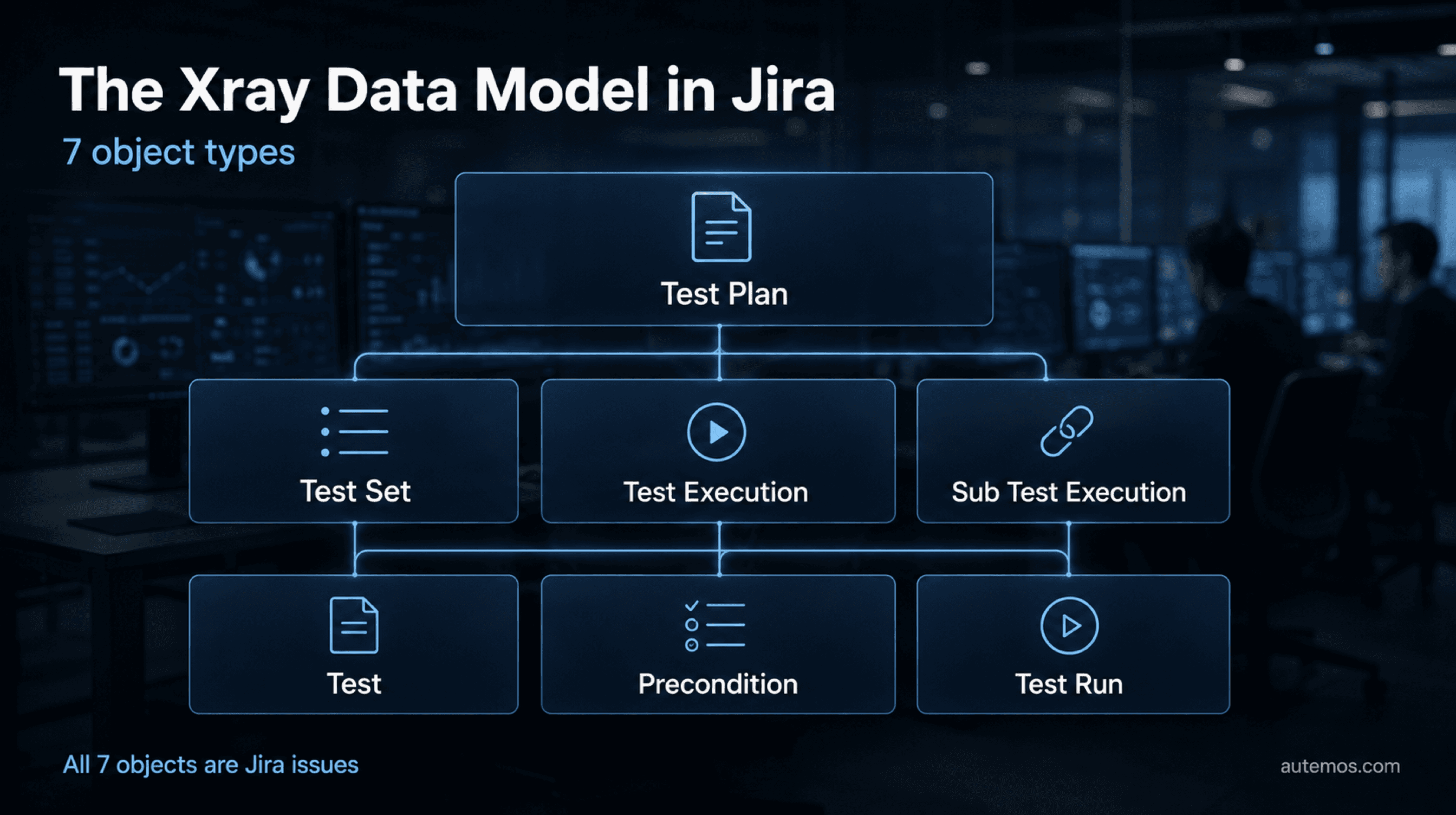
Figure 1: The 7 object types Xray adds to Jira.
What is Xray for Jira?
Xray for Jira is a test management app that extends Jira with test cases, test executions and test results as dedicated issue types. The vendor's own documentation calls it “A complete Test Management tool for Jira” and notes that running it needs no other software (Xray Docs, 2026).
The app is built by Xblend, formerly Xpand IT. Idera, Inc. acquired it in May 2021 along with the sibling product Xporter (Businesswire, 2021). The Marketplace carries 2 separate listings: “Xray - Test Management for Jira” (app 1211769) and the newer, standalone “Xray Enterprise” (app 1229688). They are different products.
On its own website the vendor claims more than 10,000 companies, 135 countries and over 100 million test cases (checked 30 August 2026). Those are the vendor's own stated figures, not independently audited numbers. Xray Cloud comes in 2 editions, Standard and Advanced, with Advanced adding AI test-script generation, wider API access and more storage. What test management as a discipline covers beyond the tool is set out in the overview.
Which objects does Xray add to Jira?
Xray adds 7 object types to Jira, and together they form the test model: Test, Precondition, Test Set, Test Plan, Test Execution, Test Run and Sub Test Execution. Once you can separate these 7 terms, every report and API response makes sense.
Object | One-sentence definition |
|---|---|
Test | The base issue type that holds the definition and steps of a single test case. |
Precondition | A reusable condition linked to one or more Tests, with support for parameters. |
Test Set | A static grouping of Tests, for example by module or subject area. |
Test Plan | A higher-level grouping that consolidates one or more Test Executions for central tracking. |
Test Execution | An issue type that runs and monitors a defined collection of Tests in a target context and environment. |
Test Run | The association between a Test Execution and one individual Test, that is, a concrete result. |
Sub Test Execution | A Test Execution created as a sub-task of a requirement or story, showing which executions cover that requirement. |
Two of those definitions are worth reading in the original. The vendor writes: “A Test Execution is an Issue type that aggregates a user-determined collection of Tests. It monitors and verifies if those Tests are working as expected in a target context and environment.” And immediately after: “An association between a Test Execution Issue and a Test Issue is called a Test Run. Hence, a Test Execution is a list of Test Runs.” (Test Execution, product documentation, 2026).
One detail about Test Sets catches many teams out. Adding a Test Set to a Test Execution puts its Tests into that execution, yet later edits to the Test Set have no effect on it. The Test Set itself does not stay attached.
At test-type level there are 3 values: Manual, Cucumber and Generic. Custom test types are labels; underneath, every automated test maps to Cucumber or Generic. The language behind the Cucumber type is covered in the piece on Cucumber and executable scenarios and the reference on Gherkin syntax.
Which endpoints bring automated test results into Jira?
Automated results reach Jira through 8 import endpoints in the Xray Cloud REST API v2, one per result format. The documentation puts it plainly: “Execution results can be imported to Jira through JSON/XML representation formats specified in Integrating with Testing Frameworks or using the proprietary Xray JSON format” (Xray Docs, 2026).
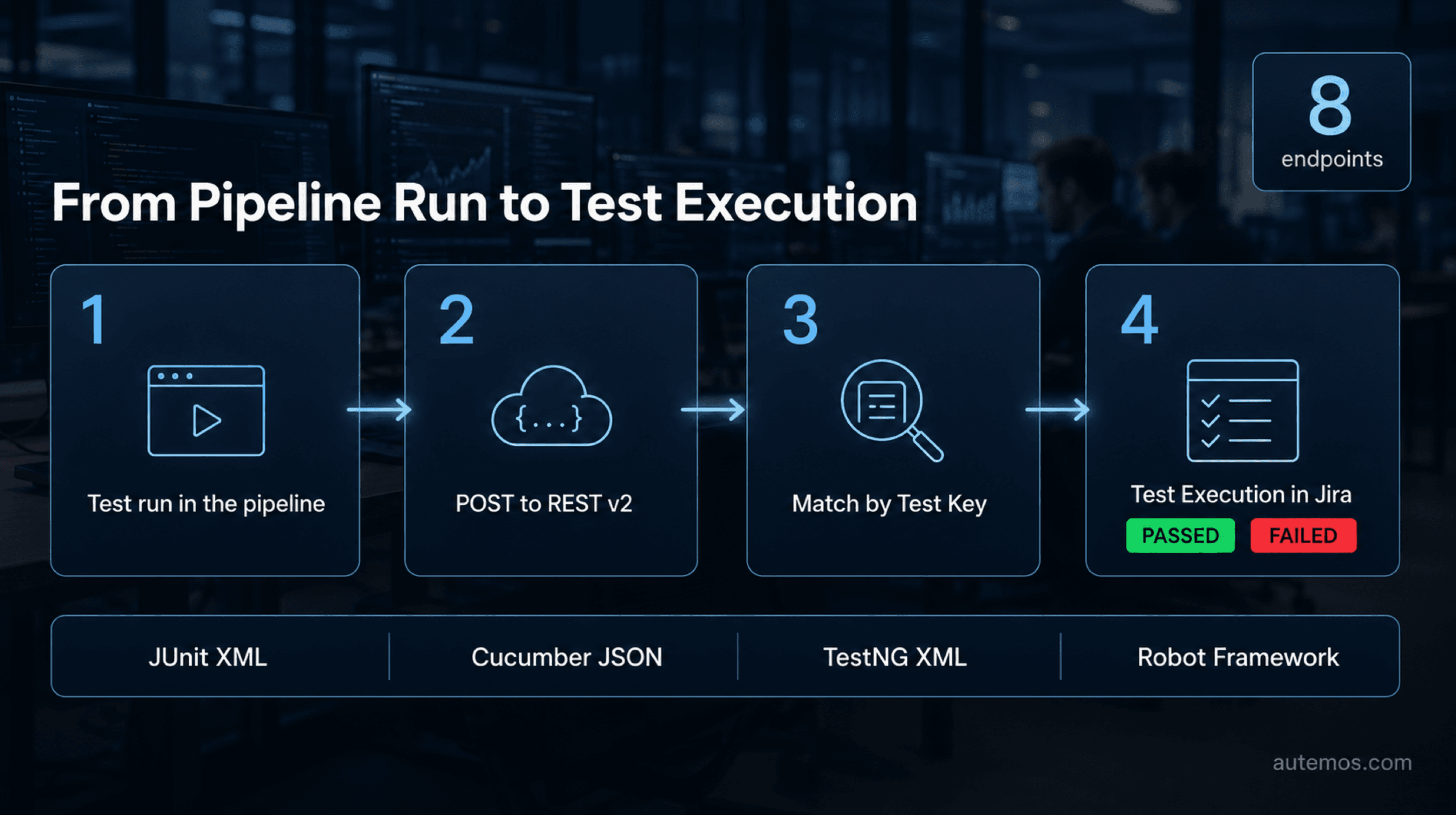
Figure 2: From the pipeline run through the REST import to the Test Execution.
Format | Endpoint (Xray Cloud, REST v2) |
|---|---|
Xray JSON | /api/v2/import/execution |
Cucumber JSON | /api/v2/import/execution/cucumber |
JUnit XML | /api/v2/import/execution/junit |
NUnit XML | /api/v2/import/execution/nunit |
xUnit XML | /api/v2/import/execution/xunit |
TestNG XML | /api/v2/import/execution/testng |
Robot Framework XML | /api/v2/import/execution/robot |
Behave JSON | /api/v2/import/execution/behave |
Each of these endpoints has a sibling with the /multipart suffix that accepts issue-field JSON alongside the result file. That lets the CI job control how the resulting Test Execution looks inside Jira. For a team that already produces JUnit XML, this is the shortest path from pipeline to test management.
How does authentication differ between Xray Cloud and Server/Data Center?
Authentication is the most common failure point on a first import: Xray Cloud uses its own app-level credentials, and Server and Data Center ride on Jira's user authentication.
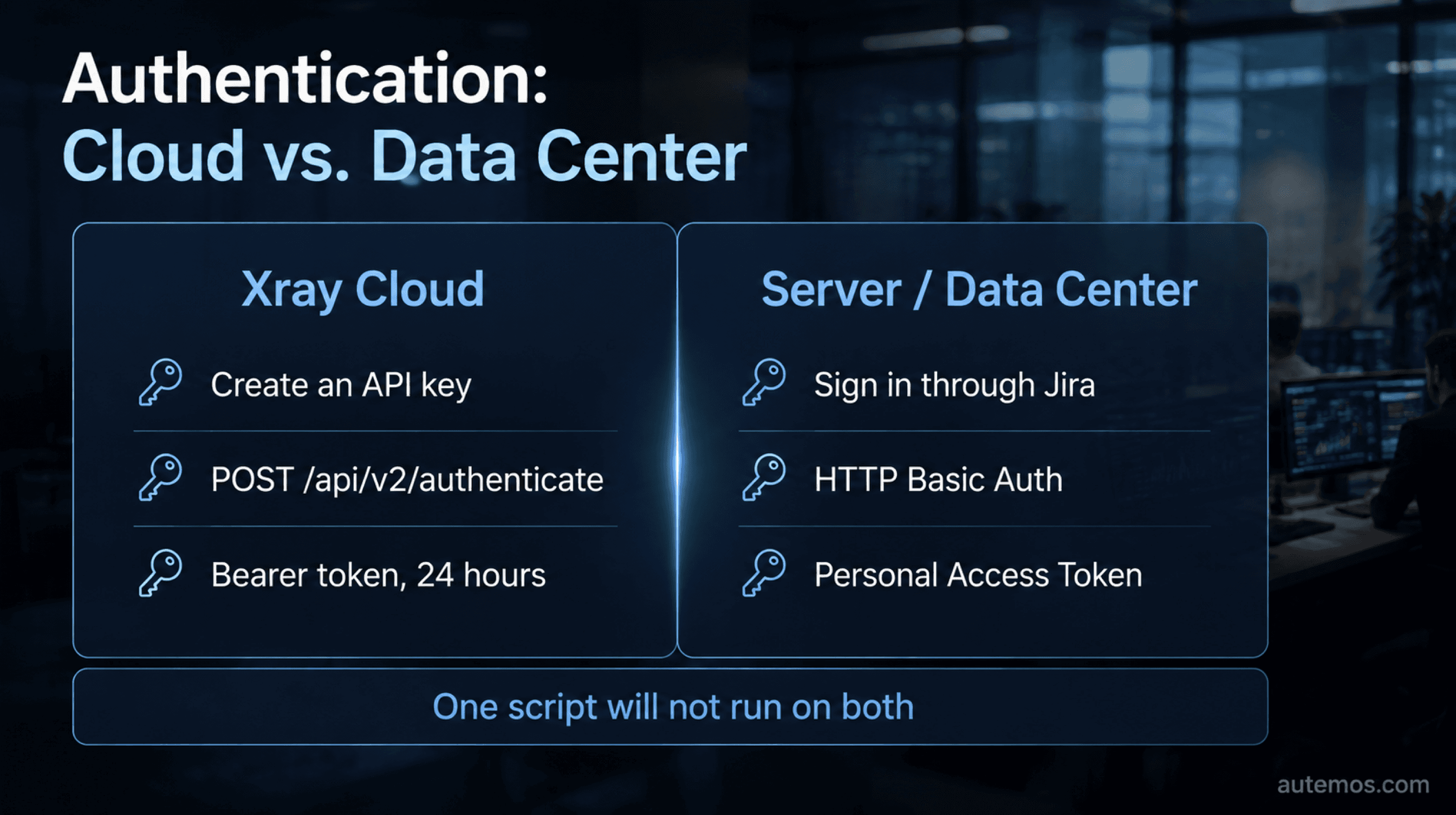
Figure 3: Authentication in Xray Cloud compared with Server/Data Center.
In Cloud you create an API Key for a user under Xray Global Settings, API Keys. You post the resulting client_id and client_secret to https://xray.cloud.getxray.app/api/v2/authenticate and get a bearer token back. That token is valid for 24 hours (Authentication REST v2, product documentation, 2026), so a CI job fetches a fresh one at the start of every run.
Server and Data Center use Jira's own REST authentication: HTTP Basic auth or Personal Access Tokens, available from Jira 8.14, sent in the Authorization header as a bearer token (REST API for Server and Data Center, 2026). A script written against Cloud will not work there without changes.
How do you set up the results import?
The results import takes 6 steps once the groundwork is done. Before you start you need:
A Jira project with Xray enabled, plus write permissions on the associated issue types.
An API Key (Cloud) or a Personal Access Token (Server/DC) for a technical user.
Test automation that writes one of the 8 supported result formats.
Test issues in Jira whose keys your automation code can reference.
Create the automated test cases as Test issues in Jira and note their issue keys.
Put the Test Key into the automation code, typically as an annotation or tag on the test. By default, the Test Key is what the app uses to match an imported result to the right Test.
Link every Test issue to the story or requirement it covers, using the “Tests” link type. Skip this and every traceability report stays empty.
Create the API Key or token and store both as pipeline secrets.
Add a step to the CI job that posts the result file to the matching v2 endpoint after the test run. To set fields on the Test Execution, use the /multipart variant.
Check the Test Execution that was created in Jira: does it contain the expected Test Runs, and are the statuses and timestamps right?
Step 6 belongs in every pipeline run. In client projects we often find an import that has been quietly producing empty executions for months, since nobody automated that check. How test runs and quality checks fit into build pipelines is covered in the article on test automation in CI/CD.
What does the Requirement Traceability Report show?
The Requirement Traceability Report, in the documentation's words, shows “the Requirements traceability through Tests, Test Runs, and Defects” (Xray Docs, 2026). The report follows a requirement in both directions and copes with multi-level hierarchies such as Epic, Story and Sub-task.
Its input is the link from step 3: Test issues point at story or requirement issues through the “Tests” link type. Those links produce a Requirement Status in the reports. A companion coverage report gives “an overview of the requirement's current status, its coverage by tests and executions and reported defects”, and the same data is available as the “Overall Test Coverage” dashboard gadget (Overall Test Coverage Gadget, product documentation, 2026).
In a regulated environment this is where the evidence comes from. Which columns an auditor expects is the subject of the article on the traceability matrix.
Does Xray run automated tests?
No. Xray does not execute automated tests. It drives no browsers, no APIs and no mobile devices. It receives finished results by REST import and organises them. An Atlassian Community post, user-generated content without editorial review, describes the flow accurately: “Execution of the automated test pipeline imports results into Xray, creating test executions and test runs” (Atlassian Community, 2026).
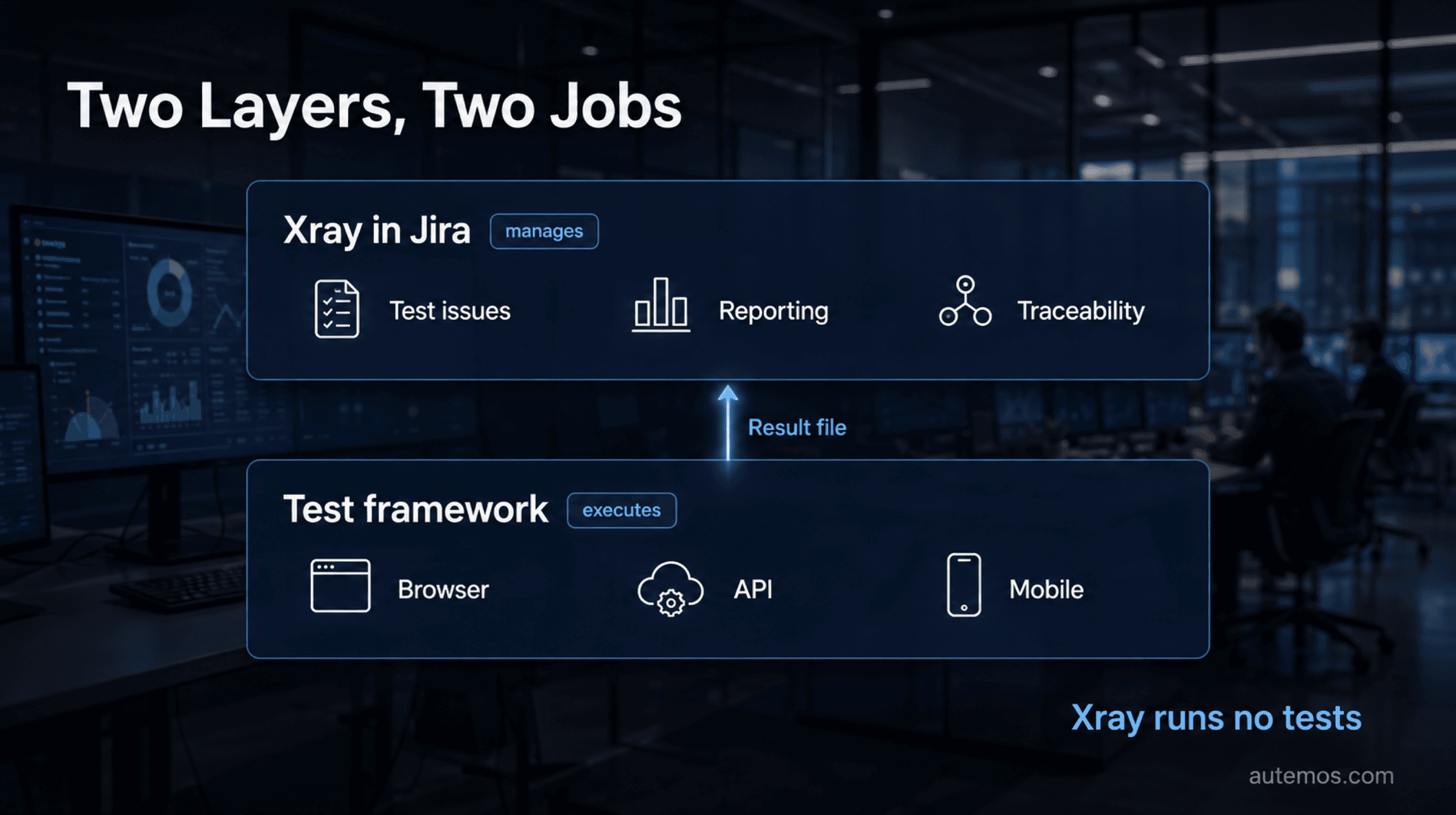
Figure 4: Execution and management are two separate layers.
The Test Key mechanic from step 2 explains why. The app learns about a test run only when a result file arrives carrying a Test Key it recognises. Until then, the test case exists in Jira as a document. Execution, waits, retries and selectors sit entirely with the automation tool.
The 2 layers complement each other here. Autemos is AI-powered test automation software, an execution layer: web, mobile, API and desktop tests, results through Allure, connections to Jira/Xray, GitLab, GitHub Actions, Jenkins and HP ALM. Organising those results against requirements stays with Xray. How recurring sequences can be structured is shown in the test workflows.
What does Xray for Jira cost?
Pricing scales with the number of Jira users, the standard model for Marketplace apps. A reliable tier breakdown could not be confirmed first-hand as of 30 August 2026: the pricing tab of the Marketplace listing returned no tier data on fetch.
The one first-party price point we could find belongs to the separate Xray Enterprise product, and the vendor's own page carries a validity caveat on it. It does not describe pricing for the test management listing. Check the pricing tab of the Marketplace listing against your real user count.
For a comparison with Zephyr Scale, TestRail, qTest or Azure Test Plans, see the overview of test management tools. One point from it belongs here: TestRail and Azure Test Plans are not Jira-native. TestRail connects through an official integration plus a companion Jira app; the management layer lives outside Jira (TestRail Support, 2026).
Frequently asked questions
The 5 most common questions concern execution, formats, authentication, matching and editions. Every answer draws on the vendor's cloud documentation (Import Execution Results REST v2, 2026).
Can Xray start automated tests itself?
Xray does not start automated tests. It is a management and reporting layer inside Jira that receives results by REST import. Browsers, API clients and mobile devices are driven by your automation tool, such as Selenium, Playwright or Autemos.
Which result formats does Xray import?
The cloud edition imports 8 formats through REST API v2: Xray JSON, Cucumber JSON, JUnit XML, NUnit XML, xUnit XML, TestNG XML, Robot Framework XML and Behave JSON. Every endpoint has a /multipart sibling that accepts issue-field JSON alongside the result file.
How does authentication differ in Cloud and Data Center?
Xray Cloud uses its own API Key: you post client_id and client_secret to the authenticate endpoint and receive a bearer token valid for 24 hours. Server and Data Center use Jira's native authentication, meaning HTTP Basic auth or Personal Access Tokens from Jira 8.14 onward.
How does Xray match a result to the right test case?
By default Xray matches on the Test Key. The automation code references the issue key of the Test issue, typically through an annotation. Without the key, no dependable link to the requirement is created.
Which Xray editions exist in Cloud?
Xray Cloud offers Standard and Advanced. Advanced adds AI-assisted test-script generation, wider API access and more storage. Per-user pricing sits in the pricing tab of the Marketplace listing.
Conclusion
Xray turns Jira into a test management system by keeping test cases, executions and results as issues and linking them to requirements through the “Tests” link type. Automated results arrive through 8 REST v2 endpoints, secured by an API Key in Cloud or a Personal Access Token in Server and Data Center.
The real work sits in 3 unglamorous details: Test Keys maintained in the automation code, consistent links to stories, and a pipeline step that checks the import. The tool executes nothing along the way. That role belongs to your automation tool, which is where Autemos fits. Which combination suits your pipeline and your evidence obligations is quickest to settle in a conversation with the Autemos team.


