·
13 min
UI testing: what a GUI test checks, why it gets flaky and how to automate it reliably

Roman Kirchmeier - Autemos

A UI test checks an application through its user interface: it clicks, types and reads results the way a person uses the software, then compares what it sees with the expected behavior. Microsoft describes the matching tools as ones that interact with your app “the way a user would” (Microsoft Learn, 2026). These tests catch defects that unit tests don't see. They're slower and more fragile in return. At Google, 14% of large tests were flaky, against 0.5% of small ones (Google Testing Blog, 2017). For QA teams in banks and insurers, that means a small set of well-chosen tests with stable locators, and a process in which every change to a test stays traceable.
TL;DR: A UI test checks software through its interface, the way a person uses it. It finds defects that unit tests miss, but it's slower and more fragile: at Google in 2017, 14% of large tests were flaky. It becomes stable with state set up via API, role or test-ID locators, auto-waiting, isolated test data and page objects.
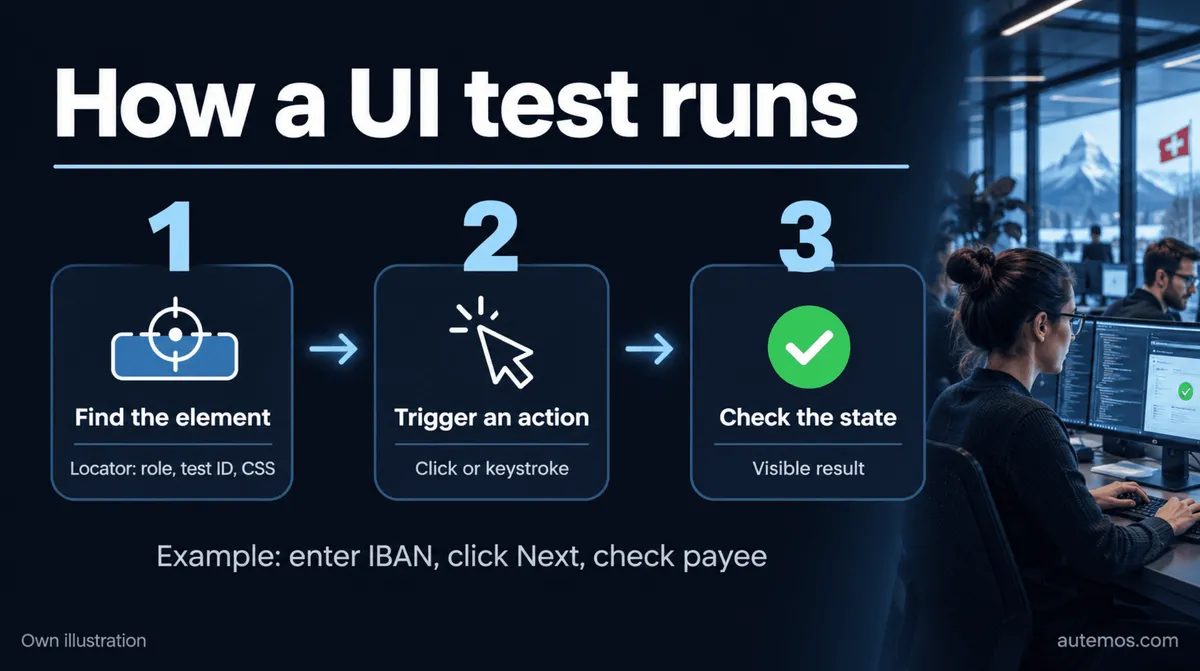
Figure 1: How a UI test runs: find the element, trigger an action, check the state.
What is a UI test?
A UI test is a software test that operates an application through its graphical interface and checks that it works correctly for users. A common synonym is GUI test. Microsoft sums it up in one sentence for its former tool Coded UI: “Coded UI tests (CUITs) drive your application through its user interface (UI).” (Microsoft Learn, 2026). Appium's own docs cover mobile platforms as well.
Technically, a test of this kind runs in three steps. It finds an element through a locator, such as an ARIA role, a test ID (data-testid) or a CSS selector. It triggers an action, say a click or a keystroke. Then it checks the visible state. An example from payments: enter an IBAN, enter the amount, click “Next” and check that the confirmation page shows the right payee.
The term describes the interface the test goes through, not its scope. It can check a single component such as a date picker, or an entire loan application. Only when it covers a business process across all layers down to the database is it an E2E test too.
How does a UI test differ from an E2E test and a unit test?
A unit test checks a single function without an interface, a UI test checks behavior through the interface, and an E2E test checks a complete flow through every layer. The terms overlap: most E2E tests run through the UI, but not every test that runs through the UI is an E2E test. The table shows the differences.
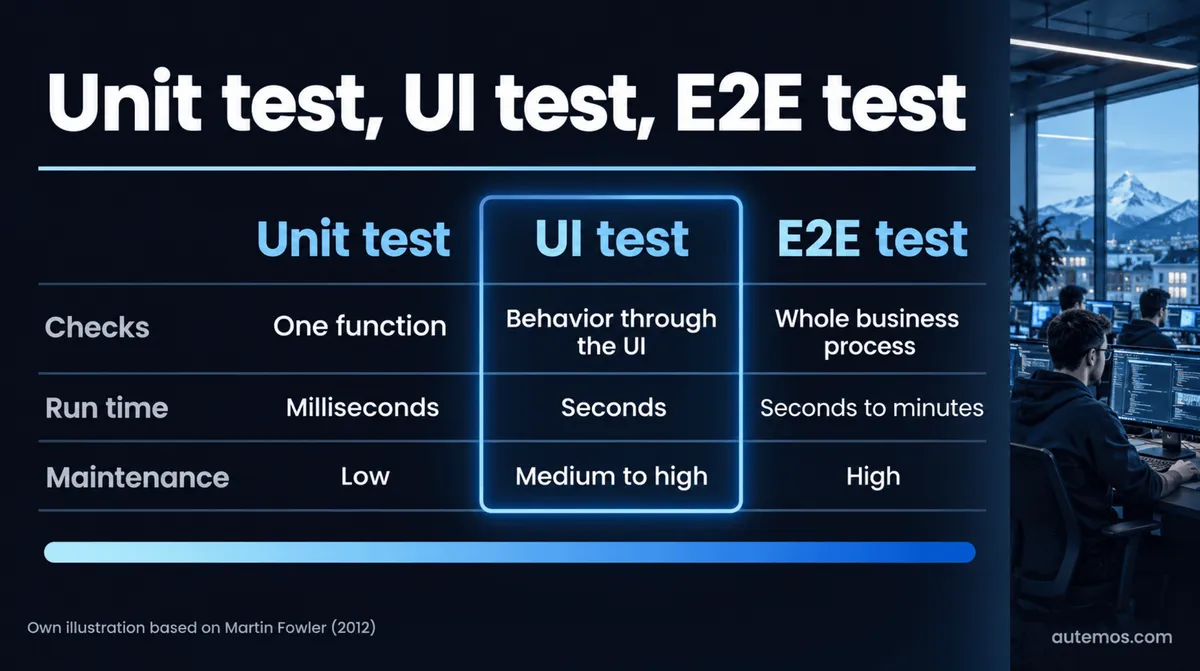
Figure 2: Unit test, UI test and E2E test compared.
Attribute | Unit test | UI test | E2E test |
|---|---|---|---|
Checks | One function or class | Behavior through the interface | A business process across all layers |
Interface | Direct code call | Browser, app or desktop window | Mostly the UI, sometimes APIs on top |
Run time per test | Milliseconds | Seconds | Seconds to minutes |
Typical failure source | Code logic | Locators, timing, rendering | Environment, test data, third-party systems |
Maintenance effort | Low | Medium to high | High |
The test pyramid explains why teams write fewer of these tests than unit tests. Martin Fowler writes that tests which run “end-to-end through the UI” are “brittle, expensive to write, and time consuming to run” (Martin Fowler, 2012). The pyramid itself goes back to Mike Cohn's 2009 book “Succeeding with Agile”.
Google suggests a split of 70% unit tests, 20% integration tests and 10% E2E tests “as a good first guess” (Google Testing Blog, 2015). How to weight the layers for your own project is covered in our post on the test pyramid in practice. For tests that cover whole flows, read the article on the E2E test.
What kinds of UI tests are there?
There are five common kinds: functional tests, visual tests, accessibility tests, cross-browser tests and usability tests. MDN draws the automation line clearly: “functional testing can largely be automated”, and usability testing tends to need “manual testing with real test subjects” (MDN, 2026).
Kind of test | What it checks | Automatable? |
|---|---|---|
Functional test | Forms, navigation, links and interactions work as expected | Yes, largely |
Visual test | Layout and rendering against an approved reference | Yes, a person reviews the differences |
Accessibility test | Alt text, contrast, keyboard use, screen reader output | Partly, the rest needs human judgment |
Cross-browser test | Same behavior in Chromium, WebKit, Firefox and on mobile devices | Yes |
Usability test | Do users understand the interface and find their way? | No, real test subjects needed |
On accessibility, the W3C sets a clear limit. Evaluation tools “can not determine accessibility, they can only assist in doing so” (W3C WAI, 2024). A tool can report that an image has no alt text. Whether the alt text describes the image well is a human call.
Visual tests compare screenshots with an approved reference and report layout differences. How vision AI evaluates those comparisons is explained in the article on visual testing with vision AI.
Cross-browser tests matter a lot in Switzerland: Safari is the most used mobile browser there at 48.25%, ahead of Chrome at 39.38% (StatCounter, October 2026). If you only test in Chrome, you skip the engine behind almost every second mobile page view. How to turn that into a browser matrix is covered in the guide to cross-browser testing.
Which tools test web, mobile and desktop interfaces?
For web apps, Microsoft now recommends Playwright, and for Windows desktop and UWP apps, Appium with WinAppDriver. That's how Microsoft words the retirement of its own tool: “Coded UI Test for automated UI-driven functional testing is deprecated.” It recommends “Playwright for testing web apps and Appium with WinAppDriver for testing desktop and UWP apps” (Microsoft Learn, 2026).
The three platforms in brief:
Web: Playwright supports “Chromium, WebKit and Firefox on Windows, Linux and macOS”, locally or in CI (Playwright, 2026). Selenium WebDriver and Cypress are other widely used frameworks.
Mobile: Appium automates interfaces on several platforms. Drivers connect it to each specific platform (Appium, 2026).
Windows desktop: Visual Studio 2019 is the last version with full Coded UI support. According to Microsoft, WinAppDriver is “no longer under active development”; Microsoft names Appium with the appium-windows-driver as its successor (Microsoft Learn, 2026).
Microsoft has set no end date for teams with old Coded UI suites. Existing tests still run in Visual Studio 2022, but you can't record new ones. Plan the migration before the next major Visual Studio upgrade.
The tool covers only part of the work. Which checks a web application needs beyond the interface, from forms to the APIs behind them, is listed in the checklist for testing web applications.
Why are UI tests so often flaky?
Tests through the UI are flaky more often than lower-level tests: they wait on asynchronous interfaces, depend on locators and often share data and environments. A flaky test passes and fails with the same code, depending on the run. At Google in 2017, 0.5% of small, 1.6% of medium and 14% of large tests were flaky (Google Testing Blog, 2017).
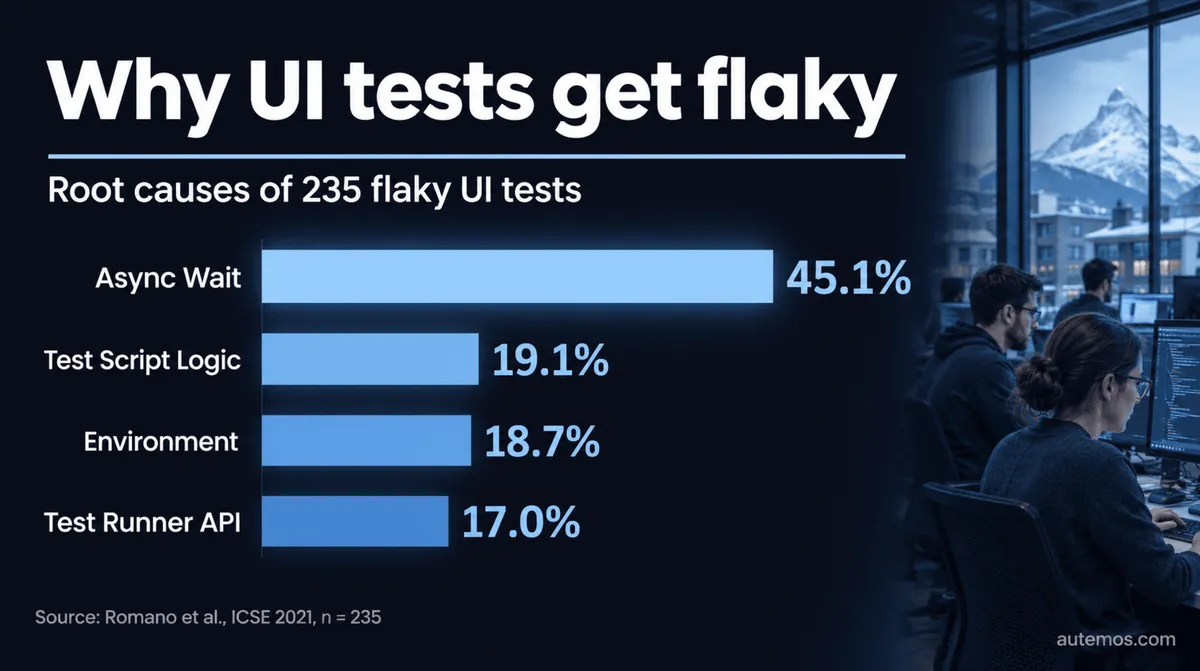
Figure 3: Root causes of flaky UI tests (Romano et al., ICSE 2021, n = 235).
The tool makes a difference too. Across all tests at Google, 1.65% were flaky; for tests using Java WebDriver it was 10.45%, for Python WebDriver 18.72% and for the Android emulator 25.46% (same source). Selenium says it openly in its own documentation: “Functional testing is difficult to get right for many reasons.” (Selenium, 2026). Cross-browser incompatibilities make it harder still.
A root-cause analysis of 235 cases comes from Romano et al., presented at ICSE 2021. The team studied flaky UI-based tests from 62 web and Android projects (Romano et al., 2021). Almost half of the cases came down to a single cause:
Root cause (Romano et al.) | Share (n = 235) | What's behind it |
|---|---|---|
Async Wait | 45.1% | The test acts before data has loaded, elements are visible or animations have finished |
Test Script Logic | 19.1% | Errors in the logic of the test script itself |
Environment | 18.7% | Differences in platform, browser or device |
Test Runner API | 17.0% | Problems in the interaction with the test framework |
Async Wait hits web projects harder: 52.0% of web cases against 32.5% of mobile cases. To fix the tests, teams most often refactored the logic (31.9%), and almost as often they deleted the test (31.1%). Only 8.9% added or increased a delay (base: all 235 cases). Every deleted test leaves a gap in coverage.
How do you make UI tests stable?
Five rules make automated tests at the user interface stable: set up state via APIs, choose user-facing locators, use auto-waiting instead of fixed pauses, isolate every test and keep interface knowledge in page objects. Auto-waiting targets Async Wait, the largest cause in the Romano study. Isolation and API-created state remove dependencies on shared data and execution order, and page objects cut upkeep when the interface changes.
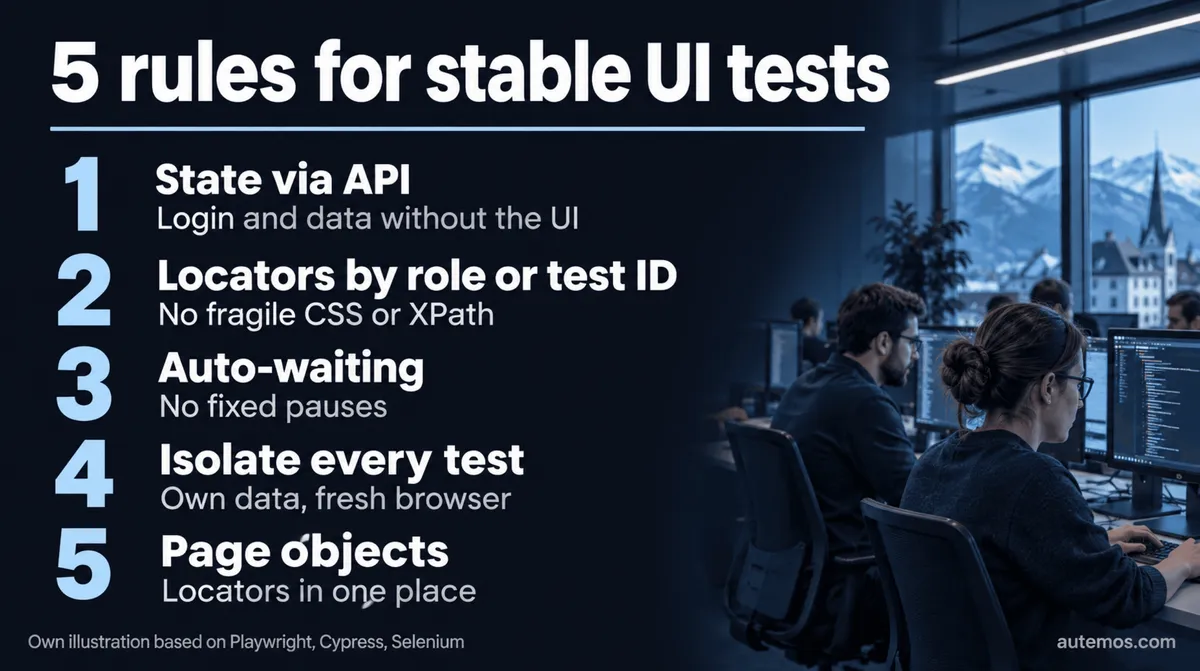
Figure 4: Five rules for stable UI tests.
Set up state via API. The test creates the login, customer record and account balance through an API or directly in the database, not through the interface. Cypress lists “using your UI to log in” as an anti-pattern (Cypress Docs, 2026). Selenium recommends the same under “Generating application state”.
Choose locators by role or test ID. Playwright writes “We recommend prioritizing role locators to locate elements” and calls test IDs “the most resilient way of testing” (Playwright, 2026). Its docs advise against CSS and XPath, since the DOM changes often. Priority order and tradeoffs are compared in the post on locator strategies.
Auto-waiting instead of fixed pauses. Before each action, Playwright checks that the element is visible, stable, enabled and not covered. It “auto-waits for all the relevant checks to pass and only then performs the requested action” (Playwright, 2026). Cypress calls fixed waits such as cy.wait(Number) an anti-pattern.
Isolate every test. Own test data, a fresh browser context, no dependency on execution order. Selenium calls this “Avoid sharing state” and “Fresh browser per test”.
Use page objects. A page object wraps the locators and actions of one page. When the interface changes, you update one class instead of thirty tests. Structure, rules and limits are explained in the guide to the page object model.
If a locator still breaks, say after a renamed attribute in the frontend, self-healing methods step in. They find the element through other attributes and propose a new locator. How that works, and why every heal has to be traceable, is covered in the article on self-healing locators.
Which checks should you automate, and which should stay manual?
Automate tests that run often, check stable flows and have a clear expected result. Checks that need human judgment stay manual. The line matches MDN's split: functional testing can largely be automated, and usability testing needs real test subjects (MDN, 2026).
Good candidates for automation:
Critical business flows that every release has to pass: login, payment order, online application
Regression tests that run in several browsers and on several devices
Forms with many input combinations, data-driven from a table
Generated documents, such as PDF account statements or insurance policies, checked against a reference
Better kept manual:
Usability, clarity of copy and visual design
Exploratory testing of new features
The part of accessibility that, per the W3C, tools can't judge
Screens that will still change a lot over the next sprints
An automated test for a screen that changes every week costs more upkeep than it finds in defects. Automate those flows once the design has settled.
Which tests do banks and insurers need under DORA?
Regulated financial firms run tests against the user interface as part of their test programs, but the EU regulation DORA doesn't explicitly require them. DORA (Regulation (EU) 2022/2554, applicable since 17 January 2025) calls in Art. 25(1) for “appropriate tests, such as” vulnerability scans, “scenario-based tests, compatibility testing, performance testing”, E2E testing and penetration testing (EUR-Lex, 2022).
The words “such as” make the list a set of examples, not a mandatory catalog. Compatibility and E2E tests often run through the interface in practice. How many of these tests an institution needs, if any, follows from its own risk assessment. Reading the regulation is a job for compliance and legal; this section isn't legal advice.
For audit and internal control, automated tests mostly need evidence:
Which software version was tested, in which environment?
Who created or changed a test, and when?
Who reviewed and approved an automatically changed locator?
Which test results belong to which release?
So each run should record which version ran where, and who approved it.
How does Autemos support UI testing?
Autemos is AI-assisted software for functional test automation across web, mobile, API and desktop. For tests through the interface, the Autemos AI Recorder generates the visual workflow, the page objects and the code in real time, from a recorded click path or from an AI chat. The team keeps control of every step.
Capture: a click recorder without plugins or browser extensions, or an AI chat using natural language, Jira tickets or existing test case text.
Approval: every AI-generated step has to be approved by the team before it runs.
Self-healing: Autemos's own stability logic goes first, with an LLM only as a fallback. Every heal appears in the report and can be reviewed, rejected and reversed.
One workflow across channels: a single test can span several browsers, mobile devices, API calls and user sessions, such as data entry on the web and approval by a second user.
Traceability: role-based access (RBAC), an audit trail and on-premises operation.
Export: web tests as Playwright code (Java or TypeScript), mobile tests as Appium code (Java), synced via Git and runnable without Autemos.
Autemos doesn't run load or performance tests, and it doesn't do security scanning. It doesn't replace usability tests with real people, and it isn't an accessibility certification. For those checks you need separate tools and specialists.
Frequently asked questions
What is the difference between a UI test and a GUI test?
In practice there's none: both terms mean a test that operates and checks software through its graphical interface. “GUI” stands for graphical user interface, and “UI” is the shorter form. Microsoft's Coded UI documentation describes tests that drive the application “through its user interface”.
How many tests should run through the UI?
There's no fixed number, but Google offers a rule of thumb: 70% unit tests, 20% integration tests and 10% E2E tests (Google Testing Blog, 2015). Tests through the UI usually sit in that top layer. Reserve the interface for flows whose failure customers or auditors would notice right away. Test everything else lower in the pyramid.
Why do UI tests fail without a code change?
Usually it's timing: in the Romano et al. study, 45.1% of 235 flaky tests came down to Async Wait, meaning the test acted before the interface was ready (Romano et al., 2021). Other causes were errors in the test script (19.1%) and differences in the environment (18.7%).
Can you build automated tests with a recorder instead of code?
Yes, with recorders that capture clicks and turn them into test steps. Microsoft offered this approach with Coded UI; in Visual Studio 2022 you can no longer record new tests with it (Microsoft Learn, 2026). Recorded tests still need stable locators and someone who maintains them.
Does test automation replace manual testing?
No, it replaces only the repeatable functional checks. Usability needs real test subjects according to MDN, and per the W3C, tools can't fully judge accessibility (W3C WAI, 2024). Exploratory testing of new features stays manual too.
Conclusion
Tests through the UI check software where users experience it, so they find defects that lower test layers can't see. Their cost is known: they're slower and more fragile. At Google, 14% of large tests were flaky, and according to Romano et al., 45.1% of the flaky tests they studied came down to wait problems. Keep their number small and pick the flows with the highest risk. Start with auto-waiting: async waits are the largest single cause. Regulated firms have one more requirement: every change to a test, including an automatic one, has to be traceable and approved. If you want to see how Autemos creates these tests with approval and documented self-healing, book a demo.