·
8 min
Cross-Browser Testing for Beginners: How to Build and Automate a Browser Matrix

Roman Kirchmeier - Autemos

Cross-browser testing checks whether a web application works in every browser and on every device your users actually have. In Switzerland, Safari is the most used smartphone browser at 48.25% (StatCounter, 2026), and Edge holds 22.76% of desktop page views (StatCounter, 2026). The work rests on three rendering engines, your own usage data and a browser matrix that sets the test depth per browser. Chrome and Edge share the Blink engine, so they count as one engine in that matrix. Our UI testing guide covers the wider context.
TL;DR: Cross-browser testing checks a web application on the Blink, WebKit and Gecko engines. Build the browser matrix from your own analytics and add StatCounter data: in Switzerland, Safari leads on mobile with 48.25% (October 2026). Chrome, Edge and Firefox have shipped every two weeks since August/September 2026. Only automated, parallel test runs keep that pace.

Figure 1: Three engines, one matrix – one browser per engine in Class A
What is cross-browser testing?
Cross-browser testing is a type of testing that checks whether a web application behaves the same across browsers, browser versions and devices. MDN defines it this way: “Cross-browser testing is the practice of ensuring that a website works across various browsers and devices.” (MDN, 2026).
MDN names three groups a team should keep in mind:
Browsers: including slightly older versions that don't support every new JavaScript or CSS feature.
Devices: from desktops through tablets and smartphones to smart TVs, with varying hardware.
People with disabilities: users who rely on a screen reader or use only a keyboard.
Most of the checks are functional: does the form submit, does the dialog open, is the calculated amount right?
Why do browsers behave differently?
Browsers on different rendering engines behave differently: Blink, WebKit and Gecko implement HTML, CSS and JavaScript independently. MDN lists “Blink, Gecko, WebKit, Trident” as common rendering engines (MDN, 2026).
Engine | Browsers | Origin |
|---|---|---|
Blink | Chrome, Edge, Opera, Samsung Internet | Google, Chromium |
WebKit | Safari on macOS and iOS, browsers on the iPhone | Apple |
Gecko | Firefox | Mozilla |
Trident | Internet Explorer 11, IE mode in Edge | Microsoft, legacy |
Microsoft says an equivalent Chromium release triggers each Edge Beta and Stable major release (Microsoft Learn, 2026). Testing Chrome and Edge together still covers only one engine.
Selenium describes what this means for test teams: “dealing with browsers (especially with cross-browser incompatibilities) makes writing good tests a challenge.” (Selenium, 2026).
Why does every iPhone browser run on WebKit?
Apple's App Store Review Guideline 2.5.6 says: “Apps that browse the web must use the appropriate WebKit framework and WebKit JavaScript.” (Apple, 2026). Apple names entitlement exceptions only for the EU and Japan, in the EU from iOS 17.4 (Apple, 2026).
Switzerland is not an EU member, and Apple's texts don't mention it. Our reading of that wording: on a Swiss iPhone, every browser renders with WebKit, Chrome and Firefox included. An iPhone test in Chrome then checks the same engine as a test in Safari.
Which browsers do users in Germany and Switzerland use?
Chrome dominates in Germany, and Chrome and Safari split the Swiss market, according to StatCounter data for October 2026. The table shows shares of page views by device type (StatCounter, 2026: desktop Germany and Switzerland, mobile Germany and Switzerland).
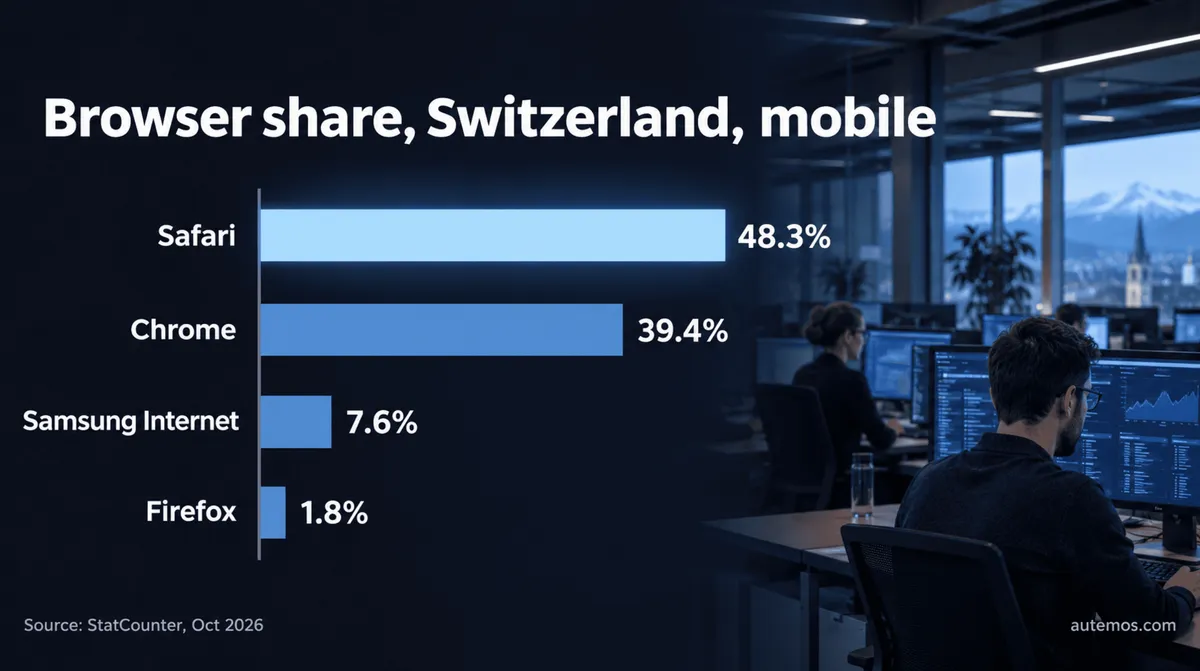
Figure 2: Safari leads on mobile in Switzerland (StatCounter, October 2026)
Browser | DE desktop | DE mobile | CH desktop | CH mobile |
|---|---|---|---|---|
Chrome | 42.27% | 67.85% | 40.99% | 39.38% |
Safari | 11.97% | 21.25% | 14.59% | 48.25% |
Edge | 18.92% | n/a | 22.76% | 0.44% |
Firefox | 17.08% | 1.70% | 10.43% | 1.78% |
Samsung Internet | 0.96% | 6.54% | n/a | 7.61% |
Opera | 6.37% | 1.27% | 2.91% | 0.86% |
Safari is Switzerland's most used mobile browser at 48.25%. Edge ranks second on Swiss desktops at 22.76%. In Germany, Firefox reaches 17.08% on desktop, close to Edge.
The device split differs too. In Germany, 60.27% of page views come from smartphones and 38.05% from desktops (StatCounter, 2026). In Switzerland it's 52.62% desktop and 45.83% mobile (StatCounter, 2026).
Why do your own analytics come first?
Your own usage data is more accurate than any market statistic. StatCounter measures page views on its own network, a proxy. MDN calls an analytics app “a much more accurate source of data” and says “important” often means “commonly used among the target audience” (MDN, 2026).
Analytics have a blind spot. MDN writes: “you are not going to have any Firefox Mobile users if the site was broken on Firefox mobile in the first place.” A browser with zero users may be a browser where your site never worked. Compare your numbers with market data before you drop a browser.
How do you build a browser matrix?
A browser matrix is a list of browsers, versions and devices that sets how thoroughly you test each combination. MDN sorts browsers into three grades (MDN, 2026):
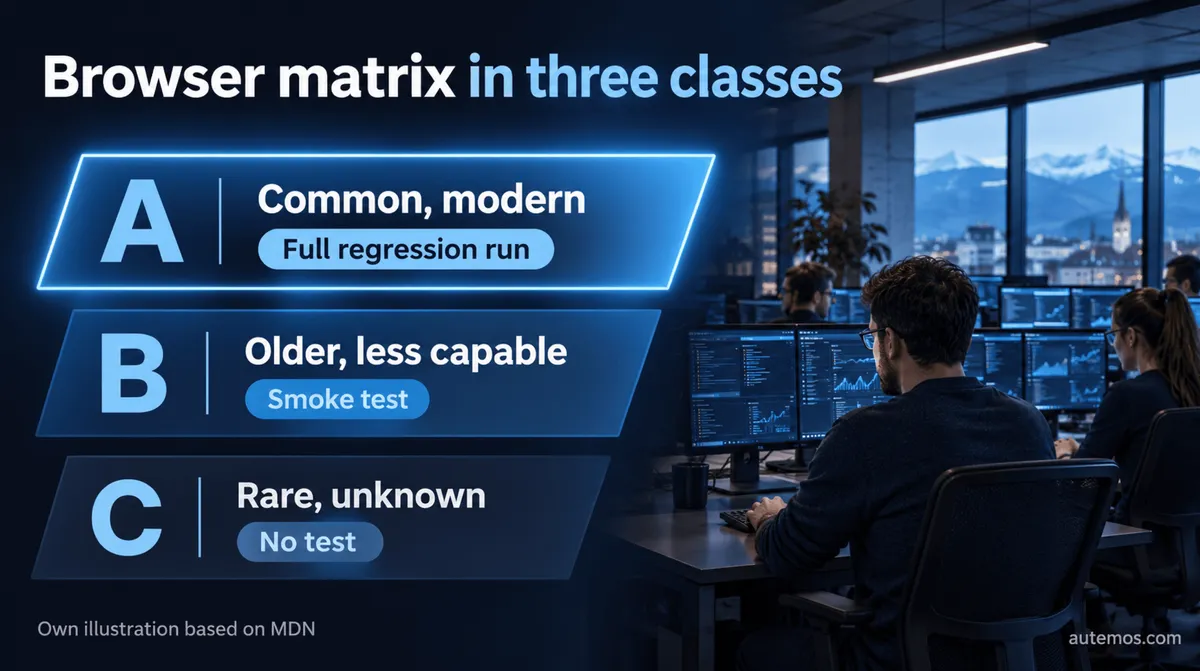
Figure 3: The three browser classes based on MDN and their test depth
A-grade: common, modern browsers. MDN's advice: “Test thoroughly and provide full support.”
B-grade: older or less capable browsers. Test them and serve a more basic experience with full access to core information and services.
C-grade: rare or unknown browsers. Don't test; serve the full site and rely on defensive coding.
Build the matrix in six steps:
Pull your own data. Export browsers, versions and device types from your analytics, split by desktop and mobile.
Compare with market data. Put the StatCounter figures for Germany and Switzerland next to yours and look for gaps.
Cover every engine. The A-grade list contains at least one Blink, one WebKit and one Gecko browser.
Assign grades. Mark each combination A, B or C and write down the test depth: full regression run, smoke test or no test.
Add special cases. These include legacy apps in Edge's IE mode, managed clients on Extended Stable and “A couple of lower-spec mobile devices”, as MDN recommends. MDN puts accessibility in grade A; see our guide to accessibility testing.
Review regularly. Check the matrix against fresh analytics data every quarter.
Baseline helps with decisions about new web features. A feature counts as “widely available” once it has worked in all core browsers for at least 30 months: Chrome and Firefox (desktop and Android), Edge, and Safari (macOS and iOS) (web.dev, 2026). It doesn't replace testing.
Why can't a manual browser matrix keep up?
A manual browser matrix falls behind: Chrome, Edge and Firefox have shipped a new major version every two weeks since August/September 2026, about 26 per browser per year. Google wrote: “Starting September 2026, Chrome will move to a two-week release cycle, from the current four-week cycle.” (Chrome for Developers, 2026). The switch began with Chrome 153 on September 8.
Edge moved to the two-week cadence with version 152, released August 27, 2026 (Microsoft Learn, 2026). Firefox followed with version 155 on September 1, 2026 (Mozilla, 2026). For managed fleets, Chrome and Edge offer an Extended Stable channel on an eight-week cycle; Edge limits it to managed environments.
Three browsers with 26 major versions each make 78 new versions a year, before counting Safari or mobile. In our view, very few teams can run a manual pass through the matrix every two weeks. Automation splits the work like this:
Stable: every build runs against the current Chrome, Edge and Firefox.
Beta: a nightly run against chrome-beta and msedge-beta catches breakage before the stable release. Playwright supports these channels but doesn't install them by default (Playwright, 2026).
Extended Stable: the version your IT actually rolls out to managed clients.
What are the limits of Playwright WebKit and simulated devices?
Playwright's WebKit tests Safari's engine, not the Safari browser itself. The docs say: “Playwright doesn't work with the branded version of Safari” (Playwright, 2026). The reason: “Playwright's WebKit is derived from the latest WebKit main branch sources, often before these updates are incorporated into Apple Safari”. A green WebKit run is a good sign for Safari, but it isn't proof.
Mobile devices have a similar limit. Playwright can run tests “on emulated tablet and mobile devices”, meaning a device profile inside the browser. Real hardware, mobile networks and the real Safari on iOS stay outside such a run. Use simulated devices for frequent runs and real devices for A-grade combinations before a release. Our article on mobile app testing explains when real devices pay off.
How do you automate cross-browser testing in CI?
An automated browser matrix runs fastest as a parallel pipeline job, with each browser in the matrix starting at the same time as its own project. Our guide to parallel test execution shows how to split workers and shards.
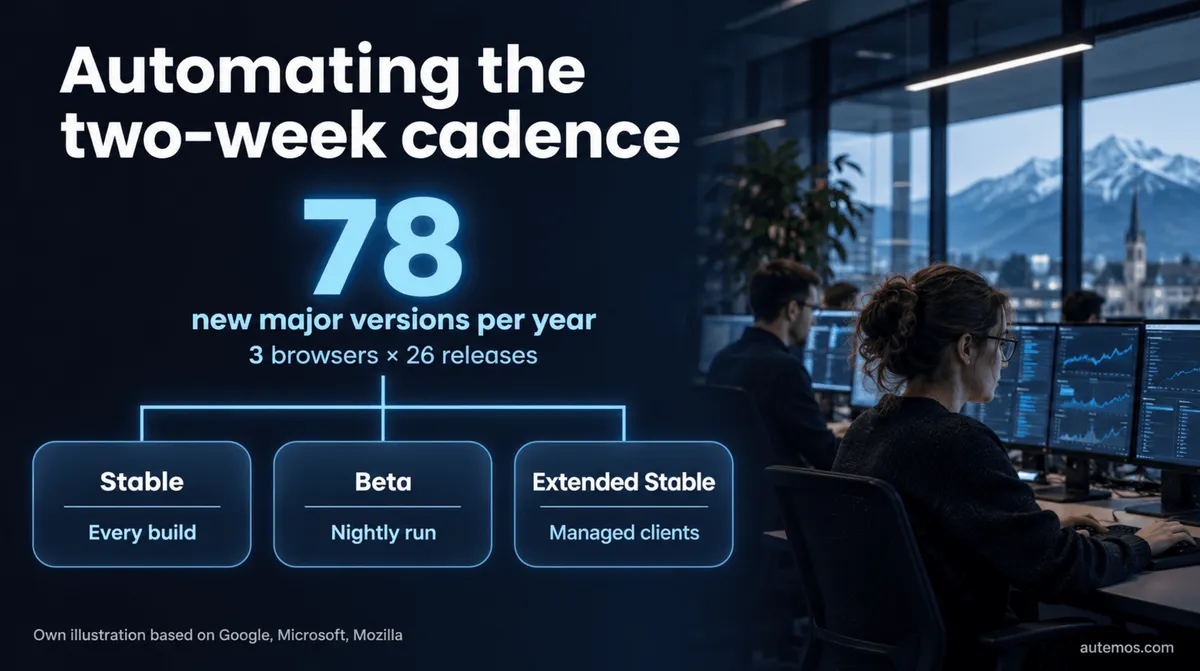
Figure 4: Covering the two-week cadence with three automated runs
Comparable results need two things. Every browser needs the same environment with the same test data; see our article on the test environment. The tests need locators that resolve the same way in every engine, such as roles and test IDs; see our guide to locator strategies.
In regulated settings, the topic connects to DORA. Article 25(1) of Regulation (EU) 2022/2554, which applies from January 17, 2025, lists appropriate tests “such as … scenario-based tests, compatibility testing” (EUR-Lex, 2022). That is a list of examples, not a mandate for browser tests.
Autemos is AI-assisted software for functional test automation across web, mobile, API and desktop. A test workflow in Autemos can span several browsers and user sessions, for example a customer application in Chrome and its approval by a clerk in Edge. Web tests export as Playwright code in Java or TypeScript and run without Autemos.
Autemos doesn't provide a device cloud or a farm of real iPhones or Safari instances. Plan real devices separately. Our checklist for testing web applications shows where cross-browser tests sit in a full review.
Frequently asked questions
How many browsers should I test?
Test at least one A-grade browser per engine: Chrome for Blink, Safari for WebKit and Firefox for Gecko. In Switzerland, add Edge with its 22.76% desktop share (StatCounter, 2026). Your own analytics decide on anything beyond that.
Is testing in Chrome alone enough?
No, a Chrome-only test leaves WebKit and Gecko unchecked. In Switzerland, 48.25% of mobile page views come from Safari, and in Germany 17.08% of desktop views come from Firefox (StatCounter, 2026).
Is Playwright WebKit the same as Safari?
No, Playwright uses a patched WebKit build and, according to its docs, doesn't work with the branded Safari (Playwright, 2026). WebKit runs catch engine bugs early. Before a release, a test in real Safari still makes sense.
Do I still need to test Internet Explorer?
Not the Internet Explorer 11 browser, but possibly IE mode in Edge. Microsoft ended IE 11 support on certain operating systems on June 15, 2022, and supports IE mode “through at least 2029” (Microsoft Learn, 2024). Legacy banking apps in IE mode usually fit grade B.
Does DORA require cross-browser tests?
DORA names compatibility testing as an example but doesn't explicitly require cross-browser tests. Article 25(1) of Regulation (EU) 2022/2554 lists it “such as” alongside other test types (EUR-Lex, 2022). Your compliance team decides how it applies; this is not legal advice.
Conclusion
Cross-browser testing starts with one question: which browsers do your users really have? Your own analytics answer it first, with market data as a cross-check. In Switzerland that means Safari on smartphones and Edge on desktops; in Germany, Chrome plus a high Firefox share on desktop. Cover Blink, WebKit and Gecko in grade A and plan for legacy cases in IE mode. Review the matrix every quarter against fresh analytics data. With two-week releases from Chrome, Edge and Firefox, only an automated, parallel matrix keeps pace. If you want to see how one test workflow spans several browsers and user sessions, talk to our team.