·
8 min
Web application testing checklist: from functionality to security

Roman Kirchmeier - Autemos

Web application testing covers eleven areas: core flows and forms, sessions and login, navigation and error states, browsers, screen sizes, accessibility, generated documents, the APIs behind the UI, performance, security and usability. A web application test is a check that shows whether a browser-based application works correctly, stays secure, loads fast enough and is usable. The checklist below splits these areas into 15 checkable items, each with a threshold or source and the right tool type. The guide to UI testing defines the basic terms.
TL;DR: Web application testing means working through 15 items from forms to security. Forms always need server-side checks, OWASP calls idle timeouts of 2 to 5 minutes common for high-value apps, and pages need an LCP of 2.5 seconds or less (Google). Functional flows are largely automatable; usability, load and pentests need other methods.
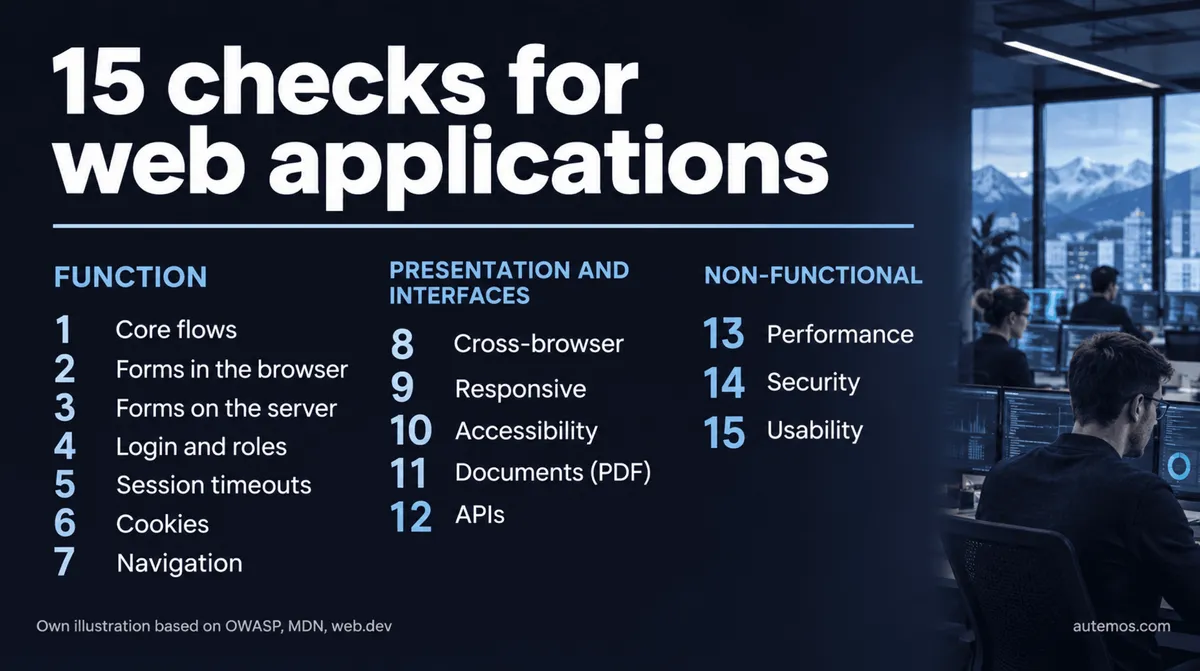
Figure 1: The 15 checklist items in three groups
How do you use this checklist?
Use the checklist as an acceptance grid before every release: each item has a checkable criterion and goes into either automated regression or a manual round. Before the first round of web application testing, assign every item an owner and a tool.
OWASP says readers can use its testing guide as a template for their own testing programs (OWASP WSTG v4.2, 2026). Do the same with this list: strike what doesn't apply and add business rules such as transfer limits or dual approvals.
Which 15 items belong on the checklist?
The web application testing checklist has 15 items in eleven areas: the first twelve cover function, presentation and interfaces, the last three performance, security and usability.
Core flows: the most important business flows (login, entering a payment, submitting an application) run without errors.
Forms in the browser: required, pattern, min, max, minlength and maxlength show the correct error message.
Forms on the server: the server rejects the same invalid input when someone bypasses the browser checks.
Login and roles: login, logout, password reset and the rights of each role behave as specified.
Session timeouts: idle and absolute timeouts fire, and the session ID changes after login.
Cookies: session cookies carry Secure, HttpOnly and SameSite.
Navigation and error states: the back button, reloads and double clicks create no duplicate bookings, and error pages show no stack trace.
Cross-browser: core flows pass in every browser of your browser matrix.
Responsive layout: layout and controls work at mobile, tablet and desktop widths.
Accessibility: automated checks run in the pipeline, and a person checks keyboard use and screen readers.
Documents: generated PDFs such as account statements match the reference in content and layout.
APIs: the calls behind the UI return correct status codes, data and error responses.
Performance: LCP at most 2.5 s, INP at most 200 ms, CLS at most 0.1 at the 75th percentile.
Security: specialists have checked the categories of the OWASP testing guide.
Usability: real users have walked through the core flows in moderated test sessions.
How do you test core flows, forms, login and sessions?
Test core flows and forms (items 1 to 3) on two levels: through the UI and directly against the server. MDN says built-in browser checks don't replace server-side checks and recommends always checking form data on the server (MDN, 2026).
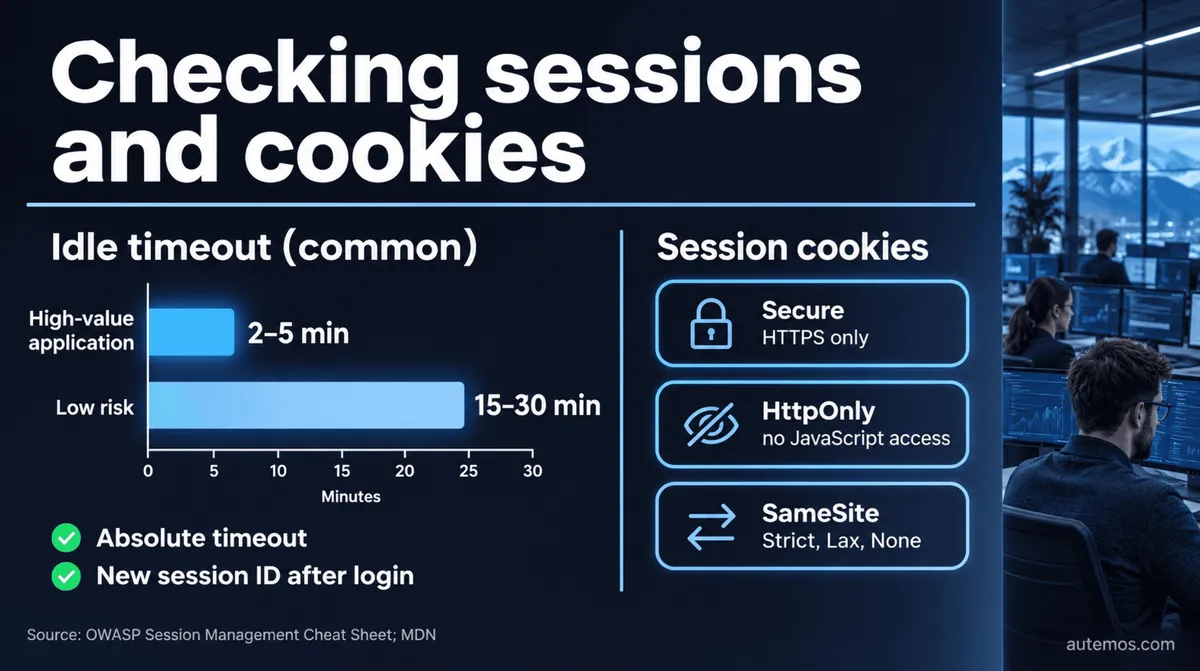
Figure 2: Common OWASP session timeouts and MDN cookie attributes
In the browser, attributes such as required or pattern set error states like valueMissing or patternMismatch. A direct server request skips them entirely. Test every rule twice: through the form and through an API call with the same invalid values. Both paths must reject the input. The E2E test article shows how to scope whole flows from login to confirmation.
Login, sessions and cookies (items 4 to 6)
OWASP gives common idle-timeout ranges of “2-5 minutes for high-value applications and 15-30 minutes for low risk applications” (OWASP Session Management Cheat Sheet, 2026). OWASP calls for an absolute timeout too, plus a new session ID after login.
Check three attributes on session cookies (MDN, 2026):
Secure: the browser sends the cookie only over HTTPS.
HttpOnly: JavaScript can't read the cookie; MDN recommends it for session cookies.
SameSite (Strict, Lax, None): gives some protection against cross-site request forgery. With SameSite=None, Secure must be set.
A functional test can log in two people in one test workflow and check that customer A never sees customer B's accounts. This case falls under A01:2025 Broken Access Control, rank 1 in the current OWASP Top 10 (OWASP Top 10:2025, 2025).
How do you test navigation, browsers, layout and accessibility?
Test navigation and presentation (items 7 to 10) with targeted failure cases, a browser matrix, several screen widths and an accessibility review. Typical cases: the back button after a payment, a reload on the confirmation page, a deep link without a session, a double click on “Submit”.
Your audience sets the browser matrix for item 8. In Switzerland, Safari is the most used mobile browser at 48.25%, and in Germany Chrome holds 67.85% on mobile (StatCounter, Oct 2026). The cross-browser testing guide turns that into a matrix across Blink, WebKit and Gecko.
Start screen-width checks (item 9) with viewport sizes in a desktop browser. Playwright can simulate tablets and mobile devices, but it doesn't work with Apple's branded Safari (Playwright, 2026). Spot-check touch gestures and iOS Safari on real devices.
Accessibility (item 10) can only be partly checked with tools. The W3C says accessibility evaluation tools “can not determine accessibility, they can only assist in doing so” (W3C WAI, 2026). In Germany, the BFSG has applied since June 28, 2025, and banking services fall under it (Federal Accessibility Agency, 2025). The guide to testing website accessibility covers the process.
How do you test PDFs and the APIs behind the UI?
Test generated documents (item 11) against an approved reference, and APIs (item 12) by calling them directly. Account statements and invoices can change unnoticed in a release: a shifted column, a missing footer, a wrongly rounded amount.
Mark changing content such as dates or reference numbers as ignore zones, or every comparison fails. A PDF compare with ignore zones checks each new document against the approved baseline and skips the marked zones.
Behind the forms there are usually REST or SOAP interfaces. Check status codes, data formats and error responses there, and send the invalid values from item 3 straight to the endpoint. The API testing guide shows how to build these tests.
Which thresholds apply to performance and security?
The Core Web Vitals set the performance thresholds (item 13): LCP within 2.5 seconds, INP of 200 milliseconds or less and CLS of 0.1 or less, measured at the 75th percentile, split by mobile and desktop (web.dev, 2026). INP replaced FID on March 12, 2024 (web.dev, 2024).
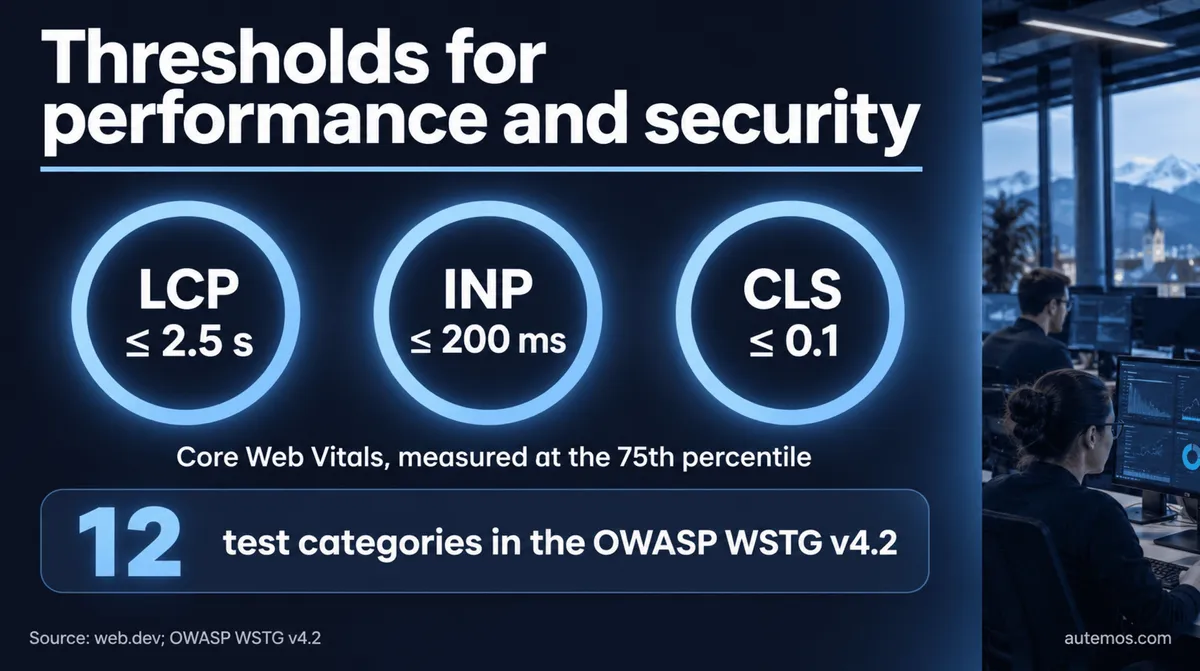
Figure 3: Core Web Vitals thresholds and the 12 WSTG categories
Security testing with the OWASP WSTG
The OWASP Web Security Testing Guide version 4.2 sets the structure for security testing (item 14), and version 5.0 is in development (OWASP, 2026). Chapter 4 groups the tests into 12 categories, from Information Gathering and Session Management to Business Logic and API Testing (WSTG v4.2, 2026).
Scanners find some of the gaps. The WSTG puts the limit bluntly: “automated tools do a poor job of testing for vulnerabilities” (OWASP WSTG v4.2, 2026). Business logic and access rights need pentesters who know the application.
What can you automate, and what does Autemos cover?
Function and compatibility are largely automatable; usability stays manual. MDN puts it this way: “functional testing can largely be automated (…), usability testing tends to require manual testing with real test subjects” (MDN Curriculum, 2026).
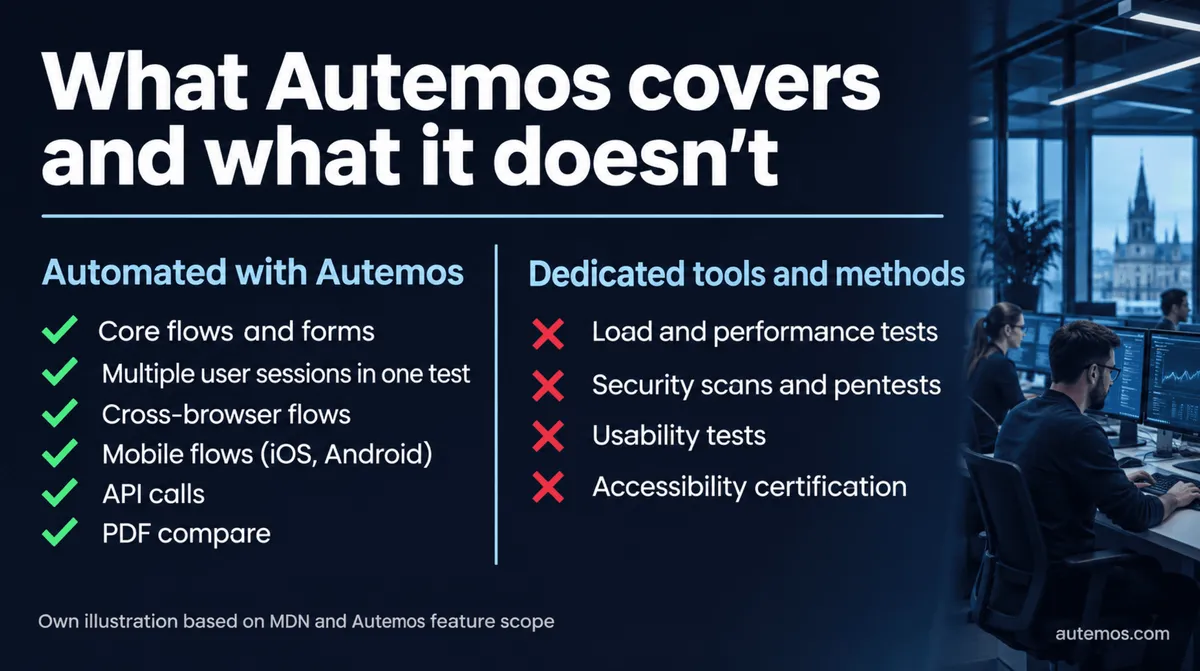
Figure 4: What Autemos covers and what needs dedicated tools
Autemos is AI-assisted software for functional test automation across web, mobile, API and desktop. One test workflow can combine several browsers, API calls and multiple user sessions. Autemos doesn't run load, performance or security tests, and it doesn't replace usability testing or an accessibility review.
Area | Automatable? | Tool type | Autemos? |
|---|---|---|---|
Core flows, forms | largely | UI test automation | Yes |
Login, roles, timeouts | largely | UI test automation | Yes, multiple user sessions in one test workflow |
Navigation, error states | largely | UI test automation | Yes |
Cross-browser | largely | UI tests across the browser matrix | Yes, one workflow across several browsers |
Responsive | partly | Viewport tests, real devices | Mobile flows (iOS, Android) yes, layout judgment no |
Accessibility | partly | Evaluation tools plus expert review | No, no certification |
Documents, PDF | yes | PDF compare | Yes, with ignore zones and QR code checks |
APIs | yes | API tests | Yes, API calls in the same workflow |
Performance, load | with dedicated tools | Load testing, field measurement | No |
Security | partly | Security scanners, pentest | No |
Usability | no | User testing | No |
To reuse forms across tests, wrap them in page objects. The Autemos AI Recorder generates the workflow, page objects and code from your clicks, and your team approves every AI-generated step before it runs. The Page Object Model guide explains the class structure.
What does DORA mean for web application testing at a bank?
DORA, Regulation (EU) 2022/2554, has applied since January 17, 2025, and Art. 25(1) lists examples of appropriate tests, introduced with “such as”. The list includes compatibility testing, performance testing, E2E testing and penetration testing (EUR-Lex, 2022).
A bank's web app touches several of these disciplines at once: compatibility (items 8 and 9), performance (13), E2E flows (1) and penetration testing (14). Each needs different tools and often a different team. Your compliance team decides which tests your institution owes; this article isn't legal advice.
Frequently asked questions
What session timeout is common for a banking web app?
OWASP gives common idle timeouts of 2 to 5 minutes for high-value applications and 15 to 30 minutes for low-risk ones (OWASP, 2026). Online banking usually counts as high-value, and OWASP says every session needs an absolute timeout too.
Can usability testing be automated?
No, according to MDN usability testing tends to require manual testing with real test subjects (MDN, 2026). In web application testing, you can automate the groundwork: functional flows, error messages and layout at different widths.
Is an automated scanner enough for accessibility?
No, the W3C says no tool alone can determine whether a site meets accessibility standards (W3C WAI, 2026). Scanners catch missing alt text; specialists check keyboard and screen reader flows by hand.
Which Core Web Vitals apply today?
Today's Core Web Vitals are LCP at 2.5 seconds or less, INP at 200 milliseconds or less and CLS at 0.1 or less, each at the 75th percentile (web.dev, 2026).
Does Autemos run load or security tests?
No, Autemos automates functional flows across web, mobile, API and desktop, including multiple user sessions in one test workflow and PDF compare. Load and performance tests, security scans and pentests need dedicated tools and specialists.
Conclusion
This web application testing checklist has 15 items, each with a checkable criterion. Check forms in the browser and on the server, sessions against the OWASP timeouts, and pages against the Core Web Vitals thresholds. Function, browsers, PDFs and APIs belong in the automated regression suite.
Accessibility needs tools and people, usability needs real test subjects, and security needs pentesters with the WSTG as their grid. For banks, DORA names several of these disciplines as examples. Review the list before every release, and strike or add items whenever roles, forms or documents change. If you want to find out which of your functional flows, multi-user scenarios and PDF checks you can automate with Autemos, talk to us.