·
8 min
Appium: Automating Mobile Tests – When AI Is Better

Roman Kirchmeier - Autemos

Appium is the most popular open-source framework for mobile test automation, with more than 21,700 GitHub stars (GitHub, 2026). Its biggest strength is a single API for iOS, Android and mobile web.
The very architecture that makes Appium so flexible also costs speed and stability. This guide explains what Appium does well, where it hits real limits, and where AI-driven methods beat its brittle locator strategies. We stick to sourced numbers throughout and clearly flag any weak or vendor-owned figures.
TL;DR: Appium uses the W3C WebDriver protocol and drives both iOS and Android through one API – ideal for cross-platform suites. The price: a 2026 benchmark measured Appium roughly 4–4.5x slower than Espresso, with 22% flaky tests on first run (Autonoma, 2026). AI and Vision-AI directly soften those weaknesses.
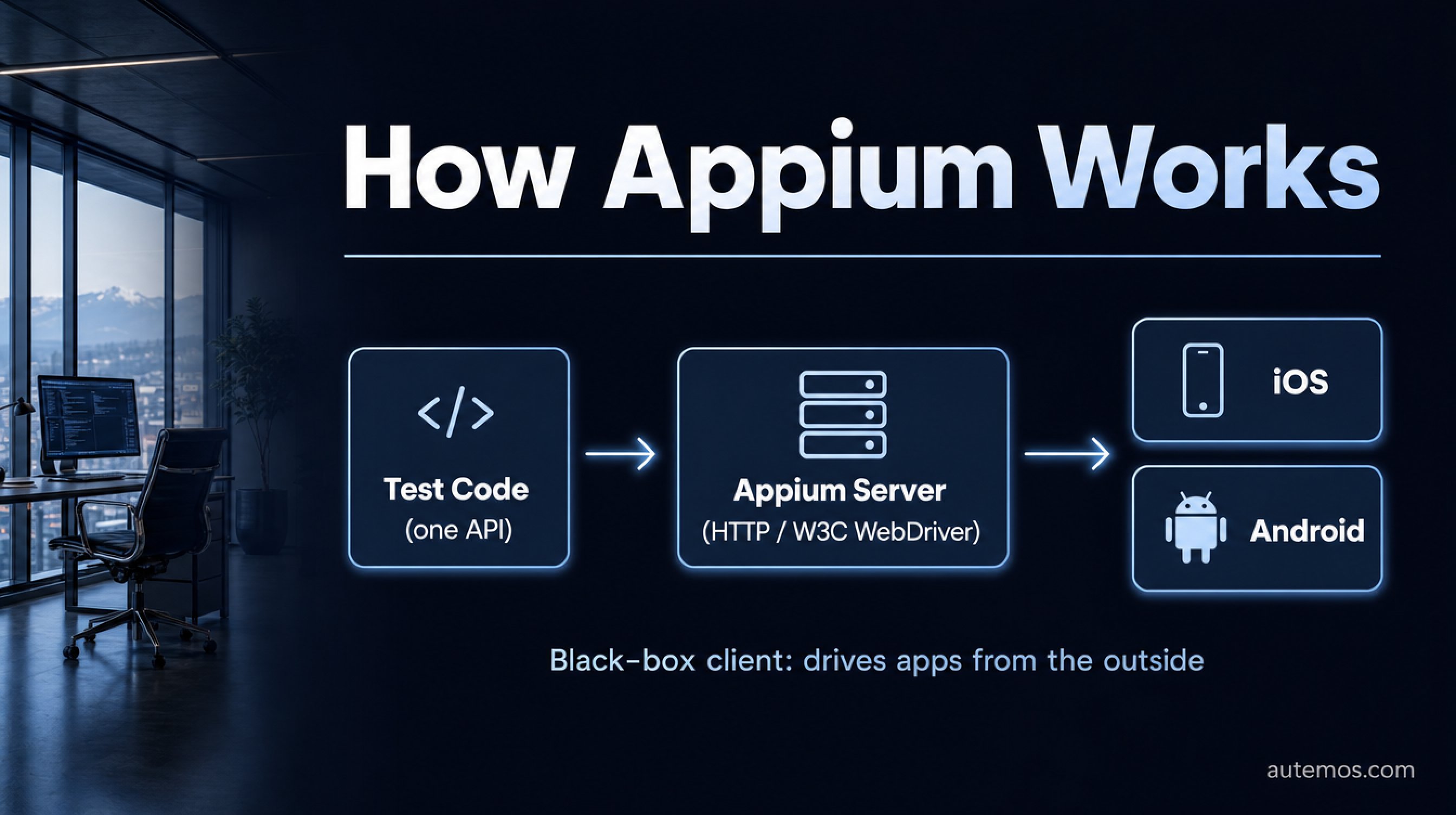
Figure 1: Appium as a black-box client – one API drives iOS and Android through the W3C WebDriver server.
What is Appium and how does it work?
Appium is an open-source, cross-platform automation framework built on the W3C WebDriver protocol (Appium docs, 2026). You write a test once and run it against iOS, Android or mobile web. That saves code and maintenance when you cover several platforms.
Technically, Appium acts as a client that sends commands over HTTP to a server. The server translates them into platform-specific actions. For you, that means identical test logic whether the target is an iPhone or a Pixel.
The key point is decoupling. Appium never talks to the app directly. It sits on the outside and drives the app through the operating systems' official UI automation interfaces. Both the flexibility and the speed problems described later flow from that design.
The Appium documentation ties its drivers to exactly this core problem: "Drivers are basically Appium's answer to the question, 'how do we support automation of multiple, unrelated platforms?'" (Appium docs, 2026). Each driver inherits from a shared base that encapsulates the WebDriver protocol.
Citation capsule: Appium is an open-source framework built on the W3C WebDriver standard that automates iOS, Android and mobile web apps through one unified API (Appium docs, 2026). With more than 21,700 GitHub stars, it is the most widely used open-source mobile testing tool.
How is Appium 2.x architected?
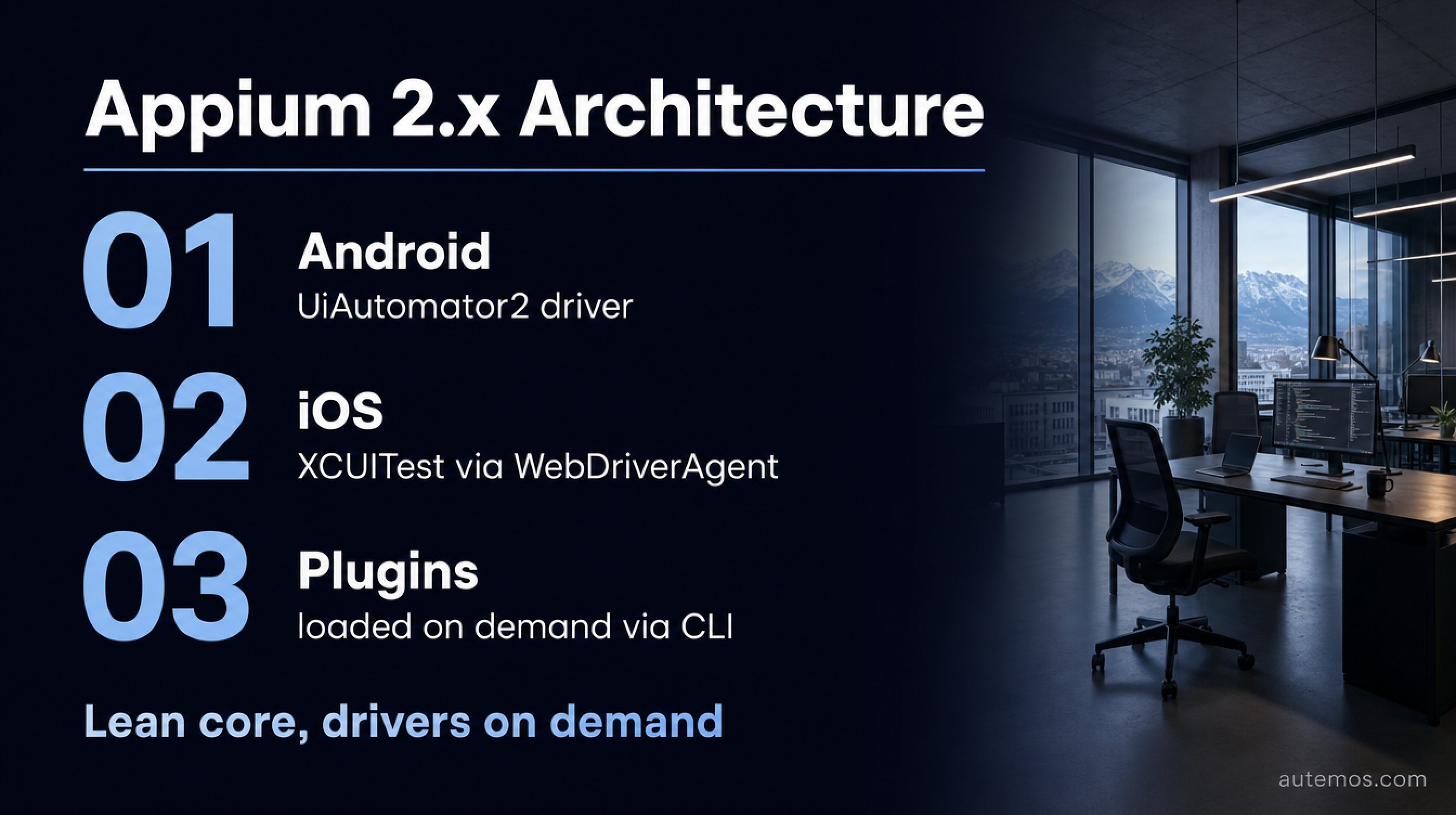
Figure 2: The modular Appium 2.x architecture – lean core, drivers and plugins loaded on demand.
Appium 2.x is modular: a lean core that loads drivers and plugins on demand via the CLI (Migration guide, 2026). You install only what you need – for example with `appium driver install uiautomator2`. Version 2.x also enforces W3C WebDriver exclusively and dropped the legacy JSONWP protocol.
Each platform uses its own driver. You should know these before you start.
Android: the UiAutomator2 driver controls apps through Google's native UI automation.
iOS: the XCUITest driver works through WebDriverAgent (WDA), a helper app running on the device.
Plugins: optional extensions, such as image recognition, are managed separately from the core.
This modularity is a genuine step up from Appium 1.x. Updating one driver no longer breaks the entire stack. But anyone taking the iOS path must know one thing: WDA has to be rebuilt and re-signed per device – a frequent source of setup frustration.
How do you get started with Appium conceptually?
Getting started with Appium follows four steps. In customer projects we see that most effort lives not in test code but in the environment – a pattern the data backs: QA teams spend around 10.4% of their time on environment setup alone, per a survey of 1,600+ professionals (LambdaTest via Katalon, 2024).
Install the Appium server as the central control instance (local or in CI).
Add the driver for your target platform (UiAutomator2 or XCUITest).
Define capabilities, a config object describing device, platform and app path.
Write the test and set a locator strategy to find UI elements by ID, XPath or accessibility label.
iOS adds one hurdle: you need a macOS host with Xcode and valid Apple signing. Android also runs on Linux. Teams that invest early in a clean CI/CD pipeline – build, signing, device cloud – save themselves a lot of friction later.
Where are Appium's real limitations?
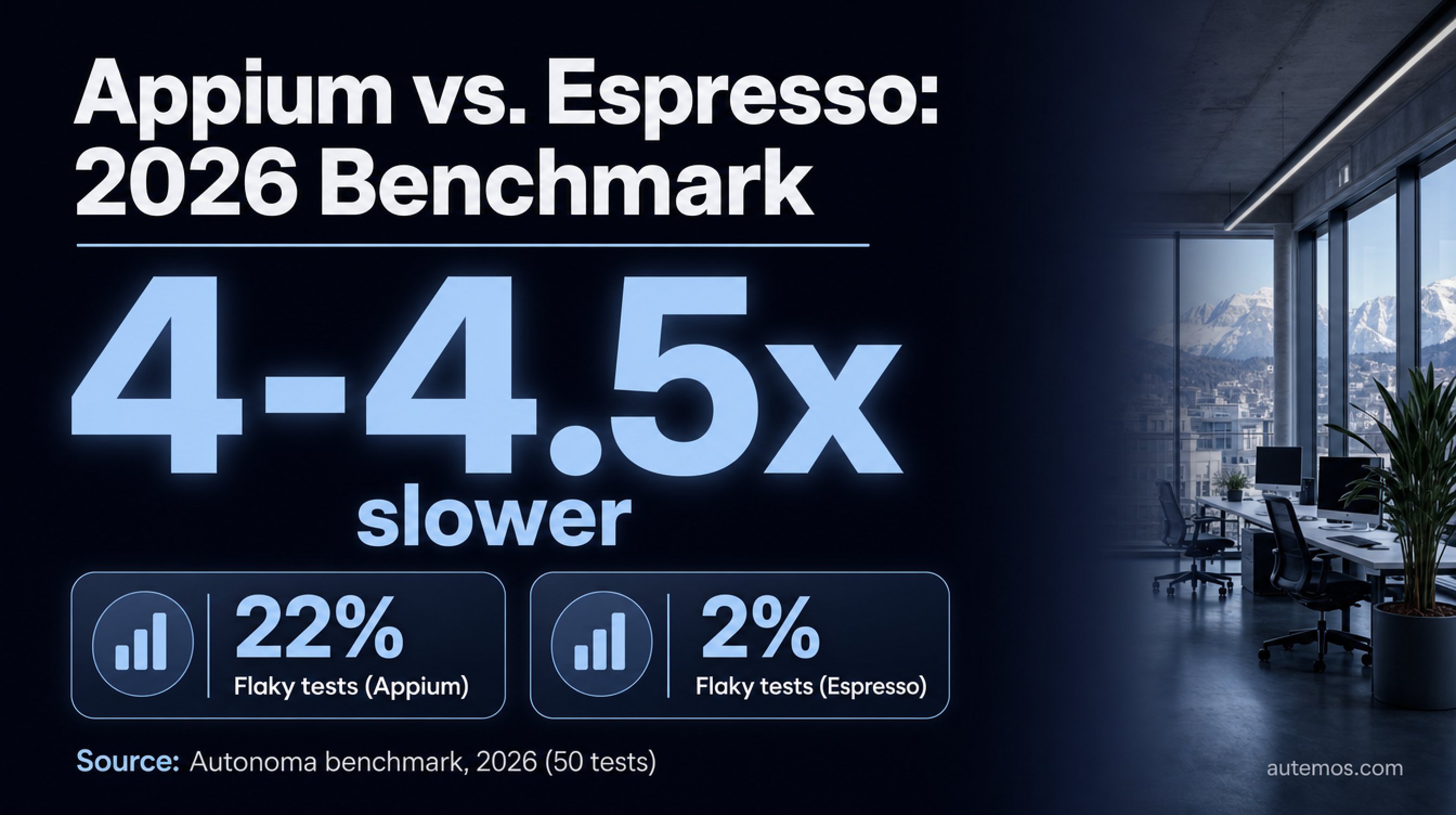
Figure 3: 2026 benchmark – Appium runs roughly 4–4.5x slower than Espresso, with 22% versus 2% flaky tests.
Appium's weaknesses are speed, flakiness and setup effort – and they have a technical root cause. A 2026 vendor benchmark measured Appium roughly 4–4.5x slower than Espresso: 18 minutes 47 seconds versus 4 minutes 12 seconds for 50 tests, with 22% flaky tests on first run versus 2% for Espresso (Autonoma, 2026). That figure comes from a single vendor-owned source – treat it as an indicator, not a law.
The vendor ties the flakiness directly to Appium's lack of visibility into the app state. Per Autonoma (2026): "Appium had 11 flaky tests out of 50 in the first run (22%). Nine of them were timing-related: Appium issued a tap before an animation completed, because it has no visibility into the app's idle state."
The reason is architecturally clear. Appium acts as an external black-box client. It doesn't know when the app's main thread is idle, so it must rely on waits and polling. Espresso, by contrast, runs inside the app process and syncs automatically with the UI state through IdlingResources.
Appium's much-cited flakiness is not a bug but a direct consequence of the black-box design. Choosing Appium means buying platform flexibility and paying with synchronization uncertainty. You cannot optimize that trade-off away, only cushion it with more robust element recognition.
Then there's the iOS-specific pain: WebDriverAgent must be re-provisioned per device, which costs extra time in regulated DACH environments with strict signing rules. For more on device setup, read our piece on testing on real iOS and Android devices.
Appium vs. Espresso vs. XCUITest – what fits when?
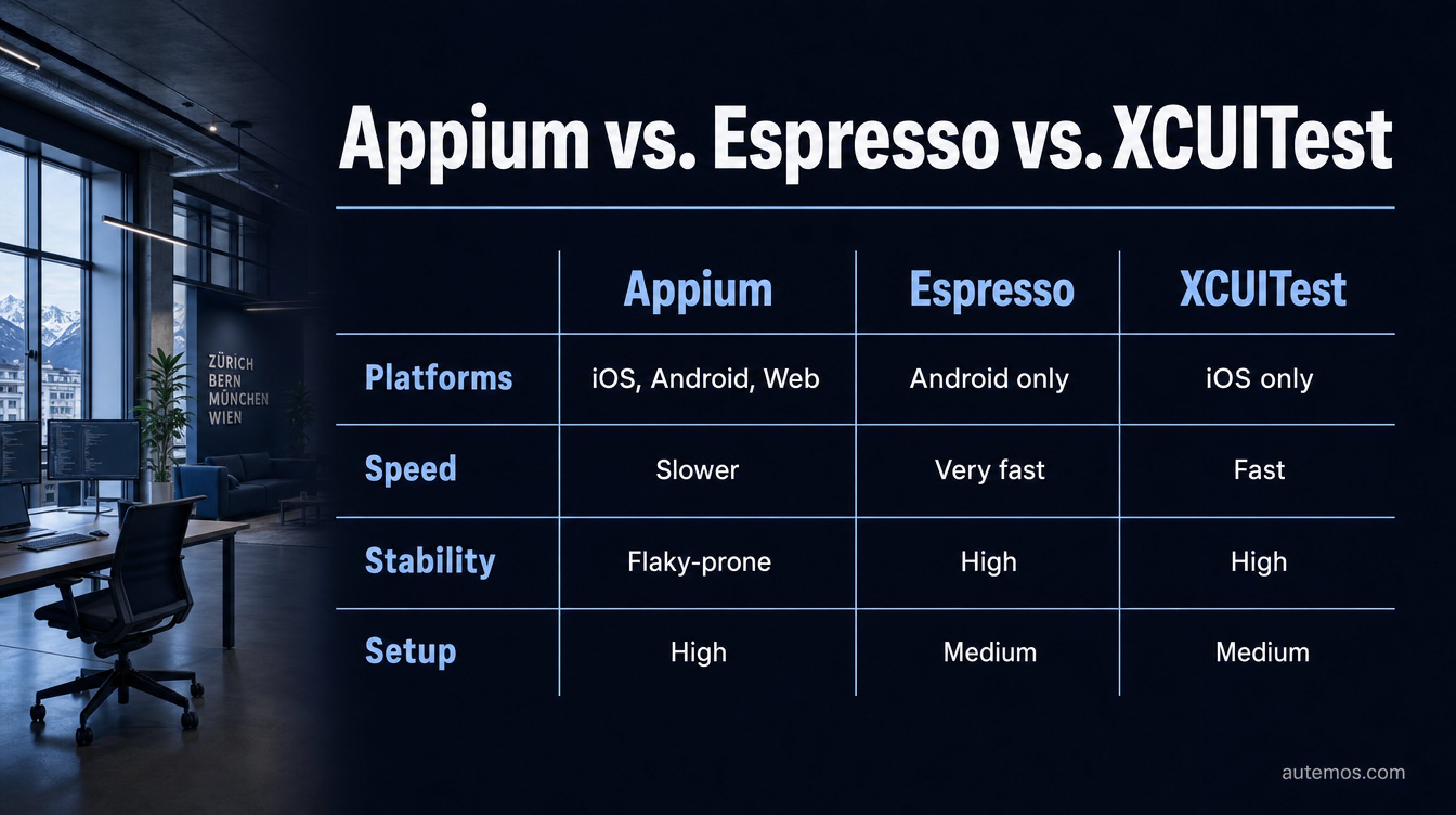
Figure 4: Decision matrix – Appium wins on cross-platform reach, Espresso and XCUITest on speed and stability.
The rule of thumb: Espresso and XCUITest win on speed and stability, Appium wins on cross-platform reach. XCUITest (iOS) and Espresso (Android) are native first-party frameworks – faster and more stable, but locked to one platform (BrowserStack, 2026). Appium trades some speed for one API across all platforms.
Criterion | Appium | Espresso (Android) | XCUITest (iOS) |
|---|---|---|---|
Platforms | iOS, Android, web | Android only | iOS only |
Speed | Slower (black-box) | Very fast (in-process) | Fast (native) |
Stability | Flakiness-prone | High (IdlingResources) | High |
Languages | Many (WebDriver) | Java/Kotlin | Swift/Objective-C |
Setup effort | High (esp. iOS/WDA) | Medium | Medium (macOS/Xcode) |
Reuse | One suite for all | Platform-specific | Platform-specific |
In customer projects we see a clear pattern: teams with a genuine cross-platform app benefit from Appium, because one suite covers two platforms. Pure iOS or Android teams almost always move faster and more reliably with the native framework. For a fuller comparison of strategies, see our overview of mobile test automation.
Where does AI beat Appium's brittle locators?
AI beats classic locators wherever UI changes would otherwise break tests – and that happens expensively often. Engineers spend around 7.8% of their time on flaky tests, per survey (LambdaTest via Katalon, 2024); a peer-reviewed five-year industrial study puts the total cost of flaky tests at roughly 2.5% of productive development time (IEEE ICST, 2024). This is exactly where self-healing and Vision-AI methods step in.
Appium identifies elements via IDs, XPath or accessibility labels. When the UI changes, those locators break. Self-healing approaches address this in several ways – from selector fallbacks through multi-locator fingerprinting to purely visual recognition without selectors (Drizz, 2026).
Vision-AI recognizes UI elements visually – the way a human sees them – and needs no brittle locators at all. How that works in practice we explore in our pieces on self-healing locators and visual testing with Vision-AI.
A note on honesty: vendor promises of 50–80%, sometimes 95% less maintenance are marketing and not independently verified (Drizz, 2026). Anchor on the sourced 7.8% flaky-test time as a realistic lever, not on rounded wishful figures.
FAQ
Is Appium free?
Yes, Appium is fully open-source and free to use (Appium docs, 2026). Costs arise indirectly – for example through device clouds for parallel testing, whose list prices start around USD 199 per month for one parallel slot (BrowserStack, 2026).
Is Appium faster than Espresso?
No, a 2026 benchmark measured Appium roughly 4–4.5x slower than Espresso (Autonoma, 2026). The reason is architectural: Appium runs as an external client, while Espresso sits inside the app process and syncs automatically through IdlingResources.
Do I need a Mac for iOS testing with Appium?
Yes, for iOS automation with the XCUITest driver you need a macOS host with Xcode and valid Apple signing (BrowserStack, 2026). WebDriverAgent must also be rebuilt and re-signed per device. Android, by contrast, also runs on Linux.
When is AI worth it instead of classic Appium locators?
AI is worth it once frequent UI changes break your locators and maintenance dominates. Since teams spend around 7.8% of their time on flaky tests (LambdaTest via Katalon, 2024), self-healing and Vision-AI methods cut exactly that effort – more in our piece on test maintenance with AI.
Does Appium 2.x solve the speed problems?
No, Appium 2.x mainly improves modularity, not fundamental speed (Migration guide, 2026). The black-box character remains, since Appium still acts as an external client. But splitting core and drivers makes maintenance and updates considerably easier.
Conclusion
Appium remains the pragmatic tool when you want to cover iOS and Android with a single suite – proven by more than 21,700 GitHub stars and the W3C WebDriver standard. That reach costs speed and stability: a 2026 benchmark shows runs roughly 4x slower and far more flakiness than Espresso. For pure single-platform teams, native frameworks are usually the better choice. And wherever brittle locators eat your maintenance budget, AI-driven and Vision-AI methods beat the classic Appium strategy. To see how an AI-driven approach makes your mobile tests more robust, explore our mobile testing solution. If you want to assess your mobile test strategy honestly and ground it in solid numbers, talk to our team.


