·
13 min
Mobile App Testing: The Complete Guide for Teams

Roman Kirchmeier - Autemos

Mobile app testing decides whether an app survives in the store. A 2017 QualiTest survey found that 88% of users abandon an app because of bugs (Applause, 2017) — the figure is old, but the pattern holds. Mobile testing is harder than web testing: thousands of device models, diverging OS versions, real sensors, network fluctuation and platform-specific toolchains. This guide explains what mobile testing covers, why it's so demanding and how teams in regulated markets can set it up in a structured, auditable and cost-aware way. It anchors four deeper articles on automation, Appium, iOS/Android and device strategy.
TL;DR: Mobile app testing checks function, performance, sensors and network behaviour across fragmented devices and OS versions. A survey of 1,600+ QA professionals found engineers lose 7.8% of their time to flaky tests (Katalon, 2024). Real devices, automation and AI cut that effort — when used honestly.

Figure 1: What mobile app testing checks – six dimensions around the app.
What is mobile app testing?
Mobile app testing is the systematic verification of an app's function, performance, usability and stability across real devices and operating systems. It goes beyond classic software testing because mobile apps involve sensors, network switches, battery and gestures. The familiar test types — functional, integration, end-to-end — still apply (BrowserStack, 2025).
The mobile context intensifies each discipline. An app must survive incoming calls, behave sensibly in airplane mode and run on a three-year-old Android exactly as it does on the newest iPhone. If you know the fundamentals of software test types, you'll recognise familiar concepts under harder conditions.
Mobile testing covers manual exploration as much as automated regression. The two complement each other. The skill lies in finding the right mix for each risk profile and release cadence.
Why is mobile testing so hard?
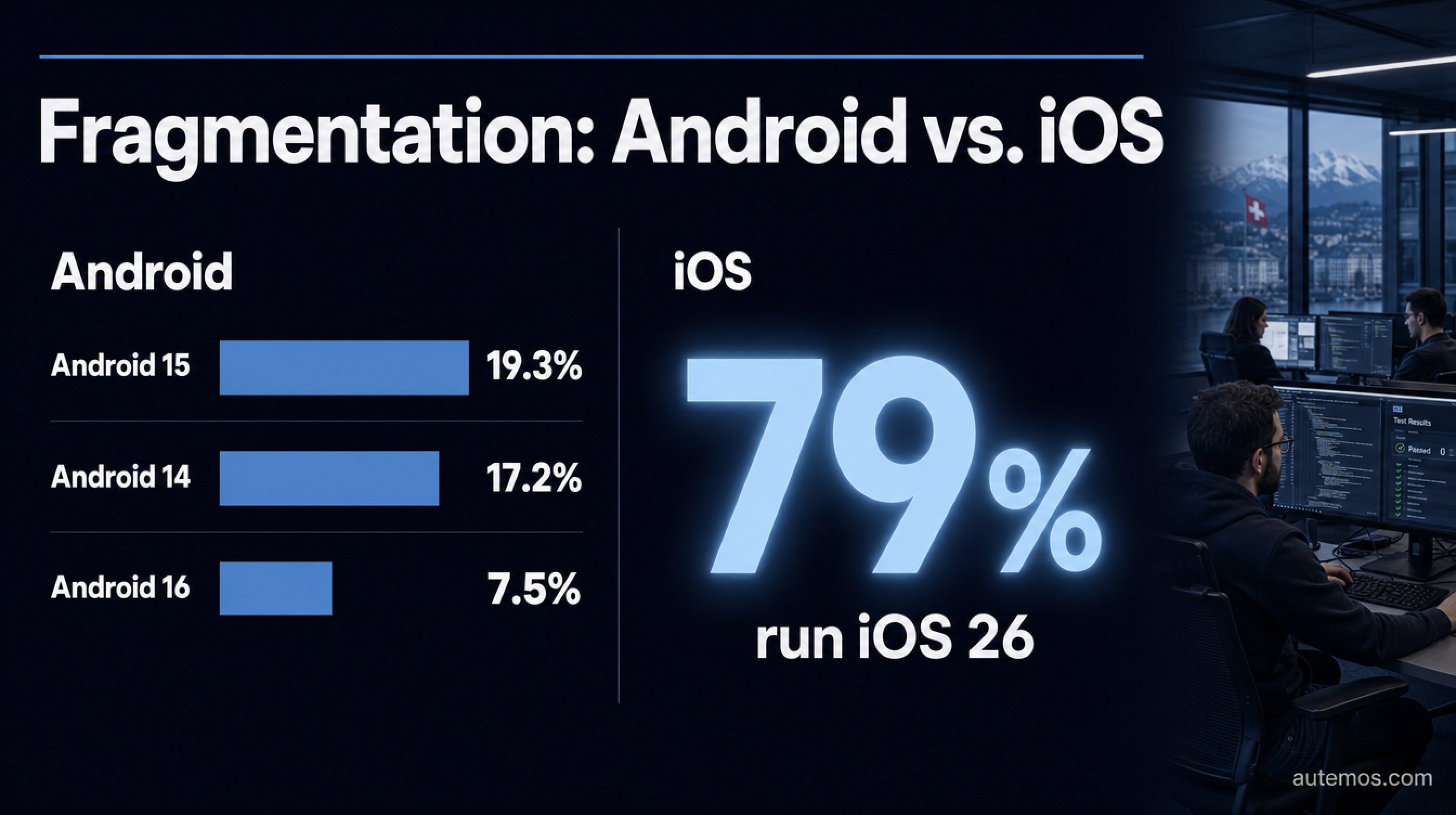
Figure 2: Fragmentation compared – Android spread out, iOS concentrated.
Mobile testing is hard because device and OS fragmentation multiply the test surface. Google's own distribution dashboard shows Android 15 on roughly 19.3%, Android 14 on 17.2% and Android 16 on just 7.5% of devices (Android Developers, 2026). There is no "test one version" — the user base spreads across many active builds.
With iOS the picture inverts. iOS 26 already runs on roughly 79% of all iPhones, and 86% of devices are under four years old (MacRumors, 2026). iOS is fast and concentrated; Android is slow and fragmented. This asymmetry shapes every test strategy.
Fragmentation in concrete terms
The often-quoted "24,093 distinct Android devices" comes from a 2015 OpenSignal study and is outdated — don't cite it as current evidence. The OS distribution above is more meaningful: it forces teams to cover several API levels in parallel.
Screens: resolutions, aspect ratios, notches, foldables
OS versions: multiple active Android API levels at once
Hardware: weak entry-level phones up to high-end flagships
Localisation: languages, date formats, RTL layouts
In customer projects we see that the most expensive bugs don't appear on the newest device, but on two-year-old mid-range Androids nobody on the team owns — which is exactly where a meaningful slice of the user base lives.
What test types exist in mobile testing?
Mobile testing involves more test types than the web because hardware and context come into play. Beyond function and UI, teams check performance, network behaviour, battery, sensors and localisation. These categories are well established in practice (BrowserStack, 2025) and form the backbone of any mobile strategy.
Test type | What it checks | Example |
|---|---|---|
Functional | Core features, flows | Login, purchase, form |
UI / layout | Rendering, responsiveness | Notch, foldable, font size |
Performance | CPU, memory, launch time | App launch under 2s |
Network / interrupt | Call, SMS, airplane mode, connection loss | Sync after Wi-Fi drop |
Battery | Power consumption | Background drain |
Gesture / touch | Swipe, pinch, multitouch | Map zoom |
Sensor | GPS, biometrics, camera | Face ID login |
Localisation | Language, format, RTL | Arabic layout |
Not every app needs every type at the same depth. A banking app prioritises security, biometrics and interrupt behaviour; a game prioritises performance and gestures. The overview of software test types provides the theoretical basis.
Manual vs automated mobile testing — what fits when?
Manual testing suits exploration and UX judgement; automation suits repeatable regression. Roughly half of all teams automate at most 24% of their tests (Katalon, 2024) — and 43% of mobile developers name testing as their biggest productivity bottleneck (JetBrains, 2024). Both findings point to the same lever.
Manual doesn't mean outdated. A human notices when a layout "feels wrong", when an animation stutters or when a flow is clumsy. Those judgements resist automation. Automation, in turn, repeats hundreds of regression checks on every build without fatigue.
The sensible mix: manual for new features and UX, automated for stable core flows. How to build automated suites and wire them into CI/CD is the focus of our article on mobile test automation. It also covers build signing and device-cloud execution.
Do I need real devices or are emulators enough?
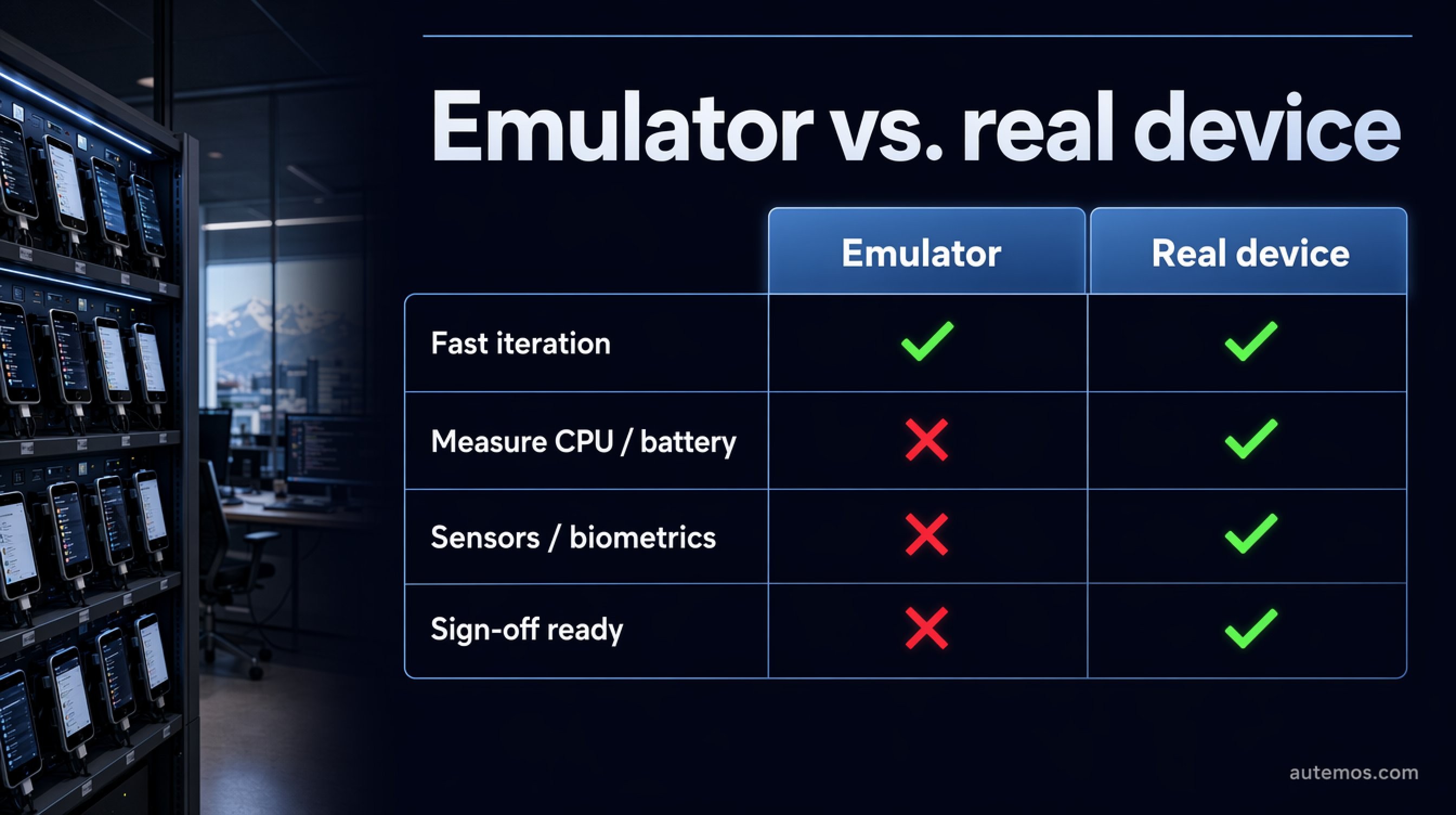
Figure 3: Emulator vs real device – when each approach holds up.
Real devices are indispensable for trustworthy results; emulators only carry the fast early iteration. Emulators and simulators can't accurately measure CPU, battery and memory, and can't reliably test camera, push, real network fluctuation, sensors, biometrics or natural gestures (BrowserStack, 2025). For performance and sign-off, there's no substitute for real hardware. According to BrowserStack: "While virtual devices help in early-stage testing, they cannot fully replicate real-world conditions such as network fluctuations, battery performance, and hardware-specific behavior."
A typical trap: x86 emulators compile and behave differently from ARM devices — the classic "passes on emulator, fails on device" (BrowserStack, 2025). These cases cost the most late in the release cycle.
Device clouds solve availability, but at a price: BrowserStack starts at around USD 199/month for one parallel slot (BrowserStack, 2026). The full trade-off, including cost math, is covered in our article on real devices vs emulators.
Which tools and frameworks does mobile testing use?
The leading frameworks are Appium for cross-platform automation, plus XCUITest and Espresso as native options. Appium builds on the W3C WebDriver protocol and has around 21.7k GitHub stars (GitHub, 2026). It drives iOS via XCUITest and Android via UiAutomator2 (Appium, 2026).
Appium 2.x is modular: a lean core, with drivers and plugins installed via CLI, and W3C WebDriver only (Appium, 2026). The upside is one API for iOS, Android and web. The cost is speed: one vendor benchmark measures Appium roughly 4–4.5x slower than Espresso (Autonoma, 2026) — a single vendor figure, not industry consensus.
Native frameworks are faster and more stable, but platform-locked (BrowserStack, 2025). When each path pays off is explored in our articles on Appium for mobile testing and testing iOS and Android.
Where do AI, Vision-AI and self-healing actually help?
AI helps where maintenance and flakiness eat time — not everywhere. The reliable anchor is the measured figure: engineers lose 7.8% of their time to flaky tests (Katalon, 2024). That's where AI applies: self-healing locators and Vision-AI aim to repair tests automatically when the UI changes.
Be wary of marketing numbers. Vendors advertise "50–80%, some claim 95%" maintenance reduction (Drizz, 2026) — those are vendor claims, not neutral findings. We deliberately don't parrot the 95%. The honest framing: AI shifts effort from locator upkeep to validating the proposed fixes.
Vision-AI identifies UI elements visually, like a human, and works without brittle locators (Drizz, 2026). In practice it pays off where layouts change often — not as a cure-all. We go deeper in self-healing locators and visual testing with Vision-AI.
What must regulated teams in DACH consider?
Regulated teams need data residency, auditable traceability and controlled device environments — a point most international vendors ignore. Sending test data to a public device cloud potentially moves sensitive content abroad. For banks under FINMA or BaFin supervision, that isn't a detail; it's an approval question.
A public device cloud is convenient — but every screenshot, every log and every test dataset potentially leaves your control with it. For regulated institutions, that's often the point where on-prem device labs and audit-grade logging become mandatory.
In customer projects across DACH, we see tool selection fail less often on technology than on one question: "Where does the data sit, and can we prove every test run in an audit-proof way?" Three points decide it in practice:
Data residency: devices and logs in the EU/Switzerland, not third-party public clouds
On-prem labs: owned device farms for sensitive data
Audit traceability: versioned, gap-free test records for auditors
How Autemos approaches mobile testing with this focus is shown on our mobile testing feature page.
How do I start with mobile testing in a structured way?
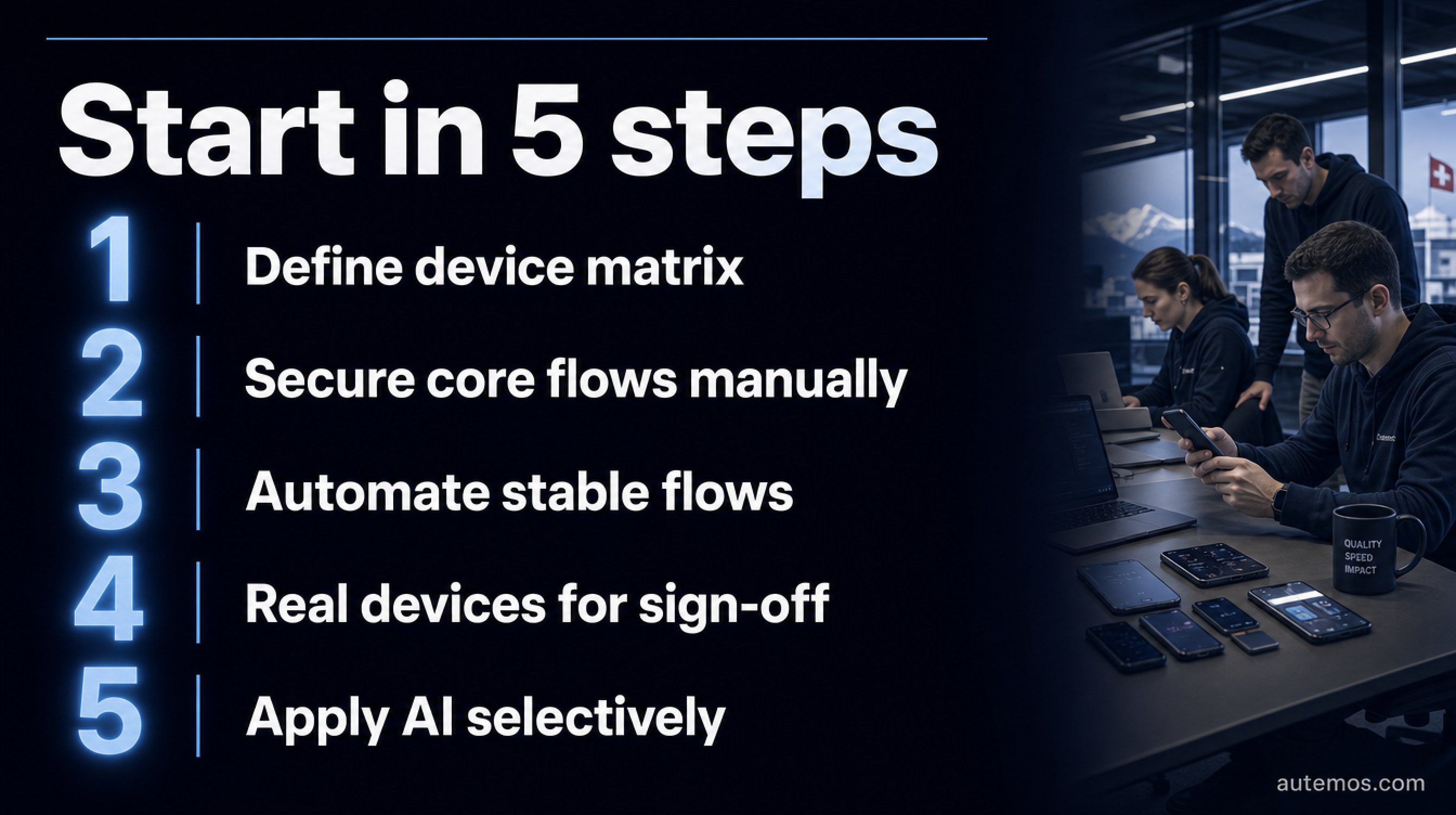
Figure 4: Start mobile testing in a structured five-step sequence.
Start risk-based: cover the most-used devices and critical flows first. Since roughly half of teams automate under 24% (Katalon, 2024), the biggest lever usually sits in the first stable regression suite — not in 100% coverage.
A pragmatic entry in five steps:
Define a device matrix — top devices and OS versions of your user base
Secure core flows manually — login, payment, onboarding
Automate stable flows — wire into CI/CD, isolate flaky tests
Real devices for sign-off — performance, sensors, battery before every release
Apply AI selectively — self-healing where maintenance hurts
If you want a broader entry into AI-assisted automation, our guide to AI test automation provides the framing. Mobile testing isn't a sprint; it's an iterative build-out.
FAQ
What's the difference between mobile app testing and web testing?
Mobile app testing factors in hardware and context; web testing usually doesn't. Mobile apps must handle sensors, network switches, battery drain, gestures and heavy device fragmentation (BrowserStack, 2025). The underlying test types are similar, but the execution conditions are far tougher.
Are emulators enough for mobile testing?
No, emulators only suffice for early functional iteration. They can't reliably reproduce CPU, battery, memory, camera, sensors or real network fluctuation (BrowserStack, 2025); the same source states plainly: "it cannot replace real devices due to accuracy and reliability factors." For performance and sign-off, teams need real devices — details in our article on real devices vs emulators.
Is Appium worth it, or are native frameworks better?
Appium is worth it for cross-platform suites; native frameworks for speed. Appium uses one API for iOS and Android but, per a vendor benchmark, runs roughly 4–4.5x slower than Espresso (Autonoma, 2026). Our Appium article explores the trade-off.
Does AI really cut maintenance effort by 95%?
No, the 95% is a vendor claim, not a neutral finding (Drizz, 2026). What's solid is that engineers lose 7.8% of their time to flaky tests (Katalon, 2024). AI reduces that realistically, not magically — more in self-healing locators.
What must regulated companies watch for in mobile testing?
Data residency, on-prem device labs and audit-grade logging. Banks under FINMA or BaFin supervision often can't push sensitive test data to public device clouds. Versioned, gap-free test evidence is decisive for auditors — see our mobile testing feature page.
Conclusion
Mobile app testing is more demanding than web testing because device and OS fragmentation, sensors and network behaviour all converge. iOS is fast and concentrated; Android slow and fragmented — each demands its own strategy. The biggest measurable lever isn't a spectacular AI promise but an honest handle on flakiness: 7.8% of lost engineering time (Katalon, 2024) is real and reducible. Start risk-based, combine emulators and real devices, and apply AI selectively. For regulated DACH teams, data residency and auditability aren't extras — they're prerequisites. If you want to put your mobile test strategy on an auditable, data-compliant footing, talk to our team — we'll show how to make it concrete.


